
Filesystem Hierarchy
Filesystem Hierarchy Standard
Section titled “Filesystem Hierarchy Standard”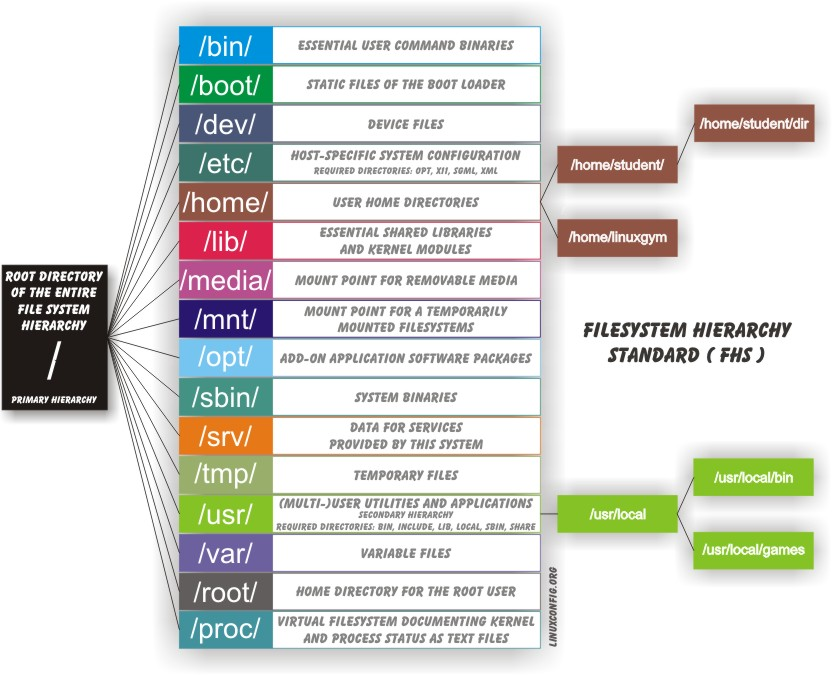
-
Linux systems store their important files according to a standard layout called the Filesystem Hierarchy Standard (FHS), which has long been maintained by the Linux Foundation (Filesystem Hierarchy Standard)
-
Having a standard is designed to ensure that users, administrators, and developers can move between distributions without having to re-learn how the system is organized.
-
Linux uses the ‘
/’ character to separate paths (unlike Windows, which uses ‘\’), and does not have drive letters. -
Multiple drives and/or partitions are mounted as directories in the single filesystem.
-
Removable media such as USB drives and CDs and DVDs will show up as mounted at
/run/media/yourusername/disklabelfor recent Linux systems, or under/mediafor older distributions. -
For example, if your username is student a USB pen drive labeled FEDORA might end up being found at
/run/media/student/FEDORA, and a file README.txt on that disc would be at/run/media/student/FEDORA/README.txt -
All Linux filesystem names are case-sensitive, so
/boot,/Boot, and/BOOTrepresent three different directories (or folders). -
Many distributions distinguish between core utilities needed for proper system operation and other programs, and place the latter in directories under
/usr(think user). -
To get a sense for how the other programs are organized, find the
/usrdirectory in the diagram from the previous page and compare the subdirectories with those that exist directly under the system root directory (/).
File System Architecture
Section titled “File System Architecture”| Directory | Purpose |
|---|---|
/ | Primary directory of the entire filesystem hierarchy |
/bin | Essential executable programs that must be available in single user mode |
/boot | Files needed to boot the system, such as the kernel, initrd or initramfs images, and boot configuration files and bootloader programs |
/dev | Device Nodes, used to interact with hardware and software devices |
/etc | System-wide configuration files |
/home | User home directories, including personal settings, files, etc. |
/lib | Libraries required by executable binaries in /bin and /sbin |
/lib64 | 64-bit libraries required by executable binaries in /bin and /sbin, for systems which can run both 32-bit and 64-bit programs |
/media | Mount points for removable media such as CDs, DVDs, USB sticks, etc. |
/mnt | Temporarily mounted filesystems |
/opt | Optional application software packages |
/proc | Virtual pseudo-filesystem giving information about the system and processes running on it. Can be used to alter system parameters. |
/run | Run-time variable data, containing information describing the system since it was booted. Replaces the older /var/run |
/sys | Virtual pseudo-filesystem giving information about the system and processes running on it. Can be used to alter system parameters. Similar to a device tree and is part of the Unified Device Model. |
/root | Home directory for the root user |
/sbin | Essential system binaries |
/srv | Site-specific data served up by the system. Seldom used. |
/tmp | Temporary files; on many distributions lost across a reboot and may be a ramdisk in memory. |
/usr | Multi-user applications, utilities and data; theoretically read-only. |
/var | Variable data that changes during system operation |
There may be additional distribution-specific directories found under the root directory. These might include /misc, which can be used for miscellaneous data, and /tftpboot, which is used for booting using tftp. If there are files in the directory, they are related to diskless workstation booting. Note that having other directories does not violate the FHS; however, it does violate it to have components in directories other than those dictated by the standard.
The Root (/) Directory
Section titled “The Root (/) Directory”- While the entire filesystem can be viewed as one big tree, there may be multiple partitions and filesystems joined together.
- The partition and filesystem that the root directory itself is contained in is rather special and is often in a special dedicated partition, with other components with directories such as
/home,/varand/opt, etc., to be mounted later.
The root partition must contain all essential files required to boot the system and then mount all other filesystems. Thus, it needs utilities, configuration files, boot loader information, and other essential startup data. It must be adequate to:
- Boot the system.
- Restore the system from system backups on external media such as tapes and other removable media or NAS etc.
- Recover and/or repair the system; an experienced maintainer must have the tools to diagnose and reconstruct a damaged system.
According to the FHS, no application or package should create new subdirectories of the root directory.
[!IMPORTANT]
/is not/root. We are not talking about/root, which is the home directory of root, the superuser. The word choices here can be confusing!
User Home (/home) Directories
Section titled “User Home (/home) Directories”- Each user has a home directory, usually placed under
/home. - The
/root(“slash-root”) directory on modern Linux systems is no more than the home directory of the root user (or superuser, or system administrator account). - On multi-user systems, the
/homedirectory infrastructure is often mounted as a separate file system on its own partition, or even exported (shared) remotely on a network through NFS. - Sometimes, you may group users based on their department or function. You can then create sub directories under the
/homedirectory for each of these groups.- For example, a school may organize
/homewith something like the following:/home/faculty//home/staff//home/students/
- For example, a school may organize
- Why
/homeis needed?- Allows users to store their personal data in form of files and directories.
- Each user gets their own home directory to retrieve or delete data.
The /bin and /sbin Directories
Section titled “The /bin and /sbin Directories”-
The
/bindirectory contains executable binaries, essential commands used to boot the system or in single-user mode, and essential commands required by all system users, such ascat,cp,ls,mv,ps, andrm. -
Likewise, the
/sbindirectory is intended for essential binaries related to system administration, such asfsckandip. -
To view a list of these programs, type:
$ ls /bin /sbin -
Commands that are not essential (theoretically) for the system to boot or operate in single-user mode are placed in the
/usr/binand/usr/sbindirectories. -
Historically, this was done so
/usrcould be mounted as a separate file system that could be mounted at a later stage of system startup or even over a network. -
On some of the newest Linux distributions
/usr/binand/binare actually just symbolically linked together, as are/usr/sbinand/sbin. -
Required programs which must exist in the
/bin/directory include:cat,chgrp,chmod,chown,cp,date,dd,df,dmesg,echo,false,hostname,kill,ln,login,ls,mkdir,mknod,more,mount,mv,ps,pwd,rm,rmdir,sed,sh,stty,su,sync,true,umountanduname -
[andtestmay be there as well, and optionally, it may include:csh,ed,tar,cpio,gunzip,zcat,netstatandping.
The /proc File system
Section titled “The /proc File system”-
Certain file systems, like the one mounted at
/proc, are called pseudo-file systems because they have no permanent presence anywhere on the disk. -
The
/procfile system contains virtual files (files that exist only in memory) that permit viewing constantly changing kernel data. -
/proccontains files and directories that mimic kernel structures and configuration information. It does not contain real files, but runtime system information, e.g. system memory, devices mounted, hardware configuration, etc. -
Some important entries in
/procare:/proc/cpuinfo /proc/interrupts /proc/meminfo /proc/mounts /proc/partitions /proc/version/prochas sub-directories as well, including:/proc/<Process-ID-#> /proc/sys -
The
/procfile system is very useful because the information it reports is gathered only as needed and never needs storage on the disk.
The /dev Directory
Section titled “The /dev Directory”-
The
/devdirectory contains device nodes, a type of pseudo-file used by most hardware and software devices, except for network devices. -
This directory is:
- Empty on the disk partition when it is not mounted
- Contains entries which are created by the
udevsystem, which creates and manages device nodes on Linux, creating them dynamically when devices are found.
-
The
/devdirectory contains items such as:/dev/sda1(first partition on the first hard disk)/dev/lp1(second printer)/dev/random(a source of random numbers).
The /etc Directory
Section titled “The /etc Directory”- The
/etcdirectory is the home for system configuration files. It contains no binary programs, although there are some executable scripts.- For example,
/etc/resolv.conftells the system where to go on the network to obtain host name to IP address mappings (DNS). - Files like passwd, shadow and group for managing user accounts are found in the
/etcdirectory. - While some distributions have historically had their own extensive infrastructure under
/etc(for example, Red Hat and SUSE have used/etc/sysconfig), with the advent of systemd there is much more uniformity among distributions today. /etc/skel: Contains skeleton files used to populate newly created home directories./etc/systemd: Contains or points to configuration scripts for starting, stopping, and controlling system services when using systemd./etc/init.d: Contains startup and shutdown scripts for when using System V initialization.
- For example,
- Note that
/etcis for system-wide configuration files and only the superuser can modify files there. - User-specific configuration files are always found under their home directory.
- Files and directories which the FHS requires to be found in this directory include:
csh.login,exports,fstab,ftpusers,gateways,gettydefs,group,host.conf,hosts.allow,hosts.deny,hosts.equiv,hosts.lpd,inetd.conf,inittab,issue,ld.so.conf,motd,mtab,mtools.conf,networks,passwd,printcap,profile,protocols,resolv.conf,rpc,securetty,services,shells,syslog.conf.
The /var Directory
Section titled “The /var Directory”-
The
/vardirectory contains files that are expected to change in size and content as the system is running (var stands for variable), such as the entries in the following directories:- System log files:
/var/log - Packages and database files:
/var/lib - Print queues:
/var/spool - Temporary files such as cache contents:
/var/tmp
- System log files:
-
The
/vardirectory may be put on its own file system so that growth of the files can be accommodated and any exploding file sizes do not fatally affect the system. -
Network services directories such as
/var/ftp(the FTP service) and/var/www(the HTTP web service) are also found under/var. -
Obviously,
/varcannot be mounted as a read-only filesystem. For security reasons, it is often considered a good idea to mount/varas a separate filesystem. Furthermore, if the directory gets filled up, it should not lock up the system.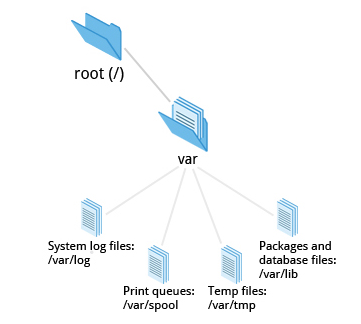
The /boot Directory
Section titled “The /boot Directory”- The
/bootdirectory contains the few essential files needed to boot the system. - For every alternative kernel installed on the system there are four files:
vmlinuz: The compressed Linux kernel, required for booting.initramfs: The initial ram file system, required for booting, sometimes calledinitrd, notinitramfs.config: The kernel configuration file, only used for debugging and bookkeeping.System.map: Kernel symbol table, only used for debugging.
- Each of these files has a kernel version appended to its name.
- The Grand Unified Bootloader (GRUB) files such as
/boot/grub/grub.confor/boot/grub2/grub2.cfgare also found under the/bootdirectory.
The /lib and /lib64 Directories
Section titled “The /lib and /lib64 Directories”/libcontains libraries (common code shared by applications and needed for them to run) for the essential programs in/binand/sbin. These library filenames either start withldorlib.- For example,
/lib/libncurses.so.5.9.
- For example,
- PAM (Pluggable Authentication Modules) files are stored in distribution-dependent locations such as
/lib64/securityor/lib/x86_64-linux-gnu/security. - Most of these are what is known as Dynamically Loaded Libraries (also known as shared libraries or Shared Objects (SO)).
- On some Linux distributions there exists a
/lib64directory containing 64-bit libraries, while/libcontains 32-bit versions. - Kernel modules (kernel code, often device drivers, that can be loaded and unloaded without re-starting the system) are located in
/lib/modules/<kernel-version-number>.
Removable media: /media, /run and /mnt
Section titled “Removable media: /media, /run and /mnt”- Most Linux systems are configured so any removable media are automatically mounted when the system notices something has been plugged in.
- Traditionally this was done under the
/mediadirectory, modern Linux distributions place these mount points under the/rundirectory.- For example, a USB pen drive with a label myusbdrive for a user named student would be mounted at
/run/media/student/myusbdrive.
- For example, a USB pen drive with a label myusbdrive for a user named student would be mounted at
- The
/mntdirectory has been used since the early days of UNIX for temporarily mounting file systems. - These can be those on removable media, but more often might be network file systems (NFS, Samba, CIFS, AFS, etc.), which are not normally mounted. Or these can be temporary partitions, or so-called loopback file systems, which are files which pretend to be partitions.
The /run Directory
Section titled “The /run Directory”The purpose of /run is to store transient files: those that contain runtime information, which may need to be written early in system startup, and which do not need to be preserved when rebooting.
Generally, /run is implemented as an empty mount point, with a tmpfs ram disk (like /dev/shm) mounted there at runtime. Thus, this is a pseudo filesystem existing only in memory.
Some existing locations, such as /var/run and /var/lock, will be now just symbolic links to directories under /run. Other locations, depending on distribution taste, may also just point to locations under /run.
Additional Directories Under /
Section titled “Additional Directories Under /”| Directory | Usage |
|---|---|
/opt | Designed for software packages that wish to keep all or most of their files in one isolated place, rather than scatter them all over the system. This makes both installing and uninstalling software relatively easy. It also makes it easier for system administrators to determine the nature of each file within a package. |
/sys | Virtual pseudo-file system giving information about the system and the hardware. Can be used to alter system parameters and for debugging purposes. sysfs is used both to gather information about the system, and modify its behavior while running. In that sense, it resembles /proc, but it is younger and has adhered to strict standards about what kind of entries it can contain. |
/srv | Site-specific data served up by the system. Seldom used. The main purpose of specifying this is so that users may find the location of the data files for particular service. |
/tmp | Temporary files; on some distributions erased across a reboot and/or may actually be a ramdisk in memory |
/usr | Used for files which are not needed for system booting. /usr need not reside in the same partition as the root directory, and can be shared among hosts using the same system architecture across a network. Software packages should not create subdirectories directly under /usr. This directory is typically read-only data. It contains the /usr/local directory, where local binaries and such may be stored. Man pages are stored under /usr/share/man. |
The /usr Directory Tree
Section titled “The /usr Directory Tree”The /usr directory tree contains theoretically non-essential programs and scripts (in the sense that they should not be needed to initially boot the system) and has at least the following sub-directories:
| Directory | Usage |
|---|---|
/usr/include | Header files used to compile applications |
/usr/lib | Libraries for programs in /usr/bin and /usr/sbin |
/usr/lib64 | 64-bit libraries for 64-bit programs in /usr/bin and /usr/sbin |
/usr/sbin | Non-essential system binaries, such as system daemons |
/usr/share | Shared data used by applications, generally architecture-independent |
/usr/src | Source code, usually for the Linux kernel |
/usr/local | Data and programs specific to the local machine; sub directories include bin, sbin, lib, share, include, etc. |
/usr/bin | This is the primary directory of executable commands on the system |