
Advanced Shell Scripting
String Manipulation
Section titled “String Manipulation”-
A string variable contains a sequence of text characters. It can include letters, numbers, symbols and punctuation marks. Some examples include:
abcde,123,abcde 123,abcde-123,&acbde=%123. -
String operators include those that do comparison, sorting, and finding the length. The following table demonstrates the use of some basic string operators:
Operator Meaning [[ string1 > string2 ]]Compares the sorting order of string1 and string2. [[ string1 == string2 ]]Compares the characters in string1 with the characters in string2. myLen1=${#string1}Saves the length of string1 in the variable myLen1.
- Compare the first string with the second string and display an appropriate message using the
ifstatement. - Pass in a file name and see if that file exists in the current directory or not.
Parts of a String
Section titled “Parts of a String”- At times, you may not need to compare or use an entire string.
- To extract the first n characters of a string we can specify:
${string:0:n}. Here,0is the offset in the string (i.e. which character to begin from) where the extraction needs to start andnis the number of characters to be extracted. - To extract all characters in a string after a dot (
.), use the following expression:${string#*.}.
The case Statement
Section titled “The case Statement”The case statement is used in scenarios where the actual value of a variable can lead to different execution paths.
case statements are often used to handle command-line options.
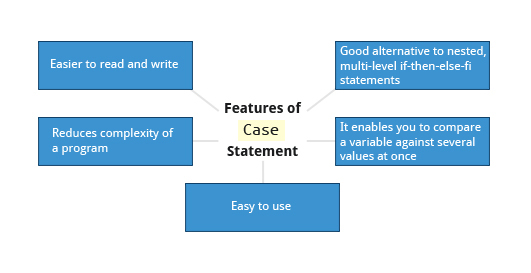
Below are some of the advantages of using the case statement:
-
It is easier to read and write.
-
It is a good alternative to nested, multi-level
if-then-else-ficode blocks. -
It enables you to compare a variable against several values at once.
-
It reduces the complexity of a program.
Structure of the case Statement
Section titled “Structure of the case Statement”-
Basic structure of the
casestatement:Terminal window case expression inpattern1) execute commands;;pattern2) execute commands;;pattern3) execute commands;;pattern4) execute commands;;* ) execute some default commands or nothing ;;esac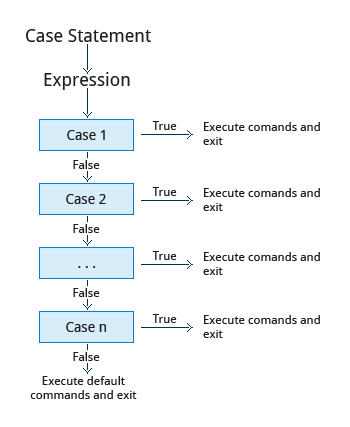
Looping Constructs
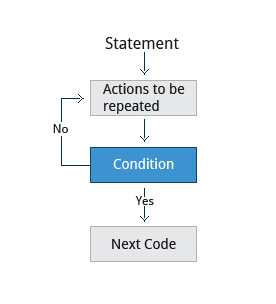
Section titled “Looping Constructs”By using looping constructs, you can execute one or more lines of code repetitively, usually on a selection of values of data such as individual files. Usually, you do this until a conditional test returns either true or false, as is required.
Three types of loops are often used in most programming languages:
forwhileuntil
All these loops are easily used for repeating a set of statements until the exit condition is true.
The for Loop
Section titled “The for Loop”-
The
forloop operates on each element of a list of items. The syntax for theforloop is:Terminal window for variable-name in listdoexecute one iteration for each item in the list until the list is finisheddone -
Example of the
forloop to print the sum of numbers 1 to 10:#!/bin/bashsum=0for i in 1 2 3 4 5 6 7 8 9 10dosum=$(($sum+$i))doneecho "The sum of 1 to 10 is: $sum"
The while Loop
Section titled “The while Loop”-
The
whileloop repeats a set of statements as long as the control command returns true. The syntax is:Terminal window while condition is truedoCommands for execution----done -
The set of commands that need to be repeated should be enclosed between
doanddone. -
You can use any command or operator as the condition. Often, it is enclosed within square brackets (
[]).
The until Loop
Section titled “The until Loop”-
The
untilloop repeats a set of statements as long as the control command is false. Thus, it is essentially the opposite of thewhileloop. The syntax is:Terminal window until condition is falsedoCommands for execution----done -
Similar to the
whileloop, the set of commands that need to be repeated should be enclosed betweendoanddone. You can use any command or operator as the condition.
Script Debugging
Section titled “Script Debugging”Debugging bash Scripts
Section titled “Debugging bash Scripts”- While working with scripts and commands, you may run into errors.
- These may be due to an error in the script, such as an incorrect syntax, or other ingredients, such as a missing file or insufficient permission to do an operation.
- These errors may be reported with a specific error code, but often just yield incorrect or confusing output.
- How do you go about identifying and fixing an error? Debugging helps you troubleshoot and resolve such errors, and is one of the most important tasks a system administrator performs.
Script Debug Mode
Section titled “Script Debug Mode”- Before fixing an error (or bug), it is vital to know its source.
- Run a bash script in debug mode either by doing
bash –x ./script_file, or bracketing parts of the script withset -xandset +x. - The debug mode helps identify the error because:
-
It traces and prefixes each command with the
+character. -
It displays each command before executing it.
-
It can debug only selected parts of a script (if desired) with:
Terminal window set -x # turns on debuggingset +x # turns off debugging
-
Redirecting Errors to File and Screen
Section titled “Redirecting Errors to File and Screen”-
In UNIX/Linux, all programs that run are given three open file streams when they are started as listed in the table:
File stream Description File Descriptor stdinStandard Input, by default the keyboard/terminal for programs run from the command line 0 stdoutStandard output, by default the screen for programs run from the command line 1 stderrStandard error, by default the screen for programs run from the command line 2 -
A shell script with a simple bug, which is then run and the error output is diverted to
error.log. Usingcatto display the contents of the error log adds in debugging. -
Using redirection, we can save the stdout and stderr output streams to one file or two separate files for later analysis after a program or command is executed.
Some Additional Useful Techniques
Section titled “Some Additional Useful Techniques”Creating Temporary Files and Directories
Section titled “Creating Temporary Files and Directories”-
Temporary files (and directories) are meant to store data for a short time.
-
Usually, one arranges it so that these files disappear when the program using them terminates.
-
While you can also use
touchto create a temporary file, in some circumstances this may make it easy for hackers to gain access to your data. This is particularly true if the name and the file location of the temporary file are predictable. -
The best practice is to create random and unpredictable filenames for temporary storage.
-
One way to do this is with the
mktemputility, as in the following examples. -
The
XXXXXXXXis replaced bymktempwith random characters to ensure the name of the temporary file cannot be easily predicted and is only known within your program.Command Usage TEMP=$(mktemp /tmp/tempfile.XXXXXXXX)To create a temporary file TEMPDIR=$(mktemp -d /tmp/tempdir.XXXXXXXX)To create a temporary directory
Example of Creating a Temporary File and Directory
Section titled “Example of Creating a Temporary File and Directory”-
Sloppiness in creation of temporary files can lead to real damage, either by accident or if there is a malicious actor. For example, if someone were to create a symbolic link from a known temporary file used by root to the
/etc/passwdfile, like this:$ ln -s /etc/passwd /tmp/tempfileThere could be a big problem if a script run by root has a line in like this:
echo $VAR > /tmp/tempfileThe password file will be overwritten by the temporary file contents.
-
To prevent such a situation, make sure you randomize your temporary file names by replacing the above line with the following lines:
Terminal window TEMP=$(mktemp /tmp/tempfile.XXXXXXXX)echo $VAR > $TEMP
Discarding Output with /dev/null
Section titled “Discarding Output with /dev/null”-
Certain commands (like
find) will produce voluminous amounts of output, which can overwhelm the console. To avoid this, we can redirect the large output to a special file (a device node) called/dev/null. This pseudofile is also called the bit bucket or black hole. -
All data written to it is discarded and write operations never return a failure condition. Using the proper redirection operators, it can make the output disappear from commands that would normally generate output to
stdoutand/orstderr:$ ls -lR /tmp > /dev/null -
In the above command, the entire standard output stream is ignored, but any errors will still appear on the console. However, if one does:
$ ls -lR /tmp >& /dev/nullboth
stdoutandstderrwill be dumped into/dev/null.
Random Numbers and Data
Section titled “Random Numbers and Data”- It is often useful to generate random numbers and other random data when performing tasks such as:
- Performing security-related tasks
- Reinitializing storage devices
- Erasing and/or obscuring existing data
- Generating meaningless data to be used for tests.
- Such random numbers can be generated by using the
$RANDOMenvironment variable, which is derived from the Linux kernel’s built-in random number generator, or by the OpenSSL library function, which uses the FIPS140 (Federal Information Processing Standard) algorithm to generate random numbers for encryption.
How the Kernel Generates Random Numbers
Section titled “How the Kernel Generates Random Numbers”- Some servers have hardware random number generators that take as input different types of noise signals, such as thermal noise and photoelectric effect. A transducer converts this noise into an electric signal, which is again converted into a digital number by an A-D converter. This number is considered random. However, most common computers do not contain such specialized hardware and, instead, rely on events created during booting to create the raw data needed.
- Regardless of which of these two sources is used, the system maintains a so-called entropy pool of these digital numbers/random bits. Random numbers are created from this entropy pool.
- The Linux kernel offers the
/dev/randomand/dev/urandomdevice nodes, which draw on the entropy pool to provide random numbers which are drawn from the estimated number of bits of noise in the entropy pool. /dev/randomis used where very high quality randomness is required, such as one-time pad or key generation, but it is relatively slow to provide values./dev/urandomis faster and suitable (good enough) for most cryptographic purposes.- Furthermore, when the entropy pool is empty,
/dev/randomis blocked and does not generate any number until additional environmental noise (network traffic, mouse movement, etc.) is gathered, whereas/dev/urandomreuses the internal pool to produce more pseudo-random bits.