
Docker Architecture
Docker uses a client-server architecture: the Docker CLI (client) converts commands into API requests and sends them to the Docker daemon (dockerd), which coordinates the actual work through a chain of specialized runtimes. The client and daemon can be on the same host or connected over a network.
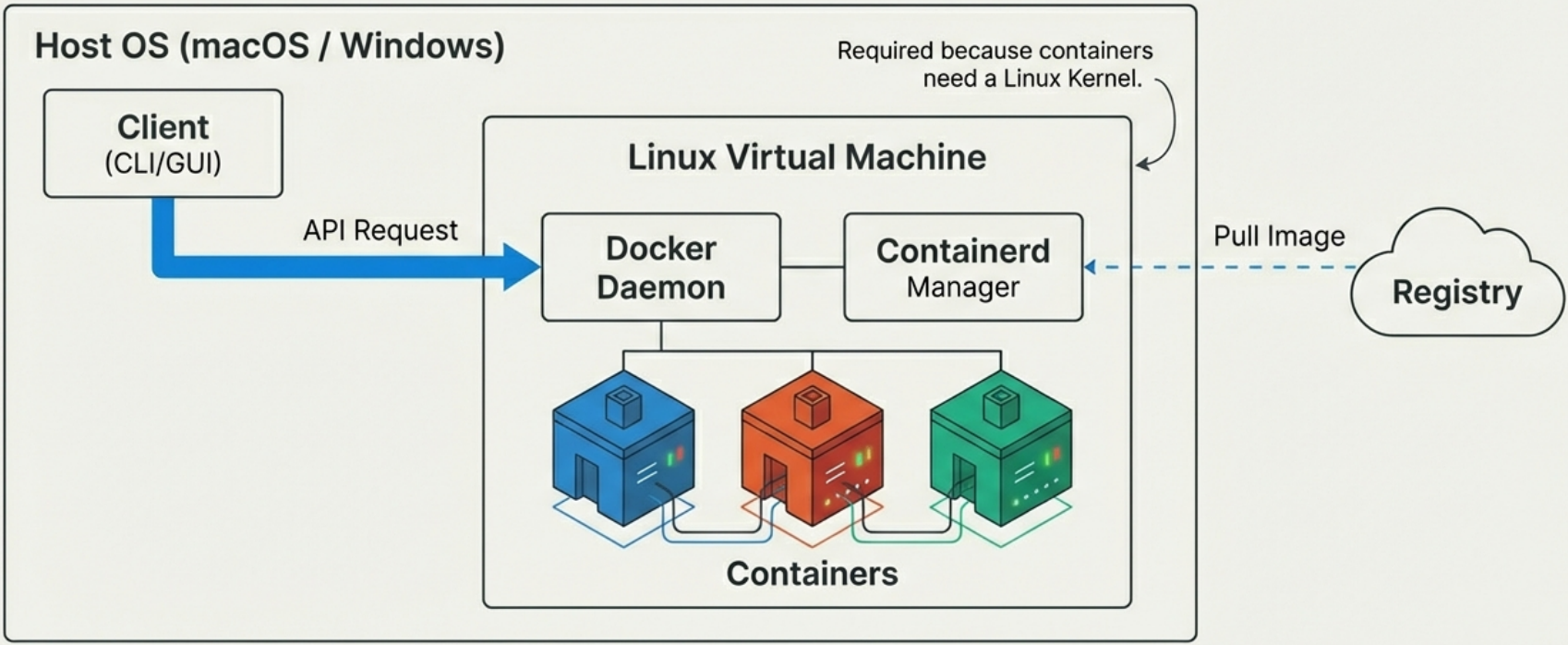
The Delegation Chain
Section titled “The Delegation Chain”No single component creates a container alone. Responsibility is delegated down a chain:
Docker CLI → dockerd → containerd → shim → runc → container process| Component | Role |
|---|---|
| Docker CLI | Translates user commands into Docker API requests |
dockerd | Receives API calls, coordinates the rest - no longer creates containers directly |
containerd | High-level runtime - manages container lifecycle, converts images to OCI bundles |
| shim | Per-container process that outlives runc, keeps streams open, enables daemonless containers |
runc | Low-level OCI runtime - calls the kernel to build namespaces and cgroups, then exits |
For the full deep dive on each component - including history, internals, the step-by-step startup sequence, and Linux binaries - see Docker Engine.
Why Client-Server?
Section titled “Why Client-Server?”The separation of client and daemon is a deliberate design choice with real consequences:
- The daemon runs as root.
dockerdneeds elevated privileges to create namespaces, manage cgroups, and manipulate network interfaces. The CLI does not need to run as root - it just sends API requests. - Remote management is a first-class feature. The daemon listens on a socket; any authorized client anywhere on the network can manage it. CI runners, Portainer, VS Code extensions - they all speak the same Docker API.
- Crash isolation. Because the daemon and the container processes are decoupled via shims, a
dockerdcrash or restart does not kill running containers. The shim keeps the container alive and reconnects the daemon when it comes back.
Docker Contexts
Section titled “Docker Contexts”A context is a named configuration that points the Docker CLI at a specific Docker daemon. This lets you manage multiple Docker environments (local, remote server, Docker Desktop, cloud) from the same terminal without changing environment variables.
# List all configured contexts - the active one is marked with *docker context ls
# Switch to a different contextdocker context use my-remote-server
# Run any Docker command against the active contextdocker ps
# Create a new context pointing at a remote daemon over SSHdocker context create my-remote-server \  --docker "host=ssh://user@remote-host"
# Create a context for a TLS-secured remote daemondocker context create prod \  --docker "host=tcp://prod-host:2376,cert=~/.docker/certs/prod"
# Inspect a contextdocker context inspect my-remote-server
# Remove a contextdocker context rm my-remote-serverContexts in Practice
Section titled “Contexts in Practice”| Use Case | Context setup |
|---|---|
| Local development | Default context (Docker Desktop or Engine) |
| Remote production server | SSH context: host=ssh://deploy@prod-host |
| Multiple cloud environments | Separate context per region/account |
| CI/CD runner | Set DOCKER_CONTEXT environment variable |
# Override context for a single command without switchingdocker --context my-remote-server ps
# Or use the DOCKER_CONTEXT environment variableDOCKER_CONTEXT=my-remote-server docker ps
Daemonless Containers
Section titled “Daemonless Containers”A key architectural property of Docker’s shim-based design: running containers are not children of the daemon. The shim process (containerd-shim-runc-v2) becomes the parent of each container’s PID 1 after runc exits.
This means:
dockerdcan be stopped, updated, and restarted without touching running containerscontainerdcan be upgraded independently of the containers it manages- The container survives daemon crashes - the shim holds the I/O streams and re-reports status when the daemon reconnects
This design is what makes zero-downtime Docker daemon upgrades possible on production hosts.
Rootless Docker
Section titled “Rootless Docker”In standard mode, dockerd runs as root. A vulnerability in the daemon, or an escaped container, gives the attacker root on the host. Rootless mode eliminates this entire threat class by running the daemon and all container processes entirely within an unprivileged user account.
How It Works
Section titled “How It Works”Rootless Docker uses two components to emulate the privileges normally required:
| Component | Role |
|---|---|
| rootlesskit | Creates a user namespace where the current user appears as root (UID 0) inside the namespace, mapped to their real UID outside. Acts as the “outer” process that launches dockerd. |
| slirp4netns | Provides networking without root – implements a user-space TCP/IP stack that tunnels traffic without requiring CAP_NET_ADMIN. |
The result: dockerd, containerd, runc, and every container process all run as the invoking user on the host. Inside their namespaces they appear to have root. Outside, they have no elevated privileges.
Host OS Rootless user namespace─────────────────────── ───────────────────────uid=1000 (alice) ───▶ uid=0 (root inside namespace) │ ├─ dockerd (as alice on host) ├─ containerd (as alice on host) └─ container process (as alice on host)Installation and Setup
Section titled “Installation and Setup”# Install rootless Docker (must be run as a non-root user)# Requires: uidmap package, kernel user namespace supportdockerd-rootless-setuptool.sh install
# The daemon socket moves to the user's runtime directoryexport DOCKER_HOST=unix://$XDG_RUNTIME_DIR/docker.sockdocker ps
# Start the rootless daemon as a systemd user servicesystemctl --user start dockersystemctl --user enable docker # auto-start on login
# Verify it is running rootlessdocker info | grep "rootless"Standard vs Rootless Comparison
Section titled “Standard vs Rootless Comparison”| Standard Docker | Rootless Docker | |
|---|---|---|
| Daemon privilege | Root (uid=0) | Non-root (invoking user) |
| Container isolation | Kernel namespaces | Kernel namespaces + user namespaces |
| Daemon compromise impact | Full host root | Limited to invoking user’s permissions |
| Performance | Full native | Small overhead (~3-5%) from user-namespace UID mapping |
| Privileged ports (<1024) | Supported | Not supported by default |
| Overlay networks | Supported | Not supported (use bridge networks) |
| AppArmor / SELinux | Full support | Limited (profile loading requires root) |
--privileged containers | Works | Not supported |
| Best for | Servers, CI/CD runners | Shared dev machines, security-sensitive environments |
What Rootless Mode Protects Against
Section titled “What Rootless Mode Protects Against”The core security argument is daemon compromise isolation:
- In standard mode:
dockerdexploited → attacker has root on the host - In rootless mode:
dockerdexploited → attacker has the invoking user’s permissions only (no/etc/shadow, nosudo, no kernel module loading)
This also protects against container escape – if a container process breaks out of its namespace, it runs as an unprivileged user on the host rather than as root.
Rootless Mode vs userns-remap
Section titled “Rootless Mode vs userns-remap”These are two different mechanisms that are often confused:
userns-remap | Rootless mode | |
|---|---|---|
| What runs as root | dockerd still runs as root | dockerd runs as the invoking user |
| What is remapped | Container UIDs → unprivileged host UIDs | Everything – daemon + containers |
| Configuration | daemon.json option, applied by a root-owned daemon | Per-user installation, no daemon.json |
| Use case | Shared server where daemon must be root | Fully unprivileged development/CI environments |
userns-remap is “root daemon, unprivileged containers.” Rootless mode is “unprivileged daemon + unprivileged containers.” They can coexist but target different environments.
When to Use Rootless Docker
Section titled “When to Use Rootless Docker”- Shared developer machines – multiple users each run their own daemon instance; no shared root process
- Security-sensitive environments – minimizes the blast radius of daemon vulnerabilities
- CI runners on shared infrastructure – Kubernetes pods running Docker-in-Docker without privileged mode
- Avoid it when: you need overlay networks, privileged containers, AppArmor profile loading, or full-speed I/O on storage drivers
Docker Desktop
Section titled “Docker Desktop”Docker Desktop is the developer-friendly distribution for macOS and Windows. It wraps Docker Engine in a Linux VM (via Apple Hypervisor / WSL2) and adds:
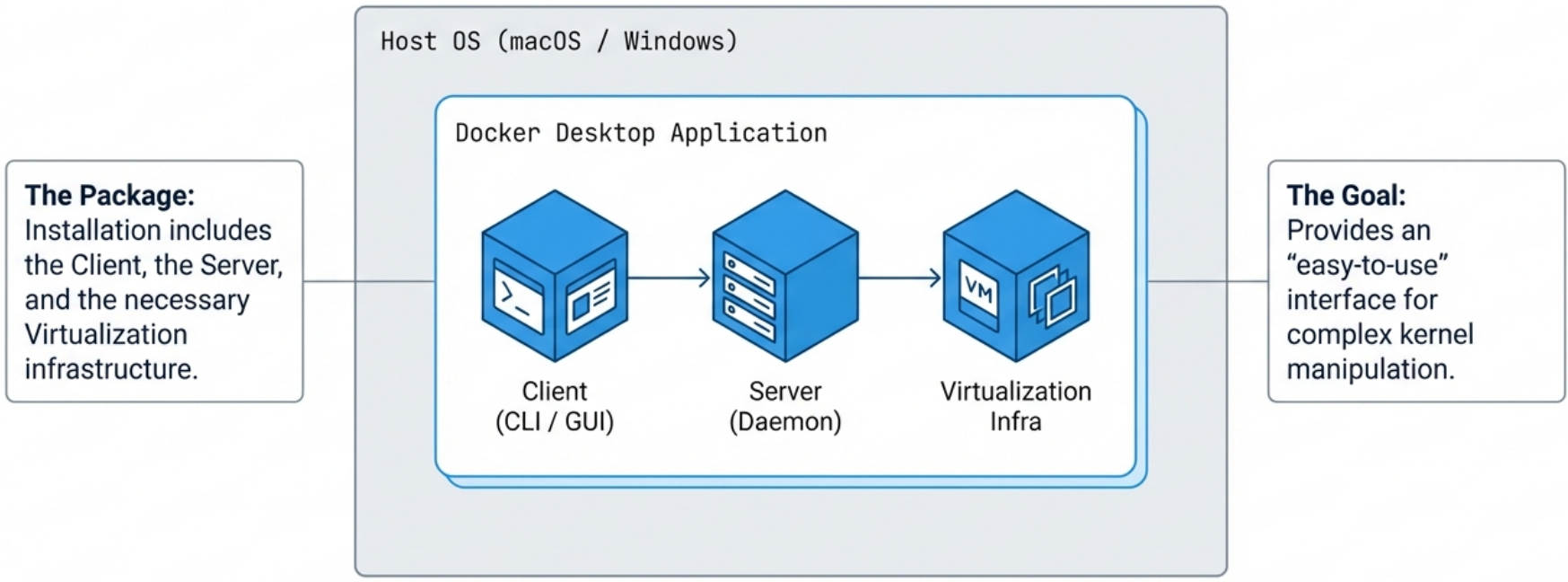
| Component | Purpose |
|---|---|
| CLI | Standard docker commands |
| GUI | Manage images, containers, resource limits (CPU/memory/disk) |
| Credential Helper | Secure credential storage for private registries |
| Extensions | Third-party tools (e.g., Dive, Portainer, Trivy) |
| Optional Kubernetes | Single-node K8s cluster alongside Docker |
Docker Engine vs Docker Desktop
Section titled “Docker Engine vs Docker Desktop”| Docker Engine | Docker Desktop | |
|---|---|---|
| OS | Linux only | macOS, Windows, Linux |
| License | Free (Apache 2.0) | Free for personal use; paid for large orgs |
| Kubernetes | Not included | Optional, single-node |
| GUI | None | Included |
| VM overhead | None | Yes (Linux VM layer) |
- On Linux, prefer Docker Engine for servers and CI runners - no VM overhead, full performance.
- On macOS/Windows, Docker Desktop is the practical choice. The VM boundary means bind mounts have some performance overhead compared to native Linux.
How the API Works
Section titled “How the API Works”Client and daemon communicate over a local socket by default:
- Linux:
/var/run/docker.sock - Windows:
\\.\pipe\docker_engine
# Connect CLI to a remote Docker daemondocker -H remote-host:2375 psexport DOCKER_HOST=tcp://remote-host:2375
# The CLI is just a REST API wrapper - you can call it directly:curl --unix-socket /var/run/docker.sock http://localhost/containers/jsonAny tool that speaks the Docker REST API - Portainer, VS Code Docker extension, CI runners - can manage Docker. The CLI is not special.