
Virtual Machine
What is a Virtual Machine?
Section titled “What is a Virtual Machine?”- A virtual machine (VM) is a technology that simulates a physical computer by creating a software-based replica.
- It acts as a fully sandboxed, isolated computing environment nested within a physical host machine.
- By splitting a single computer’s capabilities, multiple VMs can act as separate computers, each with its own operating system and applications.
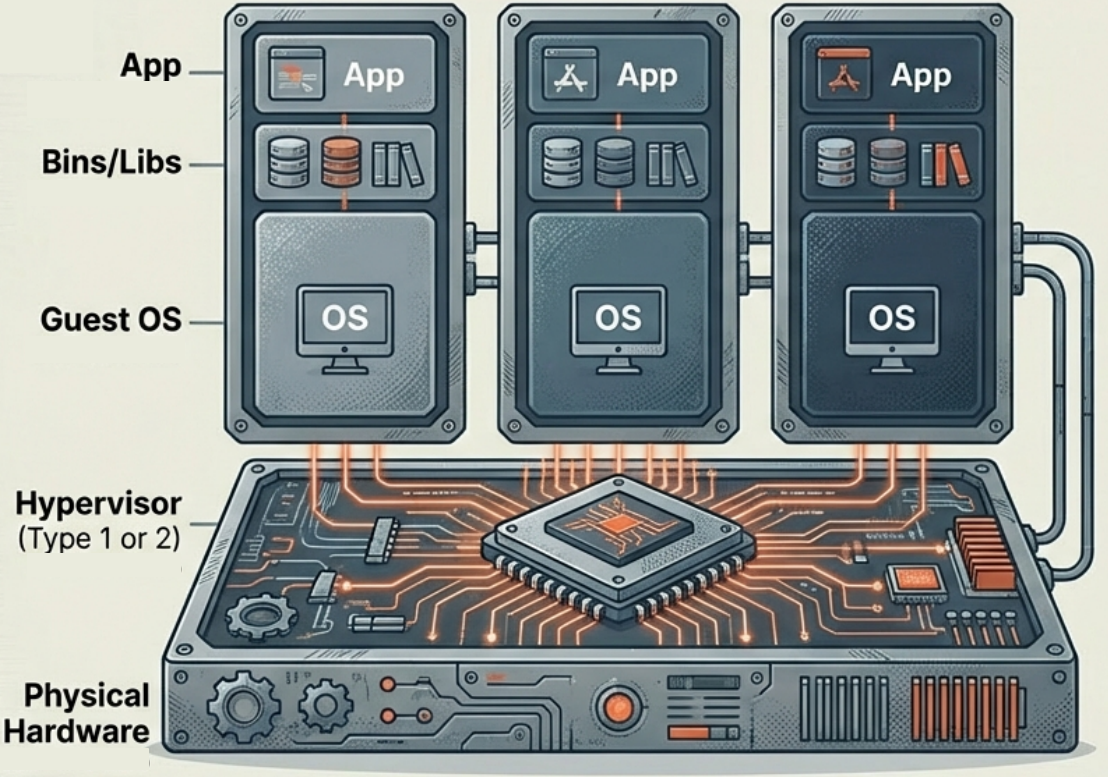
How Virtual Machines Work
Section titled “How Virtual Machines Work”- Complete System Replicas: Every VM contains its own virtualized components - a complete guest OS, virtual hardware, network interfaces, libraries, and applications.
- The Role of the Hypervisor: A VM cannot run without a hypervisor. The hypervisor sits between the VM and physical hardware, actively allocating processors, memory, and storage to each VM.
- Guest OS Bootstrapping: Because it operates like a real computer, the guest OS inside a VM must perform standard start-up activities - bootstrapping and loading the kernel - while being managed under elevated security controls by the hypervisor.
Key Advantages
Section titled “Key Advantages”- Strong Isolation: VMs provide a highly secure boundary. A crash or security breach in one VM does not affect the host or other VMs.
- OS Autonomy and Compatibility: Each VM has an independent OS - you can run Windows, Linux, and macOS concurrently on the same physical server. VMs are compatible with almost all operating systems.
- Established Ecosystem: VMs have a mature ecosystem with robust management tools, strong security controls, and well-established functionality.
Limitations
Section titled “Limitations”- High Resource Overhead: Every VM requires its own complete guest OS and virtual hardware, demanding significant CPU, RAM, and storage.
- Slow Startup Times: VMs must boot an entire OS from scratch - startup takes minutes, not milliseconds.
- Complex Scalability: Adding hardware resources or scaling virtualized environments is not as fast or fluid as scaling containers.
- Portability Hurdles: VMs are more dependent on underlying hardware than containers, and customizing or moving pre-built VM images can be difficult.
Primary Use Cases
Section titled “Primary Use Cases”- Hosting Legacy Applications: Ideal for running older applications that require specific or outdated operating systems in a secure, sandboxed environment.
- High-Security Environments: Data centers hosting applications for multiple organizations use VMs to prevent cross-contamination between tenants.
- Monolithic Workloads: Best for large, heavy applications that require full, dedicated OS functionality.
- Infrastructure as a Service (IaaS): The foundational technology allowing cloud providers to partition hardware and offer scalable compute, storage, and networking as a service.
Popular VM Providers
Section titled “Popular VM Providers”| Provider | Type | Notes |
|---|---|---|
| VirtualBox | Free / Open-source | Cross-platform x86 virtualization owned by Oracle. Large ecosystem of community images and tools. The most common choice for local development and testing. |
| VMware Workstation / Fusion | Commercial | One of the earliest x86 virtualization platforms. Enterprise-grade management UI with strong support. Now under Broadcom’s subscription model. |
| QEMU | Free / Open-source | Most flexible hardware emulation - supports virtually any CPU architecture. CLI-only, no GUI, but one of the fastest options as a result. |