
What is Docker
Docker is an open-source platform for building, shipping, and running applications inside containers. At its core it is a combination of a command-line program, a background daemon, and a set of remote services that work together to solve a consistent set of problems: installing, removing, upgrading, distributing, trusting, and running software.
Docker is not a programming language or a framework. Think of it as a software logistics provider - like a standardized shipping crane that picks up and moves containers uniformly, regardless of what’s inside. It handles the installation and removal of all software in exactly the same standardized way, leaving no lingering artifacts behind.
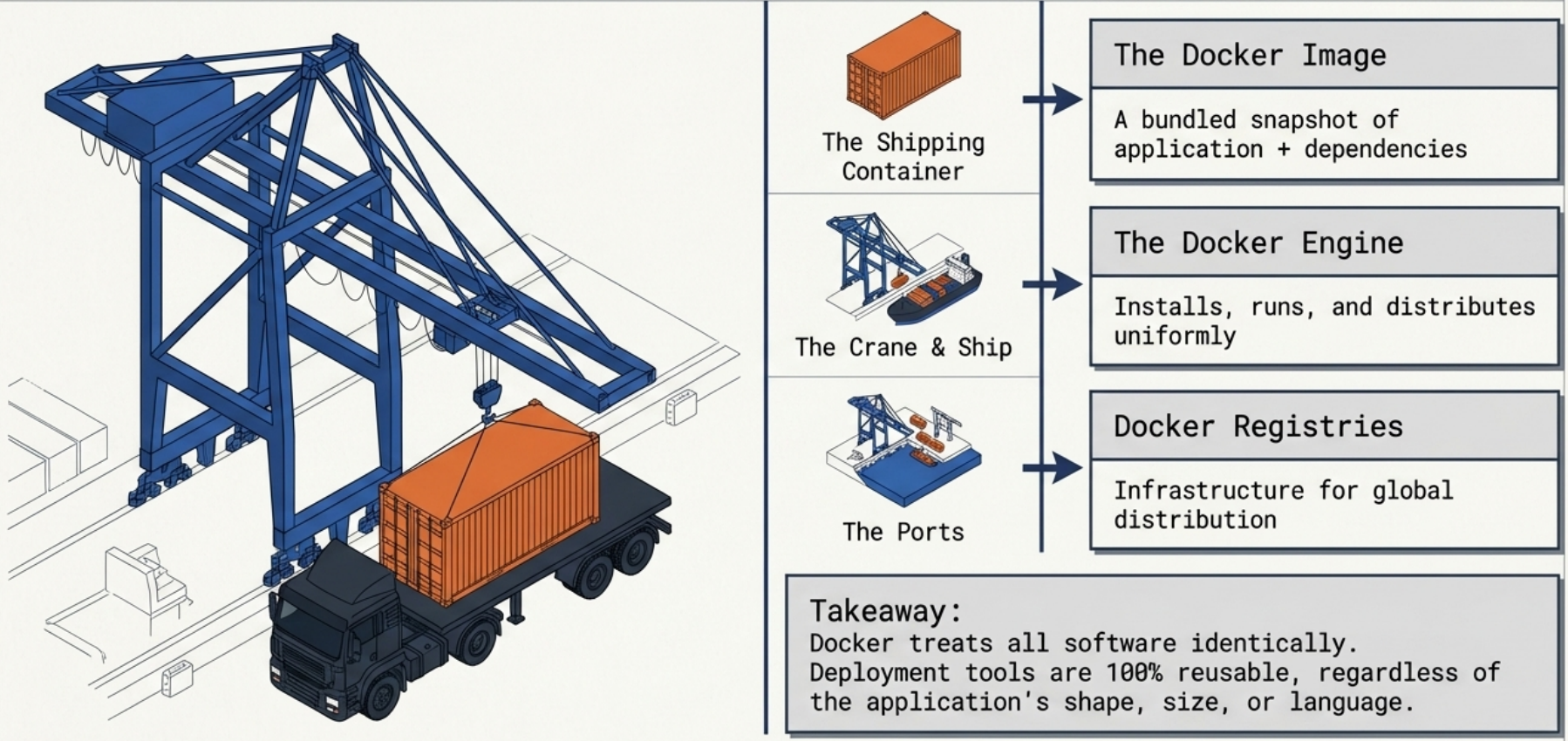
Docker achieves isolation using an operating system technology called containers. It doesn’t invent that technology - Linux namespaces and cgroups have existed since 2007. What Docker does is hide the immense complexity of working with them directly, turning complicated container best practices into cheap, sensible defaults.
Docker vs Virtual Machines
Section titled “Docker vs Virtual Machines”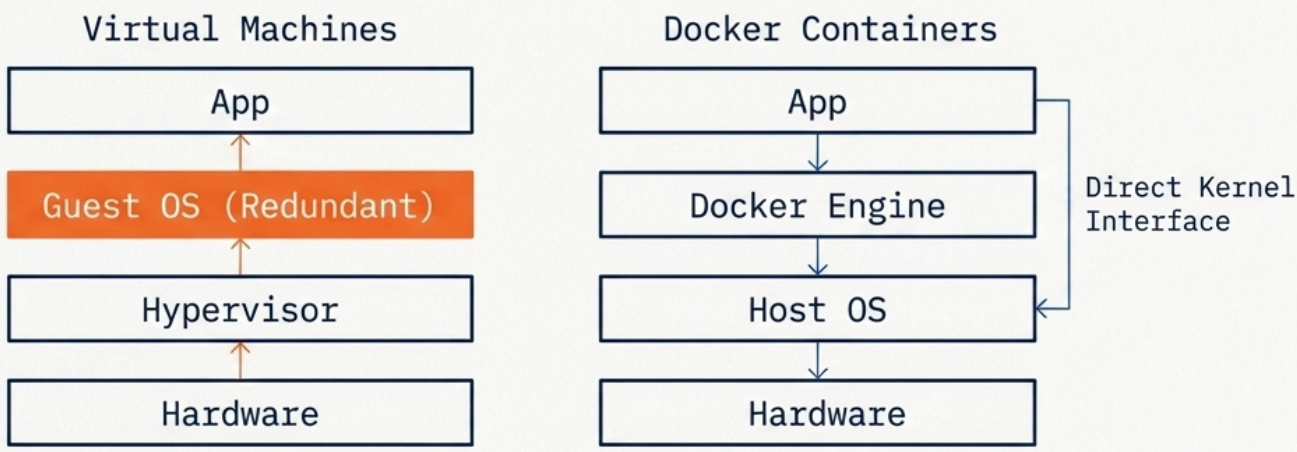
| Docker Containers | Virtual Machines | |
|---|---|---|
| OS | Shared host kernel | Full guest OS per VM |
| Size | MBs | GBs |
| Startup | Seconds | Minutes |
| Isolation | Process-level | Hardware-level |
| Overhead | Low | High |
Docker is not a hardware virtualization technology. Unlike VMs that run a full guest OS, containers interface directly with the host’s Linux kernel - no hypervisor in between. This allows multiple isolated processes to run with significantly less resource overhead and much faster startup.
Containers trade some isolation for drastically lower overhead. Use VMs when you need full OS-level isolation or a different kernel than the host.
Core Components
Section titled “Core Components”- Docker Engine: The runtime that builds and runs containers. Consists of the Docker daemon (
dockerd) and the Docker CLI client. See Docker Engine for the full architecture. - Docker Image: A read-only, layered filesystem snapshot containing everything needed to run an application. Built from a Dockerfile.
- Docker Container: A running instance of an image. Ephemeral by default - all runtime writes are lost when the container is removed unless a volume is attached.
- Docker Registry: A storage service for images. Docker Hub is the default public registry. Private registries (GCR, ECR, ACR, Harbor) are used for internal images.
- Docker Compose: A tool for defining and running multi-container applications using a
docker-compose.ymlfile.
The docker run Flow
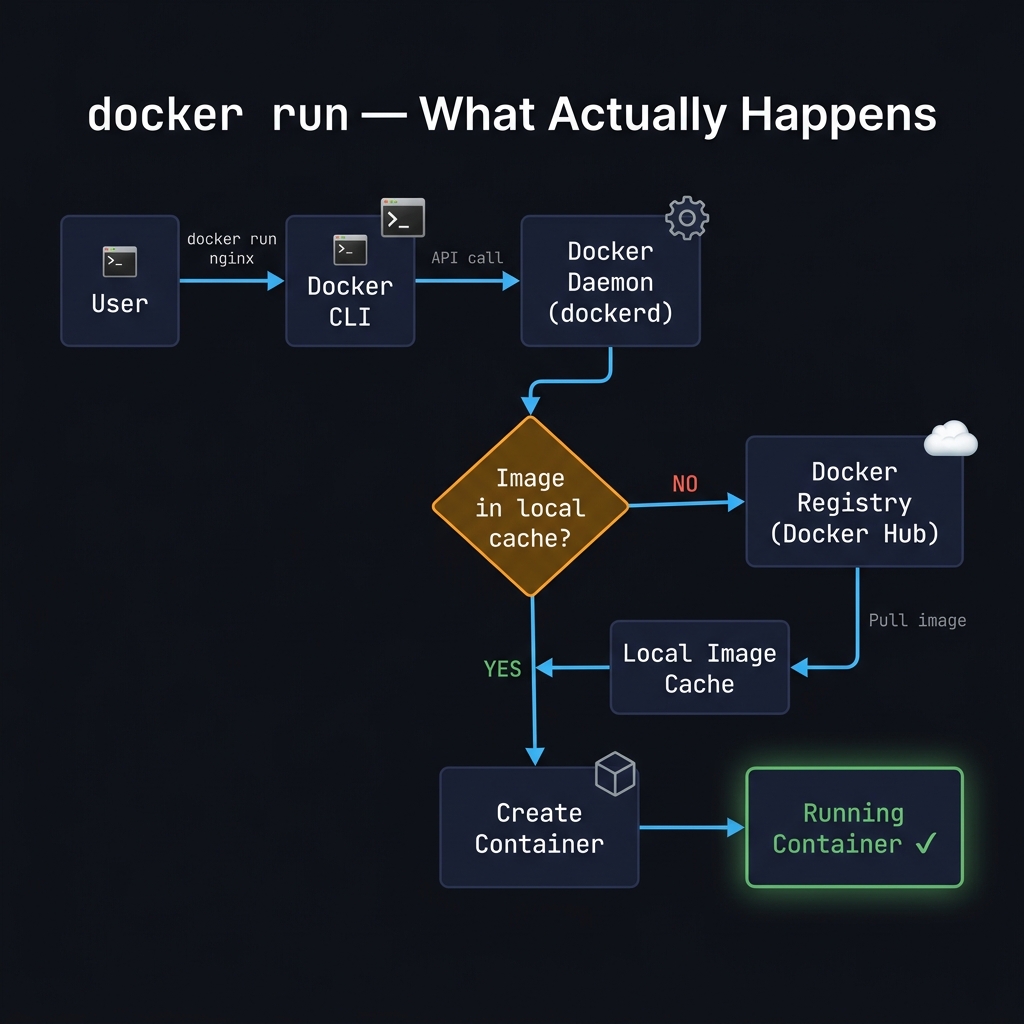
Section titled “The docker run Flow”When you type docker run nginx, more happens than it appears:
| Step | What happens |
|---|---|
| 1. CLI receives the command | The Docker CLI parses docker run nginx and sends an API request to the Docker daemon via the Unix socket (/var/run/docker.sock) |
| 2. Daemon checks the local cache | dockerd looks for the nginx image in the local image cache |
| 3a. Cache hit | If the image is found locally, the daemon skips straight to creating a container |
| 3b. Cache miss | If not found, the daemon pulls the image from Docker Hub (or a configured private registry), layer by layer, until the full image is stored locally |
| 4. Container is created | The daemon creates a writable container layer on top of the read-only image layers and sets up networking, namespaces, and cgroups |
| 5. Process starts | The entry point defined in the image (nginx -g 'daemon off;' for the nginx image) is launched inside the container |
# You can observe steps 3b and 5 directly:docker run nginx# Unable to find image 'nginx:latest' locally ← cache miss# latest: Pulling from library/nginx ← fetch from registry# ...layers...# Status: Downloaded newer image for nginx:latest# /docker-entrypoint.sh: ... ← container startingHow Isolation Works Under the Hood
Section titled “How Isolation Works Under the Hood”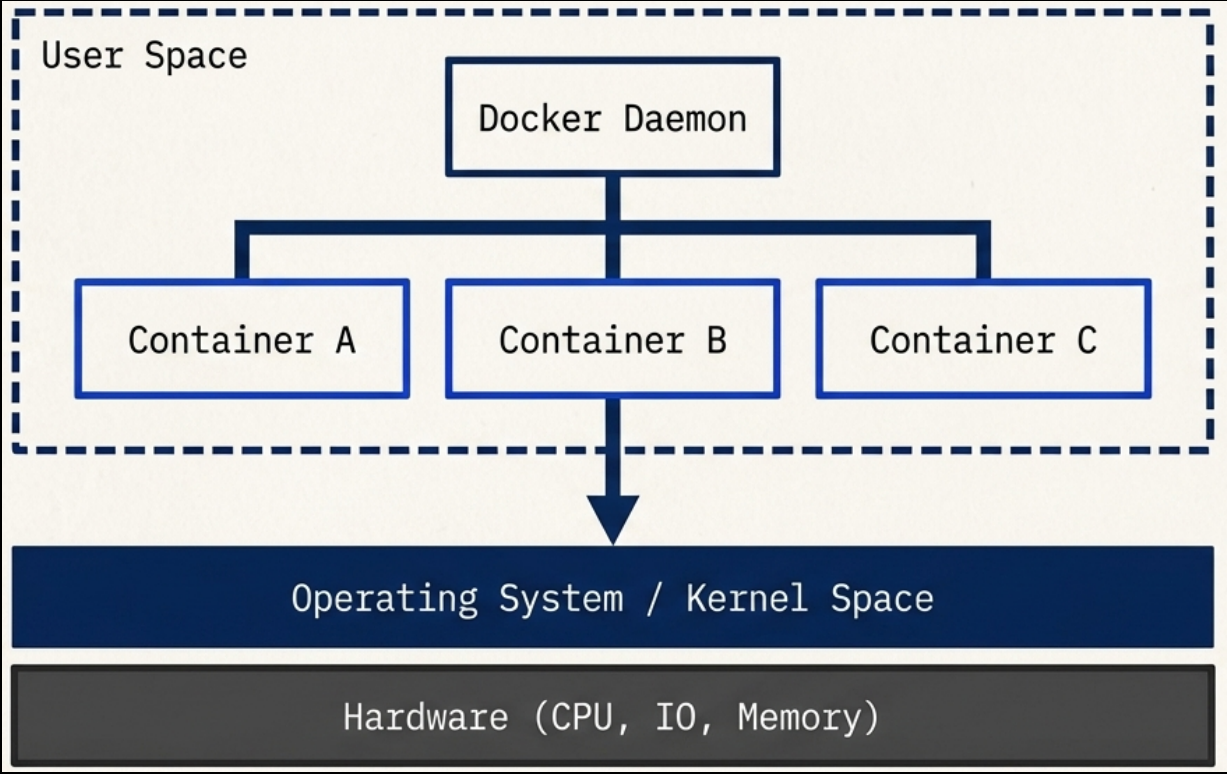
Docker and the Docker CLI both run in user space memory - they cannot modify sensitive kernel space memory. Running containers are child processes of the Docker engine, each operating entirely within its own memory subspace. Programs inside a container can only access their own scoped memory and resources, which limits their ability to impact other running programs or access sensitive data. Exceptions only occur when explicitly configured.
The Ten Core Technologies
Section titled “The Ten Core Technologies”Docker builds containers at runtime using ten major Linux system features:
| # | Feature | What it does |
|---|---|---|
| 1 | PID namespace | Manages process identifiers and capabilities |
| 2 | UTS namespace | Isolates host and domain names |
| 3 | MNT namespace | Controls filesystem access and structure |
| 4 | IPC namespace | Manages process communication over shared memory |
| 5 | NET namespace | Isolates network access and structure |
| 6 | USR namespace | Isolates user names and identifiers |
| 7 | chroot syscall | Controls the location of the filesystem root directory |
| 8 | cgroups | Provides resource protection and limits |
| 9 | CAP drop | Restricts specific OS-level capabilities |
| 10 | Security modules | Enforces mandatory access controls (AppArmor, SELinux) |
Historically, UNIX-style systems used the term “jail” (dating back to 1979) for a modified environment that restricted resource access. By 2005, “container” became the preferred term, and the goal expanded to completely isolating a process from all system resources except those explicitly allowed.
See How Containers Work for a deeper dive into namespaces and cgroups.
Problems Docker Solves
Section titled “Problems Docker Solves”| Problem | What Docker does |
|---|---|
| Installation complexity | Manages OS compatibility, resource requirements, and dependency webs automatically - no manual conflict resolution |
| Dependency hell | Isolates each app’s dependencies inside its container - no shared libraries that can conflict across services |
| System clutter | Without containers, an OS becomes a “junk drawer” of tangled dependencies. Docker keeps the host clean - remove a container and nothing is left behind |
| Portability | The same container image runs identically on a developer’s laptop, a CI runner, and a production cloud VM. No rewrites, no JVM required |
| Security surface | Applications run in a “container jail” - a compromised program has strictly limited ability to access sensitive data or interfere with other processes |
- Docker originally used its own runtime, but the ecosystem standardized around the OCI (Open Container Initiative) spec.
- OCI defines the image format and runtime spec, meaning OCI-compliant images built with Docker run identically on containerd, CRI-O, or Podman.
- Practical consequence: Kubernetes dropped direct Docker support in v1.24 (
dockershimremoval), but OCI images built with Docker still run on Kubernetes - the runtime underneath changed, not the image format.
Docker in the Ecosystem
Section titled “Docker in the Ecosystem”Docker is the foundation, not the ceiling. The broader container ecosystem builds on top of it:
- Container orchestration: Tools like Kubernetes solve higher-level problems - scheduling containers across clusters, high availability, service discovery, and rolling deployments. Any image you build with Docker runs on Kubernetes without modification.
- Managed Kubernetes: Building a Kubernetes cluster from scratch is a full-time job. Use a managed offering (GKE, EKS, AKS) before attempting to self-host.
- Docker sub-components: Docker itself is composed of independent open-source projects -
runc,containerd,notary- each maintained separately and used directly by other runtimes. - Industry support: Amazon, Microsoft, and Google are active contributors to Docker and the OCI standard. The container model is not going away.
Docker and AI
Section titled “Docker and AI”Docker consistently ranks as the #1 most-used and most-desired developer tool, and that position has only strengthened as AI applications have become a mainstream part of the development stack.
The GPU Problem
Section titled “The GPU Problem”Running AI workloads inside containers hits a fundamental technical wall: GPUs and AI acceleration hardware require their own specific drivers and SDKs, and making those work seamlessly inside a container’s isolated environment is still an unsolved problem at the industry level.
Docker Model Runner
Section titled “Docker Model Runner”To address this, Docker released Docker Model Runner - a tool for running local Large Language Models (LLMs) outside of containers. By running models directly on the host, they get unrestricted access to GPUs and AI acceleration hardware without the driver compatibility overhead.
This is a deliberate architectural trade-off: the LLM runs outside the container boundary where hardware access is not an issue, while the rest of the application stack (APIs, databases, front ends) stays containerized as normal.
When to Use Docker
Section titled “When to Use Docker”Best suited for:
- Server-side software: web servers, proxies, mail servers, databases, background workers
- Any Linux application you want to run portably across environments
- Windows server applications running on Windows Server
- Daily developer tooling - keeps the host machine clean, prevents shared resource conflicts
When not to use Docker:
- Native macOS desktop applications (Docker cannot run these - it runs a Linux VM under the hood)
- Native Windows GUI applications on non-Windows hosts
- Programs that require full, unrestricted machine access
- AI/ML model inference workloads that need direct GPU access - run those on the host or use Docker Model Runner
- Blindly running untrusted software that demands administrative privileges
Getting Help
Section titled “Getting Help”# List all Docker commands and basic syntaxdocker help
# Get detailed help for a specific commanddocker help <COMMAND>
# Example: copy files between container and hostdocker help cpEach command’s help output shows the usage pattern, a general description, and a detailed breakdown of its arguments.