
ConfigMaps & Secrets
Most applications consist of two parts:
- The Application Binary and its
- Configuration.
How you package those two parts together determines how painful your multi-environment deployments will be.
Why Decouple Configuration?
Section titled “Why Decouple Configuration?”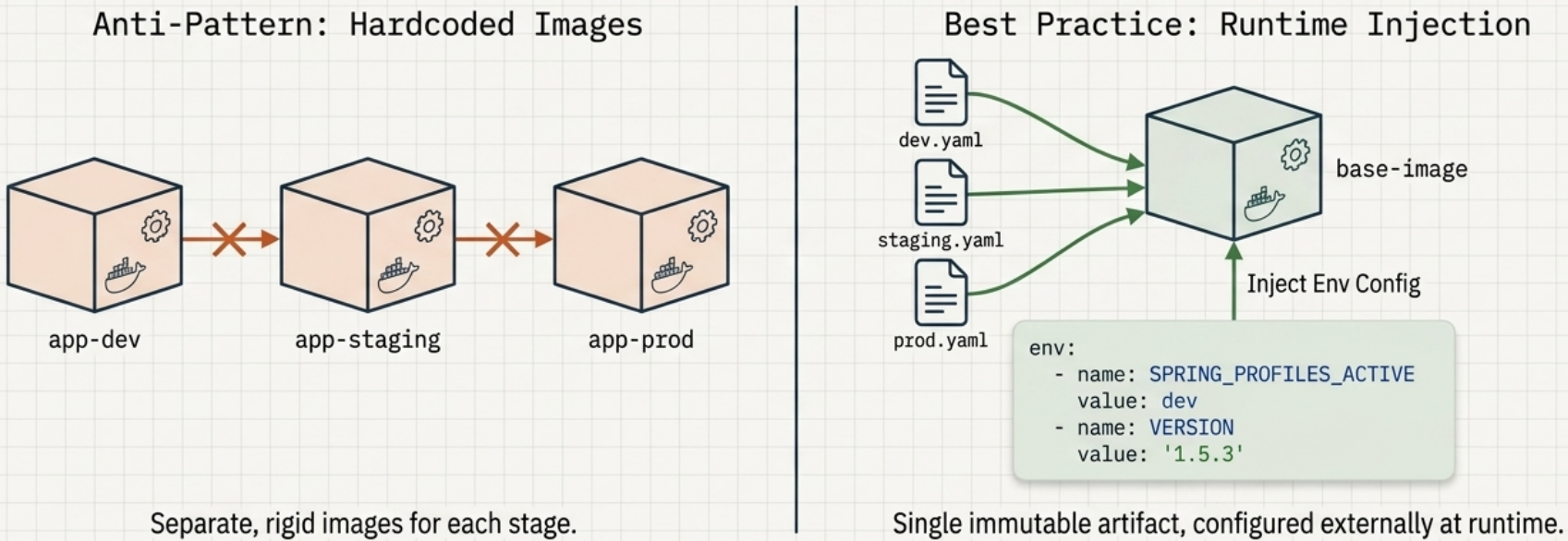
The anti-pattern is embedding configuration directly inside the container image. It forces you to maintain a separate image per environment (dev, staging, prod) – each with its own build, its own repository slot, and its own deployment pipeline. A one-line config change means rebuilding and redeploying everything.
The Kubernetes approach: build one hardened base image with no embedded environment config, store it once, and inject the correct configuration at run time. The same image runs in every environment – only the configuration resource changes.
| Coupled (anti-pattern) | Decoupled (Kubernetes way) | |
|---|---|---|
| Images per environment | 3 (dev, staging, prod) | 1 |
| Config change requires | Full rebuild + redeploy | Update config resource only |
| Security scanning | Per-image | One image |
| ”Works in dev, fails in prod” risk | High (image drift) | Low (same image everywhere) |
Kubernetes provides two first-class API objects for this:
- ConfigMaps – non-sensitive configuration (hostnames, ports, feature flags, config files)
- Secrets – sensitive data (passwords, TLS certificates, API keys)
Inline Pod Configuration
Section titled “Inline Pod Configuration”Before reaching ConfigMaps and Secrets, you can configure a container directly in the pod manifest – overriding the image’s default command, arguments, and environment variables without rebuilding the image.
Container Command and Arguments
Section titled “Container Command and Arguments”Every Docker image bakes in a default executable (ENTRYPOINT) and optional default arguments (CMD). The pod manifest exposes two fields that map directly to these:
| Dockerfile directive | Pod manifest field | What it does |
|---|---|---|
ENTRYPOINT | command | The executable that runs |
CMD | args | Default arguments to that executable |
Override only the arguments (keep the image’s executable):
spec: containers: - name: app image: my-app:1.0 args: ["--listen-port", "9090"] # replaces the image's default CMDOverride the entire command (change the executable itself):
spec: containers: - name: app image: my-app:1.0 command: ["node", "--cpu-prof", "--heap-prof", "app.js"]Both command and args accept a list of strings. You can write them as YAML arrays (["a", "b"]) or as block lists:
command: - node - --cpu-prof - app.jsEnvironment Variables
Section titled “Environment Variables”Env vars are declared per container (there is no pod-level global env block). All values must be strings – quote numbers and booleans.
spec: containers: - name: app image: my-app:1.0 env: - name: APP_ENV value: "production" - name: MAX_CONNECTIONS value: "100" # must be quoted – YAML would parse 100 as an integerVariable referencing with $(VAR_NAME):
Kubernetes lets env vars reference other env vars defined in the same container using $(NAME):
env: - name: POD_NAME value: "web-server" - name: LOG_PREFIX value: "$(POD_NAME)-log" # resolves to "web-server-log" - name: LISTEN_PORT value: "8080"args: - --port - $(LISTEN_PORT) # also works in command/argsRules for $(VAR_NAME) resolution:
| Rule | Detail |
|---|---|
| Order matters | The referenced var must be declared before the var that uses it |
| Manifest-only | Cannot reference vars baked into the image (e.g., NODE_VERSION from a Node.js base image) |
| Unresolved | If the reference can’t be resolved, it stays as the literal string $(VAR_NAME) – no error |
| Escaping | Use $$(VAR_NAME) to pass the literal dollar-paren string without resolution |
To reference image-baked or OS-level variables, run the command through a shell – the shell resolves them at runtime using standard $VAR syntax:
command: - sh - -c - 'echo "Running on $HOSTNAME"; sleep infinity' # shell resolves $HOSTNAMEConfigMaps
Section titled “ConfigMaps”A ConfigMap is a v1 core API object that stores non-sensitive configuration data as a flat map of key-value pairs. Containers consume it as environment variables, startup arguments, or mounted files – without any Kubernetes-specific application code.
Characteristics
Section titled “Characteristics”| Property | Detail |
|---|---|
| API group / version | v1 (core) |
| Structure | data block (plain text) and optional binaryData block (Base64) |
No spec or status | ConfigMaps hold data only, not operational state |
| Key format | Alphanumeric, dashes -, dots ., underscores _ only |
| Size limit | 1 MiB – use external config stores for larger payloads |
| Namespaced | Yes – only visible to pods in the same namespace |
What to Store (vs. Secrets)
Section titled “What to Store (vs. Secrets)”| Store in ConfigMaps | Store in Secrets instead |
|---|---|
| Database hostnames and ports | Passwords and credentials |
| Feature flags | TLS certificates and private keys |
| Config files (nginx.conf, app.yaml) | API keys and OAuth tokens |
| Service names | Any cryptographically sensitive data |
| Account names (non-sensitive) |
Creating ConfigMaps
Section titled “Creating ConfigMaps”Imperative Creation
Section titled “Imperative Creation”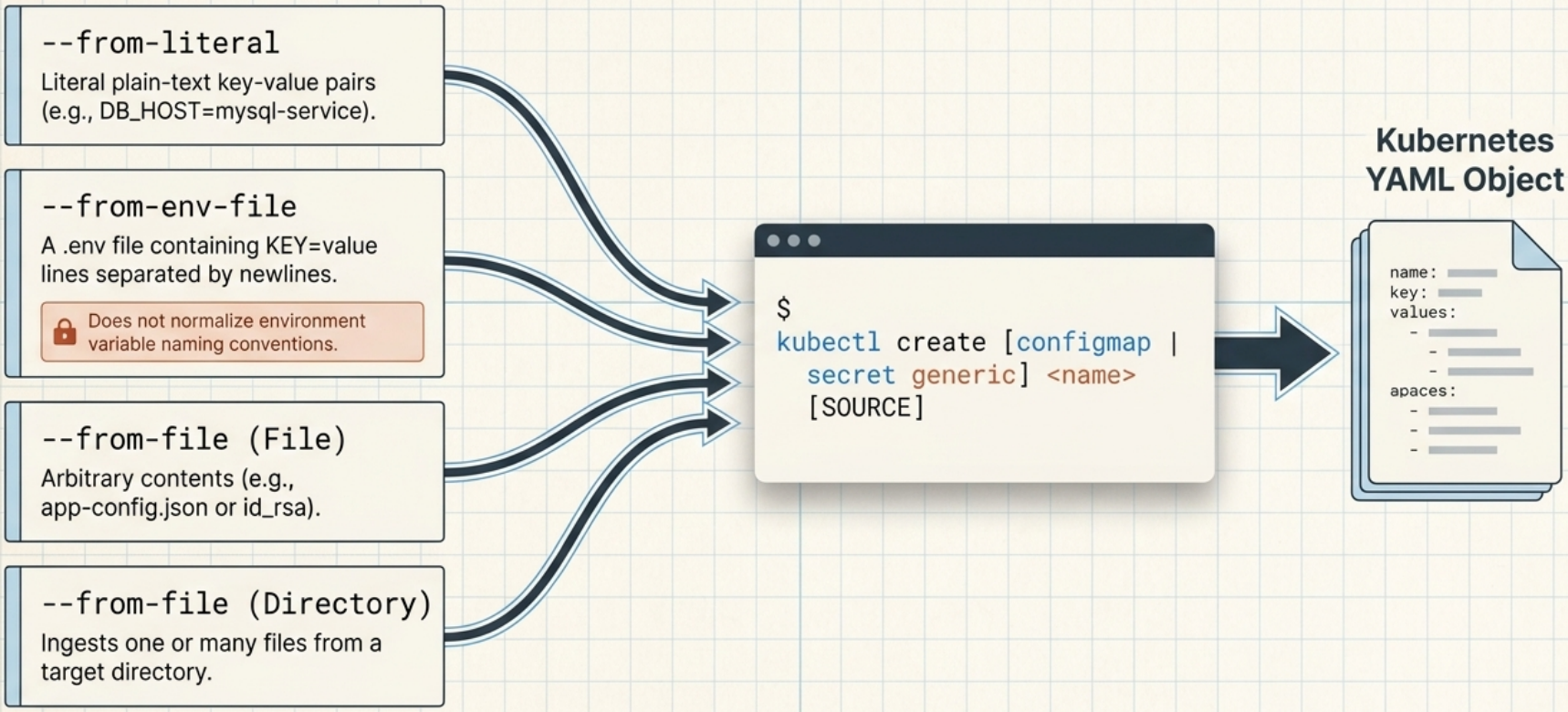
Imperative – from literal values:
kubectl create configmap app-config \ --from-literal=db_host=postgres.prod.svc \ --from-literal=db_port=5432Imperative – from files:
# File name becomes the key; file contents become the valuekubectl create configmap nginx-config --from-file=nginx.conf
# Custom key name (instead of using the filename)kubectl create configmap nginx-config --from-file=server-config=nginx.conf
# Entire directory – every file in the dir becomes a key (subdirs/symlinks ignored)kubectl create configmap app-config --from-file=config/
Imperative – from an env file (key=value lines):
kubectl create configmap app-config --from-env-file=app.envDeclarative – data for text, binaryData for binary:
apiVersion: v1kind: ConfigMapmetadata: name: app-configdata: db_host: "postgres.prod.svc" db_port: "5432" nginx.conf: | # pipe (|) = literal block – entire block is one string value server { listen 80; server_name _; location / { proxy_pass http://backend:8080; } }binaryData: icon.png: iVBORw0KGgo... # Base64-encoded binary – kubectl handles this automaticallykubectl apply -f app-config.yaml
kubectl get configmap app-config -o yamlkubectl describe configmap app-configInjecting ConfigMap Data into Containers
Section titled “Injecting ConfigMap Data into Containers”1. Single Key (configMapKeyRef)
Section titled “1. Single Key (configMapKeyRef)”Bind a specific ConfigMap key to a named environment variable:
spec: containers: - name: app image: my-app:1.0 env: - name: DB_HOST valueFrom: configMapKeyRef: name: app-config # ConfigMap name key: db_host # key to extract optional: true # if true, container starts even if CM or key is missing - name: DB_PORT valueFrom: configMapKeyRef: name: app-config key: db_port2. Entire ConfigMap (envFrom)
Section titled “2. Entire ConfigMap (envFrom)”Bulk-inject all keys from a ConfigMap as environment variables:
spec: containers: - name: app image: my-app:1.0 envFrom: - prefix: APP_ # optional: prepend APP_ to every key → APP_DB_HOST, APP_DB_PORT configMapRef: name: app-config optional: true # container starts even if the ConfigMap doesn't existenvFrom behaviour rules:
| Scenario | What happens |
|---|---|
| Two ConfigMaps with the same key | Last one listed wins |
A key conflicts with an env block entry | The explicit env entry always takes precedence |
| Keys with invalid env var characters | Silently skipped – use configMapKeyRef for those keys |
3. Volume Mount (Recommended for files)
Section titled “3. Volume Mount (Recommended for files)”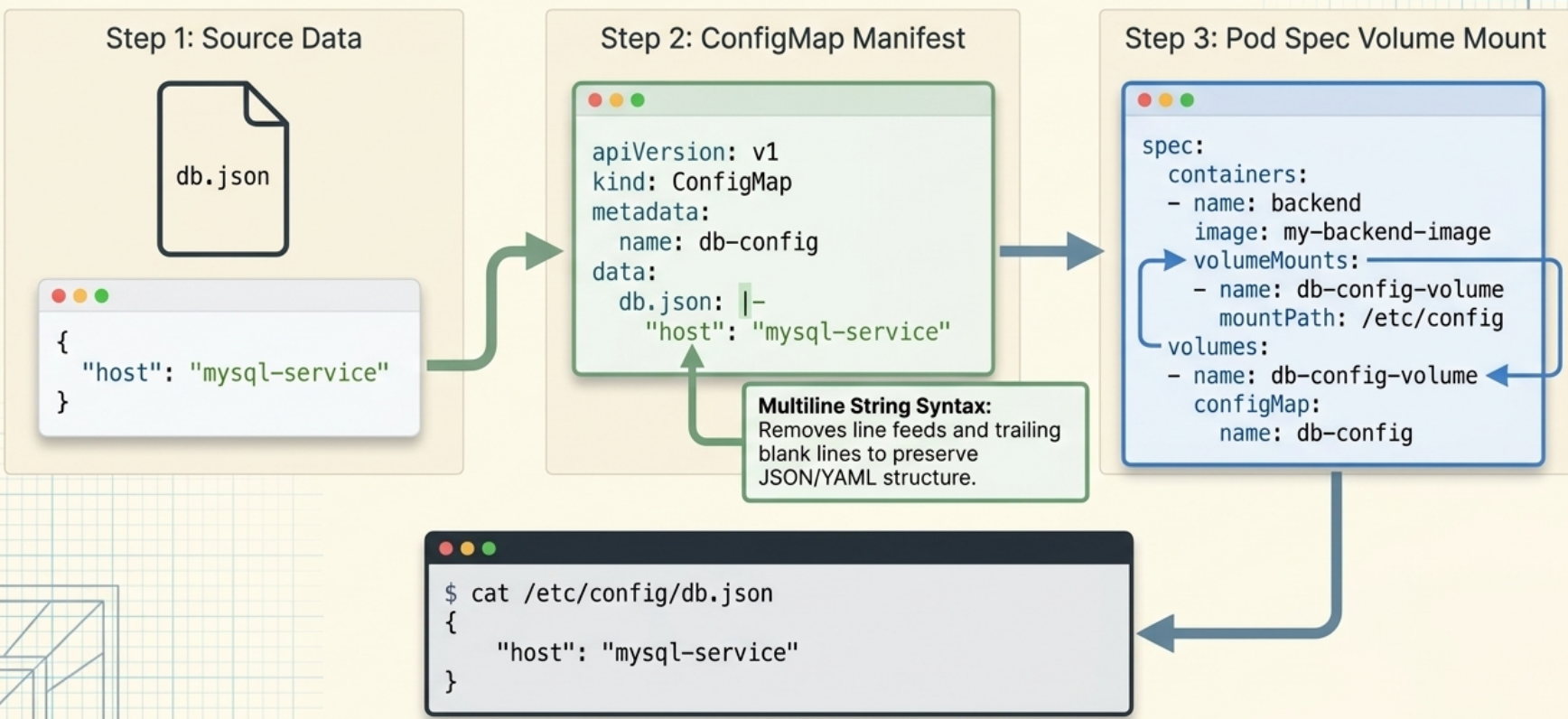
Each key becomes a separate file inside the mounted directory:
spec: volumes: - name: config-vol configMap: name: app-config containers: - name: app image: nginx volumeMounts: - name: config-vol mountPath: /etc/app-configResult: /etc/app-config/db_host, /etc/app-config/db_port, /etc/app-config/nginx.conf
For advanced volume mechanics – atomic symlink updates, selective key projection,
subPathcaveats, andoptionalflag – see Volumes & Storage → ConfigMap Volumes.
Injection Method Comparison
Section titled “Injection Method Comparison”| Method | Updates propagate? | Best for |
|---|---|---|
configMapKeyRef | ❌ No (static at startup) | Specific key → named env var, custom var name |
envFrom | ❌ No (static at startup) | Bulk-inject all keys, prefix namespacing |
| Volume mount | ✅ Yes (1–2 min) | Config files, hot-reload, multi-file configs |
Error Handling and Startup Blocking
Section titled “Error Handling and Startup Blocking”By default, a missing ConfigMap or key blocks the container from starting (the pod still schedules and other containers may start). Add optional: true to allow the container to start with the variable simply unset.
Immutable ConfigMaps
Section titled “Immutable ConfigMaps”Updating a ConfigMap while pods are running risks a split-brain: pods that restarted after the change pick up the new config, while older replicas still run the old one. To prevent this, lock the ConfigMap:
apiVersion: v1kind: ConfigMapmetadata: name: app-config-v1data: db_host: "postgres.prod.svc"immutable: true # API server rejects any further data changesOnce immutable is set, you cannot change the data – only delete the object. To roll out a new config:
- Create a new ConfigMap with a version suffix (
app-config-v2) - Update the pod template’s
configMapReforconfigMapKeyRefto point to the new name - Rolling restart picks up the new config cleanly
Secrets
Section titled “Secrets”Secrets store sensitive data using the same key-value structure as ConfigMaps but are handled differently: distributed only to nodes that need them, and stored in memory via tmpfs so they never touch disk.
Secrets vs ConfigMaps: Field Comparison
Section titled “Secrets vs ConfigMaps: Field Comparison”| Secret field | ConfigMap equivalent | Description |
|---|---|---|
data | binaryData | Base64-encoded values |
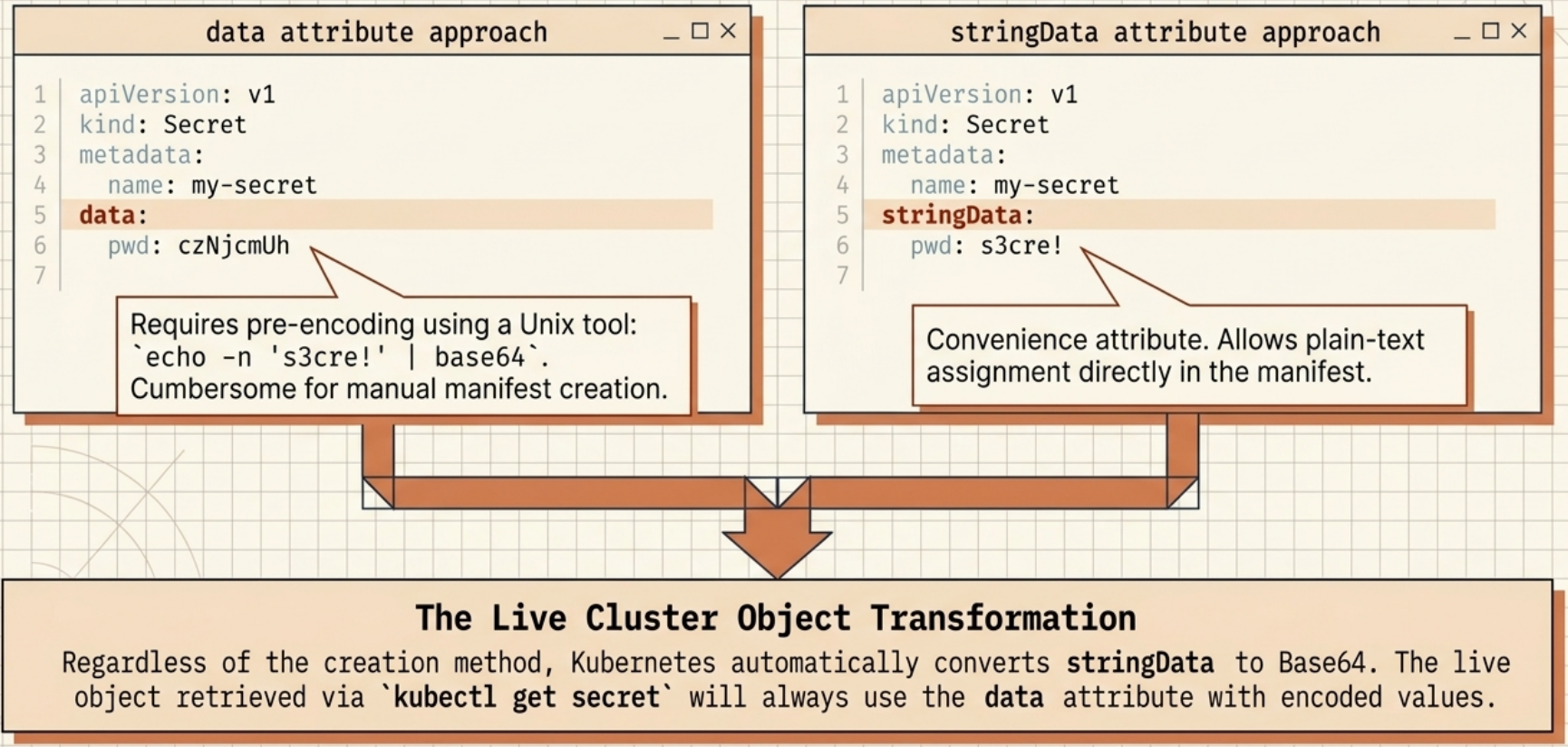
stringData | data | Plain-text values – write-only (converted to data on apply) |
immutable | immutable | Locks the object from further data changes |
type | (no equivalent) | Declares the Secret category for validation |
Why Secrets Aren’t Truly Secure (Out of the Box)
Section titled “Why Secrets Aren’t Truly Secure (Out of the Box)”Built-in Secret Types
Section titled “Built-in Secret Types”| Type | Required keys | Use case |
|---|---|---|
Opaque | Any | Default – arbitrary user credentials |
kubernetes.io/tls | tls.crt, tls.key | TLS certificates for Ingress and services |
kubernetes.io/dockerconfigjson | .dockerconfigjson | Private container registry pull credentials |
kubernetes.io/dockercfg | .dockercfg | Legacy Docker registry format |
kubernetes.io/basic-auth | username, password | HTTP Basic authentication |
kubernetes.io/ssh-auth | ssh-privatekey | SSH private key |
kubernetes.io/service-account-token | token, ca.crt, namespace | ServiceAccount tokens |
bootstrap.kubernetes.io/token | token-id, token-secret | Node bootstrapping |
Kubernetes validates that a Secret’s keys match the requirements for the declared type.
Creating Secrets
Section titled “Creating Secrets”Imperative – generic (Opaque):
kubectl create secret generic db-creds \ --from-literal=username=admin \ --from-literal=password=S3cur3P@ss!Imperative – TLS:
kubectl create secret tls app-tls \ --cert=server.crt \ --key=server.keyImperative – Docker registry pull secret:
kubectl create secret docker-registry registry-creds \  --docker-server=registry.example.com \  --docker-username=deployer \  --docker-password=token123 \  --docker-email=ci@example.com
# Or import directly from local Docker configkubectl create secret docker-registry registry-creds \  --from-file=$HOME/.docker/config.json
Use a pull secret in a pod via spec.imagePullSecrets:
spec: imagePullSecrets: - name: registry-creds containers: - name: app image: registry.example.com/my-private-app:1.0Declarative – data block (pre-encoded Base64 values):
Encode the value first, then paste the output into the manifest:
# Encode a valueecho -n 'S3cur3P@ss!' | base64# S3N1cjNQQHNzIQ==
# Decode to verifyecho -n 'S3N1cjNQQHNzIQ==' | base64 --decode# S3cur3P@ss!apiVersion: v1kind: Secretmetadata: name: db-credstype: Opaquedata: password: S3N1cjNQQHNzIQ== # Base64-encoded – must be pre-encoded manuallyDeclarative – stringData (plain text, auto-encoded on apply):
apiVersion: v1kind: Secretmetadata: name: db-credstype: OpaquestringData: username: admin # Kubernetes base64-encodes this on apply password: S3cur3P@ss!Dry-run trick – generate a Secret manifest without manual Base64 encoding:
kubectl create secret generic db-creds \ --from-literal=username=admin \ --from-literal=password=S3cur3P@ss! \ --dry-run=client -o yaml > db-creds.yamlInjecting Secrets into Containers
Section titled “Injecting Secrets into Containers”Single key (secretKeyRef)
Section titled “Single key (secretKeyRef)”spec: containers: - name: app image: my-app:1.0 env: - name: DB_PASSWORD valueFrom: secretKeyRef: name: db-creds key: password optional: trueEntire Secret (envFrom)
Section titled “Entire Secret (envFrom)”spec: containers: - name: app image: my-app:1.0 envFrom: - secretRef: name: db-creds⚠️ Security risks of injecting Secrets via environment variables
Section titled “⚠️ Security risks of injecting Secrets via environment variables”Avoid injecting Secrets into env vars in production:
| Risk | Explanation |
|---|---|
| Log exposure | Many runtimes dump env vars to stdout on startup or crash – credentials land in your logging pipeline |
| Child process inheritance | Every child process spawned by the container inherits all env vars – third-party scripts get your secrets |
| Recommended alternative | Mount Secrets as volume files instead |
Volume Mount (Recommended)
Section titled “Volume Mount (Recommended)”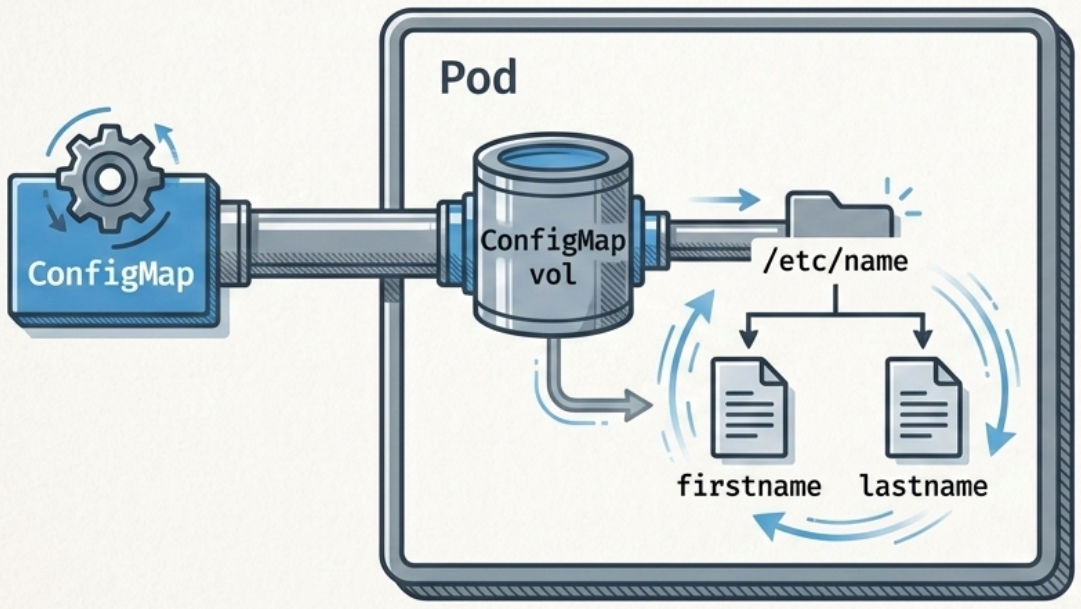
spec: volumes: - name: secret-vol secret: secretName: db-creds containers: - name: app image: my-app:1.0 volumeMounts: - name: secret-vol mountPath: /etc/db-creds readOnly: true # always read-only for Secretskubectl exec api-pod -- cat /etc/db-creds/password# S3cur3P@ss! (decoded from Base64 at mount time)For advanced Secret volume mechanics –
tmpfsstorage, file permissions,defaultMode,fsGroupfor non-root processes – see Volumes & Storage → Secret Volumes.
Secret Lifecycle
Section titled “Secret Lifecycle”Create Secret → Stored in etcd → Pod scheduled → kubelet transfers Secret(plain text) (unencrypted to a node to node over the network by default)
→ container runtime mounts Secret via tmpfs → App reads plain text (Base64 decoded at mount time; from /etc/<mount-path> never written to disk)
→ Pod deleted → kubelet wipes tmpfs replica from node memorySecrets Limitations
Section titled “Secrets Limitations”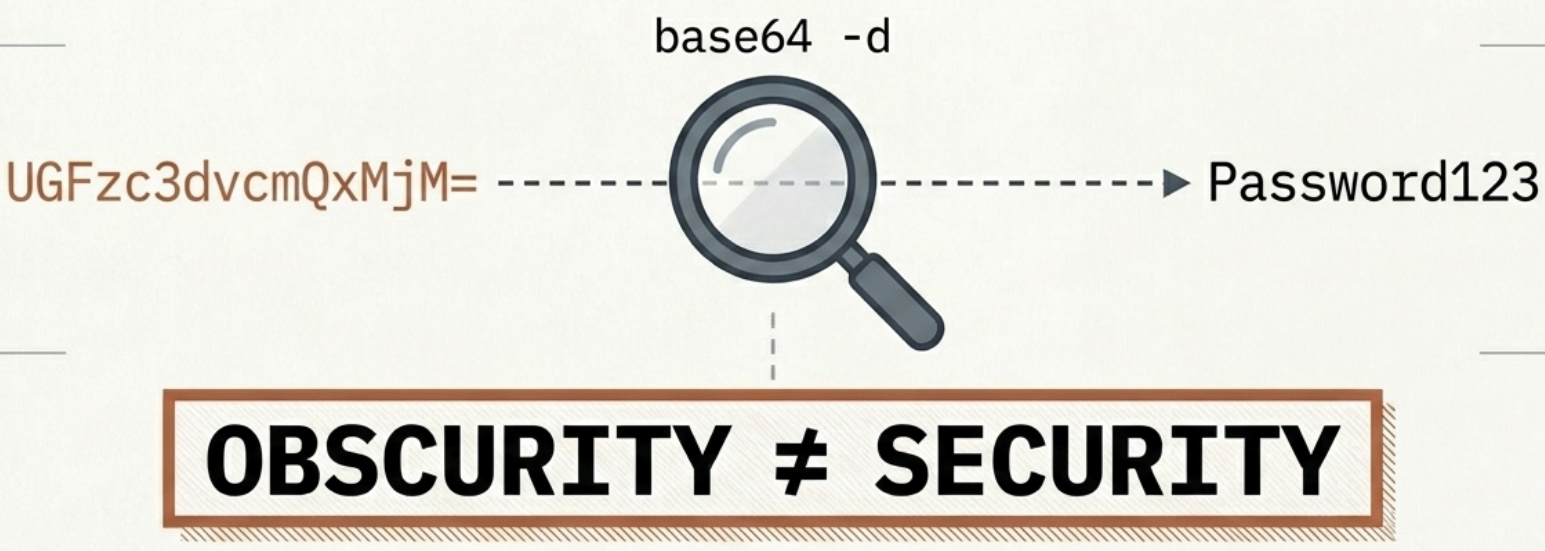
| Limitation | Detail |
|---|---|
| Base64 ≠ encryption | Anyone with API access can decode instantly |
| Unencrypted etcd | Requires explicit EncryptionConfiguration to fix |
| RBAC over-permission | A single misconfigured role grants cross-namespace Secret reads |
| No auto-rotation | Volume-mounted files update, but the app must re-read them; env vars never update |
| No audit by default | Standard Kubernetes logs don’t track Secret reads |
Building a Secure Secrets Architecture
Section titled “Building a Secure Secrets Architecture”| Layer | Mechanism | What it protects |
|---|---|---|
| Encryption at rest | EncryptionConfiguration + KMS provider | Secrets stored encrypted in etcd |
| Encryption in transit | Service mesh (mutual TLS) | Node-to-node and control-plane traffic |
| Access control | Least-privilege RBAC | Limits who can read/modify Secret objects |
| Node isolation | Avoid privileged containers; secure etcd nodes | Prevents host-path access to cached data |
| External vault | HashiCorp Vault / cloud KMS + Secrets Store CSI Driver | Secrets stored outside Kubernetes; injected at runtime |
| Sealed Secrets | Bitnami Sealed Secrets – asymmetric encryption | Encrypted manifests safe to commit to git; only in-cluster controller can decrypt |
| External Secrets Operator | ESO – syncs from HashiCorp Vault, AWS SM, GCP SM, etc. | Centralised external secret management; avoids storing secrets in etcd |
Downward API
Section titled “Downward API”ConfigMaps and Secrets handle configuration you define before deployment. The Downward API solves a different problem: injecting metadata that is only known after the pod is scheduled – such as the pod’s own IP, the node it ran on, or its resource limits.
The Downward API is not a REST endpoint your application calls. The kubelet reads the pod’s live metadata and projects it directly into the container as environment variables or files.
To project Downward API data as files (required for labels/annotations, or file-reading sidecars), see Volumes & Storage → Downward API Volumes.
fieldRef vs resourceFieldRef
Section titled “fieldRef vs resourceFieldRef”| Reference type | What it exposes |
|---|---|
fieldRef | Pod-level metadata: name, namespace, IP, node name, labels, annotations |
resourceFieldRef | Container-level compute resources: CPU/memory requests and limits |
Supported Fields
Section titled “Supported Fields”| Field path | Inject as env? | Inject as file? | Description |
|---|---|---|---|
metadata.name | ✅ | ✅ | Pod name |
metadata.namespace | ✅ | ✅ | Namespace |
metadata.uid | ✅ | ✅ | Pod UID |
metadata.labels['<key>'] | ✅ | ✅ | Value of a single label |
metadata.labels | ❌ | ✅ | All labels as key="value" lines |
metadata.annotations['<key>'] | ✅ | ✅ | Value of a single annotation |
metadata.annotations | ❌ | ✅ | All annotations as key="value" lines |
spec.nodeName | ✅ | ❌ | Worker node name |
spec.serviceAccountName | ✅ | ❌ | ServiceAccount name |
status.podIP / status.podIPs | ✅ | ❌ | Pod IP address(es) |
status.hostIP / status.hostIPs | ✅ | ❌ | Node IP address(es) |
Injecting Pod Metadata as Environment Variables
Section titled “Injecting Pod Metadata as Environment Variables”spec: containers: - name: app image: my-app:1.0 env: - name: POD_NAME valueFrom: fieldRef: fieldPath: metadata.name # resolves to the pod's name - name: POD_NAMESPACE valueFrom: fieldRef: fieldPath: metadata.namespace - name: POD_IP valueFrom: fieldRef: fieldPath: status.podIP - name: NODE_NAME valueFrom: fieldRef: fieldPath: spec.nodeName# Verify resolved values at runtimekubectl exec <pod-name> -- env | grep -E 'POD_|NODE_'Injecting Container Resource Limits
Section titled “Injecting Container Resource Limits”Some runtimes (JVM, Node.js) need to know their allocated CPU and memory to tune thread pools and garbage collection. Use resourceFieldRef:
env: - name: MEM_LIMIT_MIB valueFrom: resourceFieldRef: resource: limits.memory divisor: 1Mi # divide raw bytes by 1Mi → reports value in MiB - name: CPU_LIMIT_MILLICORES valueFrom: resourceFieldRef: resource: limits.cpu divisor: 1m # reports CPU in millicoresDivisor reference:
| Unit | Divisor | Reports |
|---|---|---|
| Bytes (default) | 1 | Raw byte count |
| Kibibytes | 1Ki | Value ÷ 1,024 |
| Mebibytes | 1Mi | Value ÷ 1,048,576 |
| Millicores (CPU) | 1m | CPU in millicores (e.g., 500m → 500) |
Cross-container reference – one container reading another’s limits:
env: - name: SIDECAR_MEM_LIMIT valueFrom: resourceFieldRef: containerName: envoy-sidecar # reference a different container's resources resource: limits.memory divisor: 1MiTroubleshooting
Section titled “Troubleshooting”| Symptom | Likely cause | Diagnostic | Fix |
|---|---|---|---|
Pod stuck Pending with configmap not found | ConfigMap doesn’t exist in the namespace | kubectl get configmap -n <ns> | Create the ConfigMap before the pod |
| Container blocked from starting | Required ConfigMap/key missing; optional: true not set | kubectl describe pod → Events | Add optional: true or create the missing resource |
| Env var is empty or wrong value | Wrong key name in configMapKeyRef | kubectl exec -- env | Verify key matches the ConfigMap |
| Config change not reflected in running container | Using env vars (static injection) | Check injection method | Switch to volume mount, or rolling restart |
| Trailing whitespace causes escaped output in ConfigMap | File had trailing spaces | kubectl get cm -o yaml – look for \n in values | Strip trailing whitespace from source files |
$(VAR_NAME) appears as a literal string | Referencing a var defined after it in the manifest | Check env block order | Move the referenced var above the referencing var |
| Secret value is garbled | data field not properly Base64-encoded | Decode: echo "<val>" | base64 -d | Use stringData and let Kubernetes encode |
| Downward API env var shows wrong value | Field path typo or unsupported field | kubectl describe pod | Check supported fields table above |
| Secret not updating in env var after CM change | Env vars are static – only volumes update | kubectl exec -- env | Rolling restart: kubectl rollout restart deployment/<name> |