
Scheduling
The kube-scheduler watches for newly created Pods that have no node assigned and selects the best-fit node for each one. Understanding how it makes that decision – and how to constrain or influence it – is central to running reliable production workloads.
How the Scheduler Works
Section titled “How the Scheduler Works”The scheduler runs a continuous loop and evaluates every unscheduled Pod using a strict two-step process:
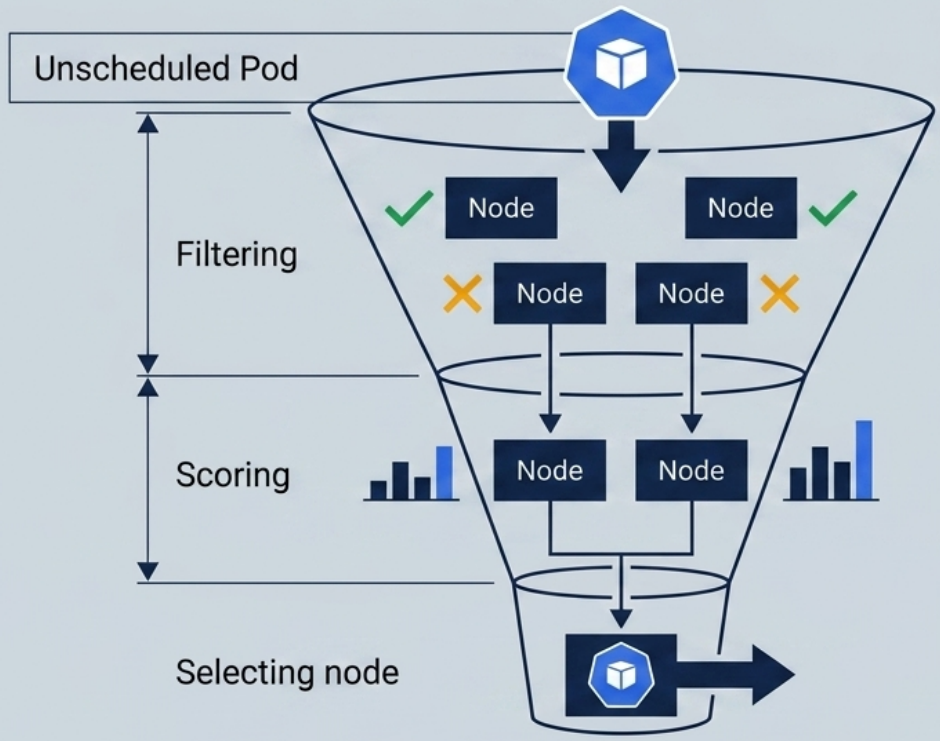
Step 1 – Filter (Feasibility)
Section titled “Step 1 – Filter (Feasibility)”Eliminates nodes that cannot run the Pod. Checks include:
- Node has enough unallocated CPU and memory (requests)
- Node satisfies
nodeSelectorlabels - Node satisfies required affinity rules
- Node does not carry an unmatched taint (with
NoScheduleeffect) - Node passes other hard constraints (volume topology, port conflicts, etc.)
Step 2 – Score (Ranking)
Section titled “Step 2 – Score (Ranking)”Ranks the surviving candidate nodes. Common scoring factors:
- Spreading pods across nodes/zones
- Preferring nodes with more remaining resources
- Soft affinity preferences
The node with the highest score wins. The scheduler writes the chosen node name into the Pod’s spec.nodeName and the kubelet on that node picks up the pod.
If no node survives the filter step, the pod stays Pending until the loop re-evaluates.
Inspecting Node Assignment
Section titled “Inspecting Node Assignment”Three ways to find which node a Pod was placed on:
# 1. Wide output – adds NODE and IP columnskubectl get pod nginx -o wide
# 2. Filter YAML – prints the specific fieldkubectl get pod nginx -o yaml | grep nodeName
# 3. Describe – top section shows "Node: <name>/<ip>"kubectl describe pod nginx
nodeName – Bypass the Scheduler
Section titled “nodeName – Bypass the Scheduler”Setting spec.nodeName directly in a manifest skips filtering and scoring entirely – the pod is assigned to that node unconditionally:
spec: nodeName: worker-node-02 # bypasses scheduler – use only for debugging containers: - name: app image: nginx:1.27.1Node Selectors
Section titled “Node Selectors”A nodeSelector is a hard requirement – the pod can only be scheduled on nodes that have all specified labels. No match → pod stays Pending.
# Label a node firstkubectl label node worker-node-03 disk=ssd
# Verifykubectl get nodes --show-labels | grep disk=ssd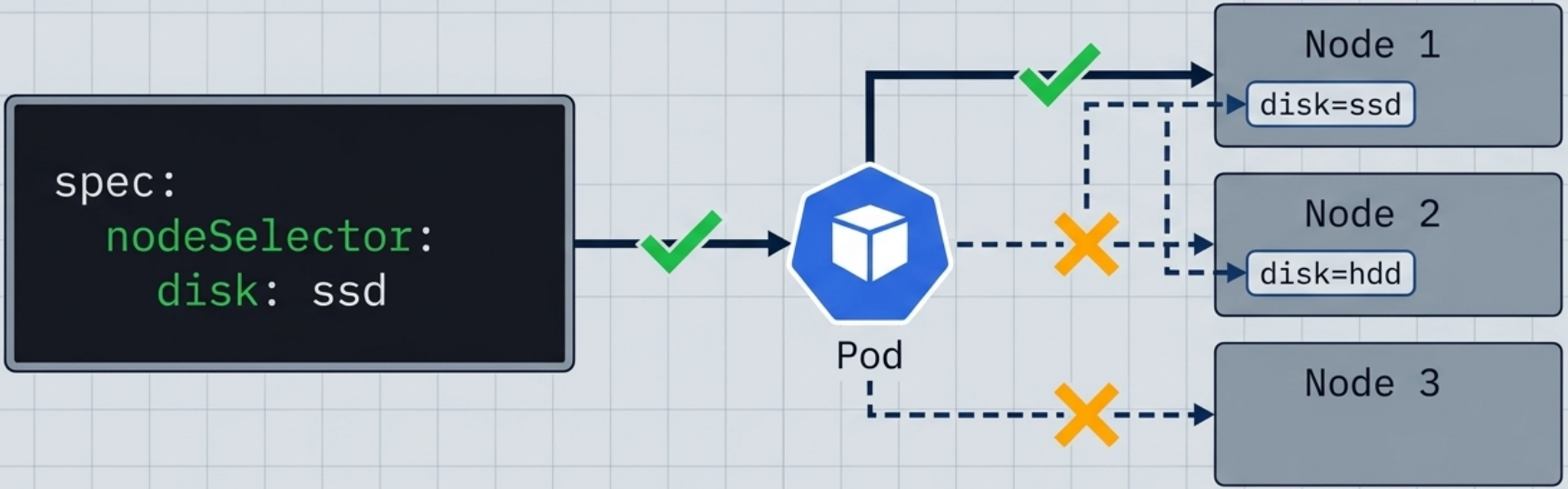
spec: nodeSelector: disk: ssd # must match node label exactly (key=value) kubernetes.io/os: linux # can combine multiple labels – all must match containers: - name: app image: nginx:1.27.1| Characteristic | Detail |
|---|---|
| Semantics | Logical AND – all labels must be present on the node |
| Flexibility | Exact key=value match only – no operators or ranges |
| On no match | Pod stays Pending |
| Mutable | Changing node labels in/out of scope triggers pod creation/deletion |
Well-Known Node Labels
Section titled “Well-Known Node Labels”Kubernetes and cloud providers automatically apply a set of standard labels to every node – you can use these in nodeSelector or affinity rules without manually labelling nodes first:
| Label | Applied by | Common use case |
|---|---|---|
kubernetes.io/hostname | Kubernetes | Per-node topology key for spreading |
kubernetes.io/os | Kubernetes | Windows/Linux targeting (linux, windows) |
kubernetes.io/arch | Kubernetes | CPU architecture (amd64, arm64) |
topology.kubernetes.io/zone | Cloud providers | Zone-level HA and spreading |
topology.kubernetes.io/region | Cloud providers | Region-level targeting |
node.kubernetes.io/instance-type | Cloud providers | GPU, spot, or specific instance targeting |
# Inspect all labels on a nodekubectl get node <name> --show-labelsNode Affinity and Anti-Affinity
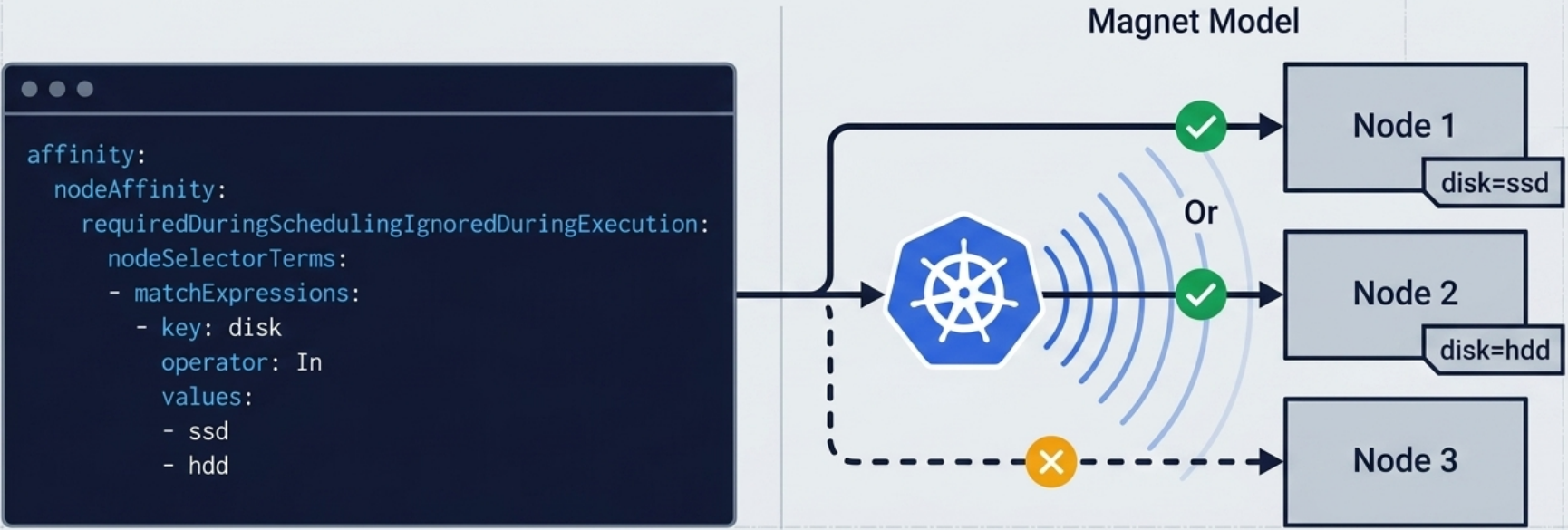
Section titled “Node Affinity and Anti-Affinity”Node affinity extends nodeSelector with operators and soft preferences. It lives under spec.affinity.nodeAffinity.
Affinity Types
Section titled “Affinity Types”| Type | Short name | Effect |
|---|---|---|
requiredDuringSchedulingIgnoredDuringExecution | required | Hard rule – pod is not scheduled if no node matches |
preferredDuringSchedulingIgnoredDuringExecution | preferred | Soft rule – scheduler tries its best but won’t block scheduling |
IgnoredDuringExecution on both types means: already-running pods are never evicted if node labels change after scheduling.
Operators
Section titled “Operators”| Operator | Meaning |
|---|---|
In | Node label value is in the specified set |
NotIn | Node label value is not in the specified set |
Exists | Node has the label key (any value, or no value needed) |
DoesNotExist | Node does not have the label key |
Gt | Node label value is numerically greater than the specified value |
Lt | Node label value is numerically less than the specified value |
Hard Requirement (required)
Section titled “Hard Requirement (required)”spec: affinity: nodeAffinity: requiredDuringSchedulingIgnoredDuringExecution: nodeSelectorTerms: - matchExpressions: - key: disk operator: In values: - ssd - nvme # pod can run on any node with disk=ssd OR disk=nvme containers: - name: app image: nginx:1.27.1Soft Preference (preferred)
Section titled “Soft Preference (preferred)”spec: affinity: nodeAffinity: preferredDuringSchedulingIgnoredDuringExecution: - weight: 80 # higher weight = stronger preference (1–100) preference: matchExpressions: - key: disk operator: In values: - ssd - weight: 20 preference: matchExpressions: - key: zone operator: In values: - us-east-1aNode Anti-Affinity
Section titled “Node Anti-Affinity”Achieved with negating operators (NotIn, DoesNotExist):
spec: affinity: nodeAffinity: requiredDuringSchedulingIgnoredDuringExecution: nodeSelectorTerms: - matchExpressions: - key: disk operator: NotIn values: - spinning-disk # repel from nodes with spinning-disk labelPod Affinity and Anti-Affinity
Section titled “Pod Affinity and Anti-Affinity”Where node affinity targets specific nodes by their labels, pod affinity targets other pods – it tells the scheduler to place a pod near (or away from) pods with a given label. The topologyKey defines what “near” means.
podAffinity→ “schedule me on a node that also runs pods matching label X”podAntiAffinity→ “schedule me on a node that does not run pods matching label X”
Both support the same required/preferred types as node affinity.
Pod Affinity – Co-locate pods (e.g. app + cache)
Section titled “Pod Affinity – Co-locate pods (e.g. app + cache)”spec: affinity: podAffinity: requiredDuringSchedulingIgnoredDuringExecution: - labelSelector: matchLabels: app: cache # must co-locate with pods labelled app=cache topologyKey: kubernetes.io/hostname # "same node" = same hostname valuePod Anti-Affinity – Spread replicas across nodes
Section titled “Pod Anti-Affinity – Spread replicas across nodes”spec: affinity: podAntiAffinity: requiredDuringSchedulingIgnoredDuringExecution: - labelSelector: matchLabels: app: web # avoid nodes that already run an app=web pod topologyKey: kubernetes.io/hostname # enforce one replica per nodeSwap topologyKey to topology.kubernetes.io/zone to spread across zones instead of nodes.
Soft Anti-Affinity (preferred)
Section titled “Soft Anti-Affinity (preferred)”spec: affinity: podAntiAffinity: preferredDuringSchedulingIgnoredDuringExecution: - weight: 100 podAffinityTerm: labelSelector: matchLabels: app: web topologyKey: kubernetes.io/hostnameTaints and Tolerations
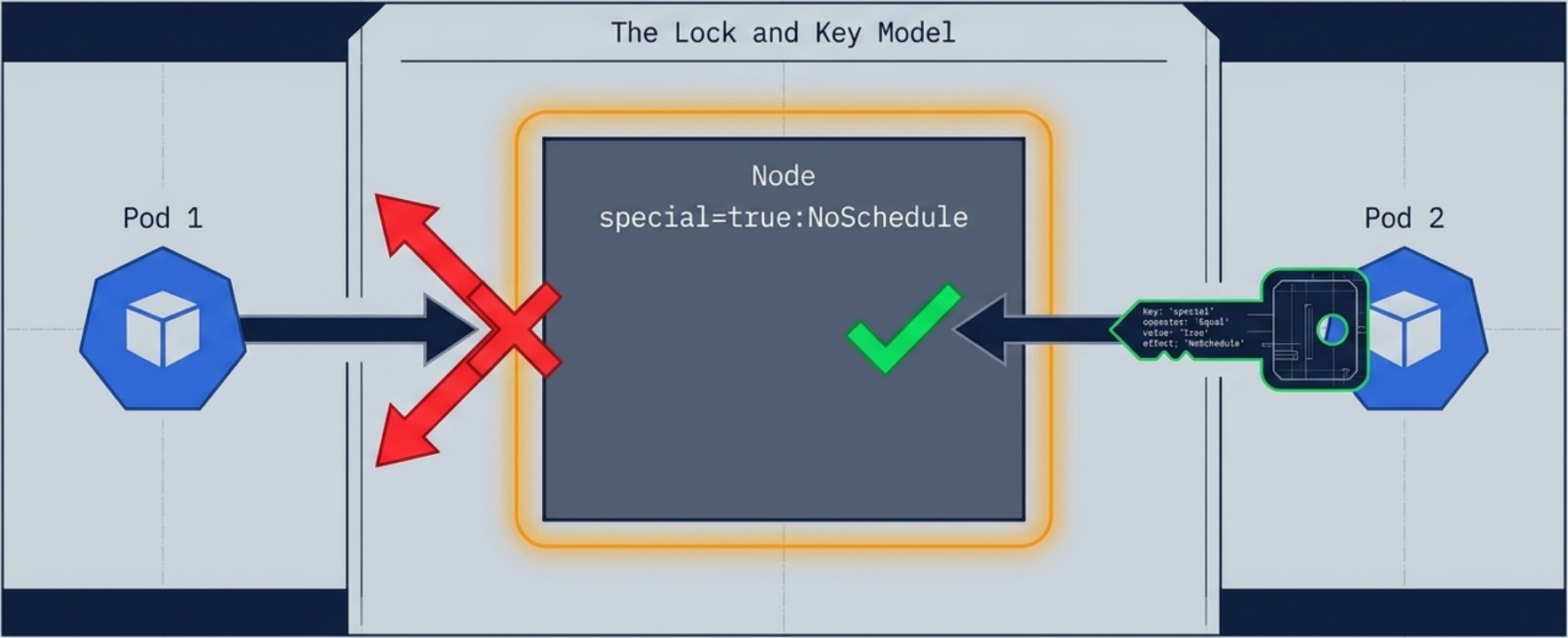
Section titled “Taints and Tolerations”Affinity pulls pods toward nodes. Taints repel pods from nodes. A pod can only be scheduled on a tainted node if it carries a matching toleration.
A taint consists of three parts – key, value, and effect – formatted as key=value:effect. The key and value are a freeform pair (similar to a label assignment) that identify what kind of taint this is. The effect tells the scheduler how to enforce it.
Primary use case: Protect dedicated nodes (GPU nodes, control plane nodes, spot-instance pools) from general workloads.
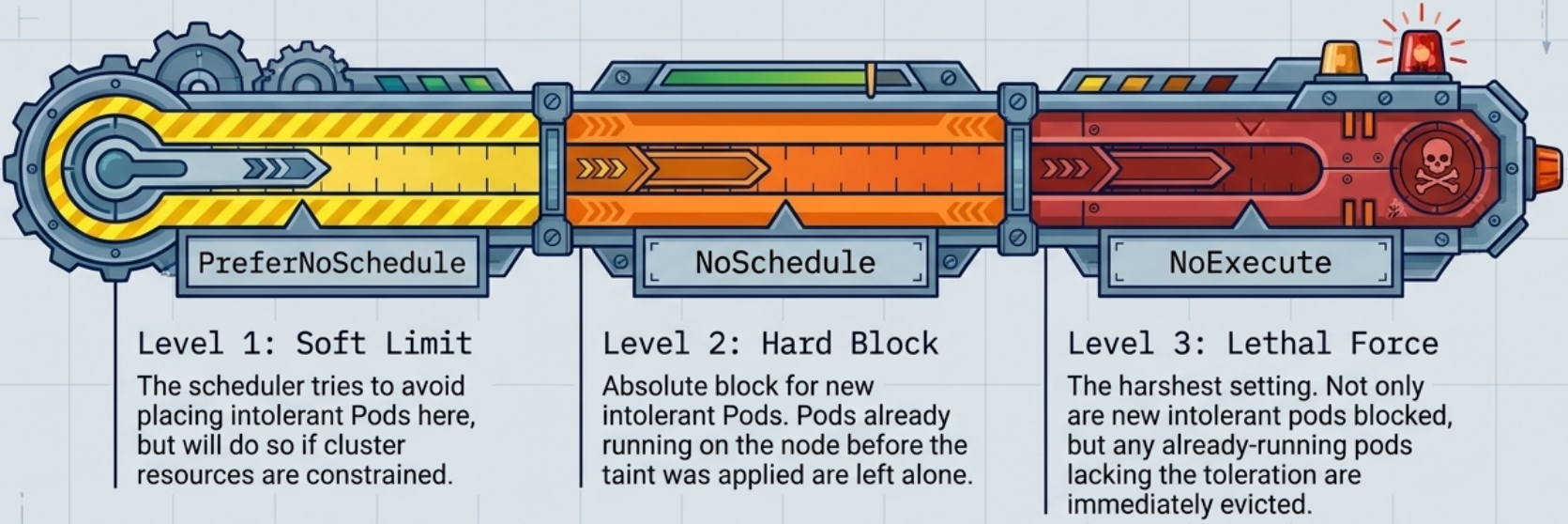
Taint Effects
Section titled “Taint Effects”| Effect | Scheduling | Running pods |
|---|---|---|
NoSchedule | Blocks new pods without a matching toleration | Already-running pods continue unaffected |
PreferNoSchedule | Scheduler avoids the node; will use it as last resort | Already-running pods continue unaffected |
NoExecute | Blocks new pods and evicts already-running pods that don’t tolerate it | Pods are evicted immediately (or after tolerationSeconds) |
# Apply a taint – format: key=value:effectkubectl taint node worker-node-02 special=true:NoSchedule
# Inspect taints on a nodekubectl get node worker-node-02 -o yaml | grep -A 5 taints:
# Remove a taint (append - to the taint string)kubectl taint node worker-node-02 special=true:NoSchedule-
Adding a Toleration to a Pod
Section titled “Adding a Toleration to a Pod”spec: tolerations: # Equal operator – key, value, and effect must all match the taint - key: "special" operator: "Equal" value: "true" effect: "NoSchedule"
# Exists operator – matches any taint with this key regardless of value # - key: "special" # operator: "Exists" # effect: "NoSchedule"
# Wildcard – tolerates ALL taints on the node (use for infrastructure daemons) # - operator: "Exists" containers: - name: app image: nginx:1.27.1Matching Rules
Section titled “Matching Rules”A toleration matches a taint when key + effect are identical (and value matches if operator: Equal).
| Toleration operator | value field required? | Matches |
|---|---|---|
Equal | Yes | Taint with same key, value, and effect |
Exists | No | Any taint with the same key (if effect specified) or any taint at all (if effect omitted) |
tolerationSeconds – Delayed Eviction under NoExecute
Section titled “tolerationSeconds – Delayed Eviction under NoExecute”With NoExecute, you can specify how long a pod should remain on the node after the taint appears before being evicted. This is critical for handling transient node conditions gracefully:
tolerations: - key: "node.kubernetes.io/not-ready" operator: "Exists" effect: "NoExecute" tolerationSeconds: 300 # stay running for 5 minutes; evict if node is still not-readyWithout tolerationSeconds, a NoExecute toleration lets the pod stay indefinitely.
Built-in System Taints
Section titled “Built-in System Taints”Kubernetes automatically applies taints in response to node conditions. Knowing these is essential for designing pods that survive node failures:
| Taint | When applied |
|---|---|
node.kubernetes.io/not-ready:NoExecute | Node fails its readiness check |
node.kubernetes.io/unreachable:NoExecute | API server cannot reach the node |
node.kubernetes.io/memory-pressure:NoSchedule | kubelet reports low memory |
node.kubernetes.io/disk-pressure:NoSchedule | kubelet reports low disk |
node.kubernetes.io/pid-pressure:NoSchedule | kubelet reports PID pressure |
node.kubernetes.io/unschedulable:NoSchedule | Node is cordoned (kubectl cordon) |
node-role.kubernetes.io/control-plane:NoSchedule | Default on all control plane nodes |
Pod Topology Spread Constraints
Section titled “Pod Topology Spread Constraints”Controls how pods are distributed across topology domains (zones, nodes, racks) for resilience and availability. Unlike affinity, which attracts pods to specific nodes, topology spread constraints enforce even distribution.
spec: topologySpreadConstraints: - maxSkew: 1 # max pod count difference between any two zones topologyKey: topology.kubernetes.io/zone # domain: standard zone node label whenUnsatisfiable: DoNotSchedule # hard: keep pod Pending if constraint can't be met labelSelector: matchLabels: app: web # count only pods with this label containers: - name: app image: nginx:1.27.1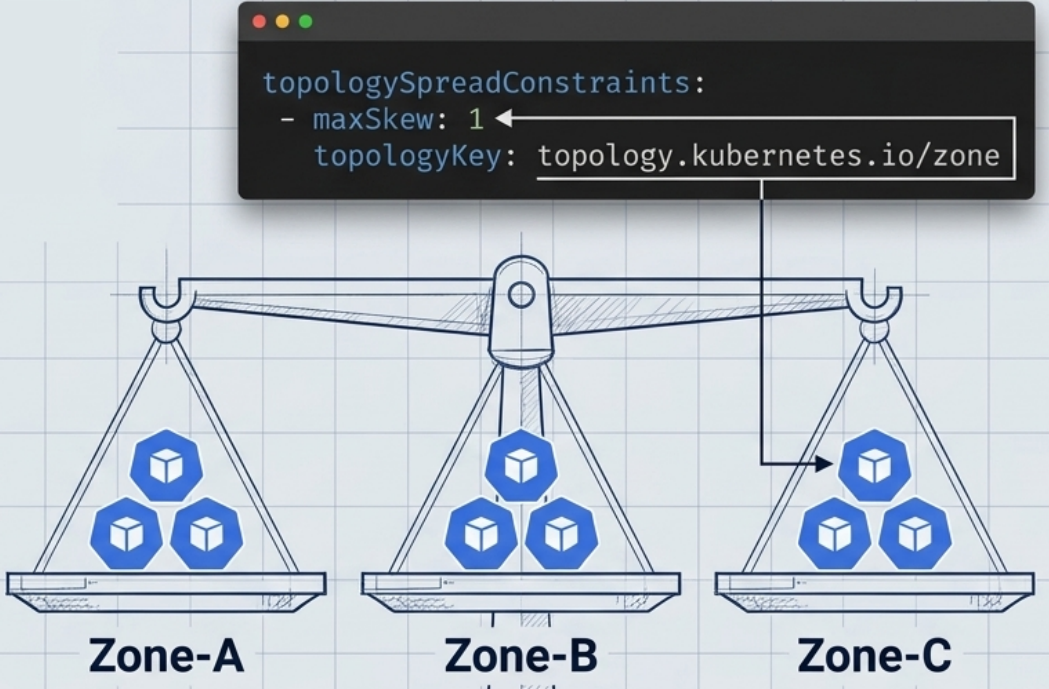
Fields
Section titled “Fields”| Field | Purpose |
|---|---|
maxSkew | Maximum allowed difference in pod count between the most and least loaded topology domain |
topologyKey | Node label key that defines the domain boundaries (e.g. topology.kubernetes.io/zone → zone-level spreading, kubernetes.io/hostname → node-level spreading) |
whenUnsatisfiable | DoNotSchedule (hard – pod stays Pending) or ScheduleAnyway (soft – schedule but try to minimize skew) |
labelSelector | Identifies which pods to count when evaluating skew |
Practical Example: 6 Replicas Across 3 Zones
Section titled “Practical Example: 6 Replicas Across 3 Zones”apiVersion: apps/v1kind: Deploymentmetadata: name: webspec: replicas: 6 selector: matchLabels: app: web template: metadata: labels: app: web spec: topologySpreadConstraints: # Spread evenly across zones (max 1 pod difference per zone) - maxSkew: 1 topologyKey: topology.kubernetes.io/zone whenUnsatisfiable: DoNotSchedule labelSelector: matchLabels: app: web # Also spread across individual nodes within each zone - maxSkew: 1 topologyKey: kubernetes.io/hostname whenUnsatisfiable: ScheduleAnyway # soft – don't block if a node is full labelSelector: matchLabels: app: web containers: - name: app image: nginx:1.27.1Priority and Preemption
Section titled “Priority and Preemption”Kubernetes uses PriorityClasses to determine scheduling order when the cluster is under resource pressure. Higher-priority pods schedule first and can preempt (evict) lower-priority pods to make room.
PriorityClass Resource
Section titled “PriorityClass Resource”apiVersion: scheduling.k8s.io/v1kind: PriorityClassmetadata: name: high-priorityvalue: 1000000 # higher value = higher priority (default pods have value 0)globalDefault: false # if true, applied to all pods without a priorityClassNamedescription: "For critical production services"kubectl get priorityclasses# NAME VALUE GLOBAL-DEFAULT# high-priority 1000000 false# system-cluster-critical 2000000000 false# system-node-critical 2000001000 falseUsing a PriorityClass in a Pod
Section titled “Using a PriorityClass in a Pod”spec: priorityClassName: high-priority containers: - name: app image: nginx:1.27.1Preemption Behaviour
Section titled “Preemption Behaviour”If a high-priority pod cannot be scheduled due to insufficient resources, the scheduler will:
- Find a node where evicting lower-priority pods would free enough capacity
- Gracefully terminate those lower-priority pods (honouring
terminationGracePeriodSeconds) - Schedule the high-priority pod on the now-available node
Built-in System Priority Classes
Section titled “Built-in System Priority Classes”| Class | Value | Used by |
|---|---|---|
system-node-critical | 2,000,001,000 | Node-essential pods (kube-proxy, CSI drivers) |
system-cluster-critical | 2,000,000,000 | Cluster-essential pods (coredns, CNI plugins) |
Scheduling Mechanisms: Quick Reference
Section titled “Scheduling Mechanisms: Quick Reference”| Mechanism | Direction | Hard or Soft | Primary use case |
|---|---|---|---|
nodeName | Assigns to specific node | Hard | Debugging only – bypasses all scheduler logic |
nodeSelector | Attracts to labeled nodes | Hard | Simple node targeting (exact label match) |
Node Affinity (required) | Attracts to nodes matching expressions | Hard | Complex targeting with operators (In, Gt, etc.) |
Node Affinity (preferred) | Attracts to preferred nodes | Soft | ”Prefer zone A but don’t block” |
| Node Anti-Affinity | Repels from nodes matching expressions | Hard or Soft | Workload isolation, zone spreading |
| Pod Affinity | Co-locates with matching pods | Hard or Soft | Performance – keep app and cache on same node |
| Pod Anti-Affinity | Separates from matching pods | Hard or Soft | HA – spread replicas across nodes/zones |
Taint + NoSchedule | Repels from tainted nodes | Hard | Dedicated nodes (GPU, spot, control plane) |
Taint + PreferNoSchedule | Soft repel from tainted nodes | Soft | Gentle node isolation |
Taint + NoExecute | Repels + evicts | Hard | Node draining, emergency isolation |
| Topology Spread | Distributes evenly across domains | Hard or Soft | High availability across zones/nodes |
| Priority / Preemption | Schedules high-priority pods first | Hard | Critical workloads that must schedule regardless |