
Persistent Volumes
Container filesystems are ephemeral by design - when a container restarts or a pod is rescheduled, everything written to the container’s local disk is gone. For stateful workloads (databases, message queues, shared uploads), you need storage that outlives the pod. Kubernetes solves this through the persistent volume subsystem: a layered abstraction that lets applications claim durable storage from any cloud or on-premises backend without knowing the underlying hardware.
Architecture Overview
Section titled “Architecture Overview”The persistent volume subsystem separates the concerns of storage administration from storage consumption using three distinct layers:
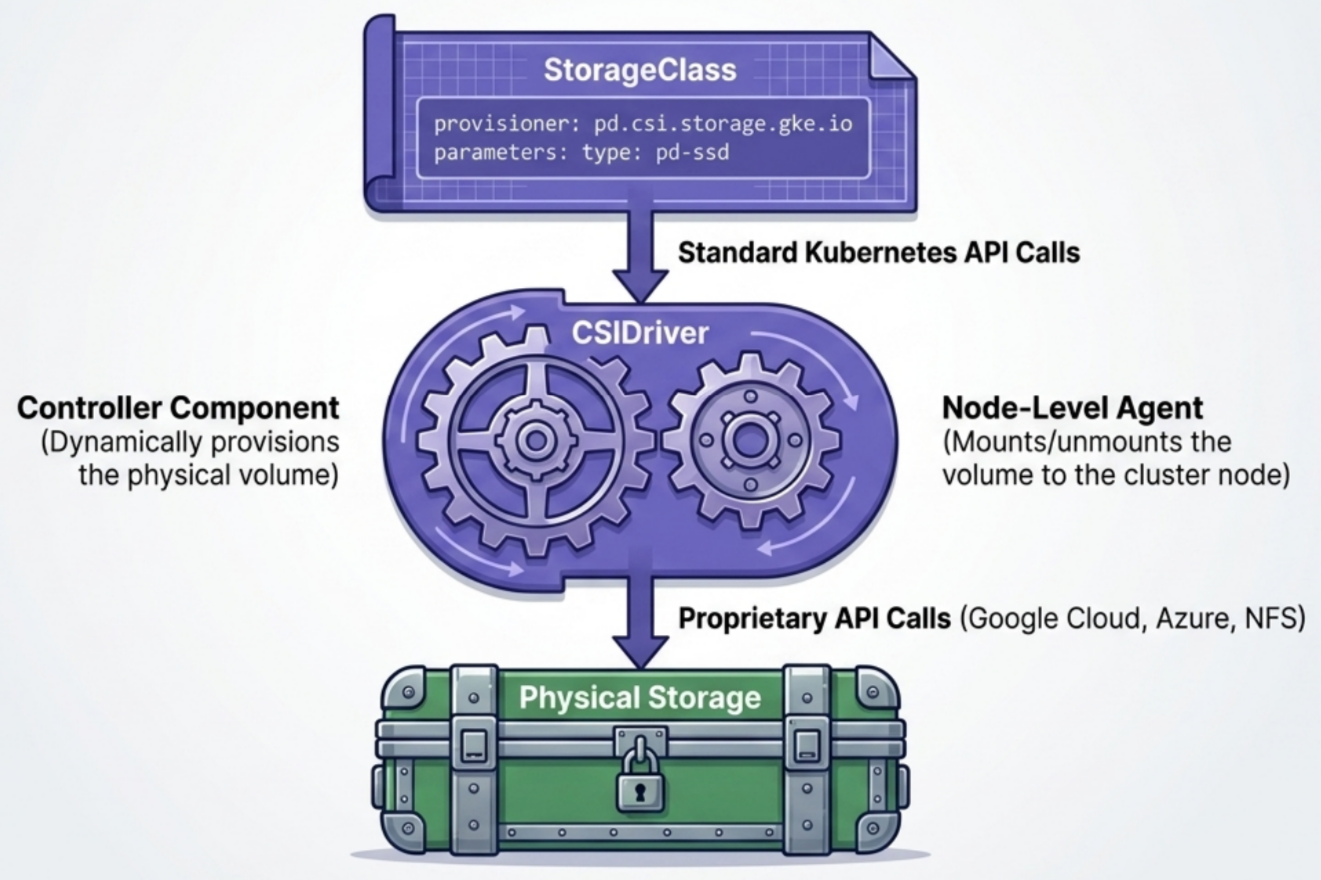
| Layer | Role |
|---|---|
| Storage Providers | Physical or cloud storage backends - own the hardware, provide replication, snapshots, encryption |
| CSI Plugin Layer | Translation bridge between Kubernetes API and vendor-specific storage APIs |
| PV Subsystem | Kubernetes-native API objects (StorageClass, PersistentVolume, PersistentVolumeClaim) that pods use to request and mount storage |
Two key architectural rules:
- 1:1 mapping: A single physical volume maps to exactly one
PersistentVolume. You cannot split a 50 GiB disk into two 25 GiB PVs. - Locality: Storage is geographically bound. Pods must run in the same zone/region as their volume. Cross-zone mounts fail.
The Container Storage Interface (CSI)
Section titled “The Container Storage Interface (CSI)”The Container Storage Interface is an open-source, vendor-neutral spec that defines how container orchestrators talk to storage backends. It replaced the old “in-tree” plugin model where storage code was compiled directly into Kubernetes.
In-Tree vs Out-of-Tree (CSI)
Section titled “In-Tree vs Out-of-Tree (CSI)”| Attribute | Legacy in-tree plugins | Modern CSI drivers |
|---|---|---|
| Code location | Compiled into Kubernetes core | Maintained outside the core repository |
| Licensing | Must be open source | Vendors can keep code proprietary |
| Release cycle | Updates tied to Kubernetes releases | Vendors ship updates independently at any time |
| Maintenance | High burden on core maintainers | Vendors own their own codebases |
How CSI Drivers Deploy
Section titled “How CSI Drivers Deploy”CSI drivers run as regular pods inside the cluster. A typical driver is split into two co-operating components:
flowchart TB
    API(["fa:fa-network-wired <b>Kubernetes API Server</b><br/><small>Cluster Control Plane Entrypoint</small>"])

    subgraph ControlPlane [" <b>Control Plane</b> (Central Management) "]
        direction TB
        Controller["fa:fa-gears <b>CSI Controller Plugin</b><br/>- Dynamic PV Provisioning<br/>- Lifecycle & Volume Deletion<br/>- Central Controller Deployment"]
    end

    subgraph WorkerNodes [" <b>Worker Nodes</b> (Data Plane Execution) "]
        direction TB
        Node["fa:fa-server <b>CSI Node Agent</b><br/>- Attach / Detach Volume<br/>- Format & Mount/Unmount filesystem<br/>- DaemonSet (runs per node)"]
    end

    API ==>|"<b>Watches & Reconciles</b><br/>PV / PVC Claims"| Controller
    API ==>|"<b>Dispatches Instructions</b><br/>VolumeAttachment / Pod Specs"| Node
- Controller - watches the API server for new PVCs and calls the cloud API to provision/delete physical disks
- Node agent - runs on every worker node (e.g., as
pdcsi-node-xyzinkube-system) to attach storage hardware to the node and mount it into containers
Deployment methods:
- Distributed via Helm charts or YAML manifests
- Managed cloud platforms (GKE, EKS, LKE) pre-install their native CSI drivers automatically
- On-premises or third-party backends (NetApp, EMC) require manual driver installation
Driver examples:
| Cloud | CSI driver name |
|---|---|
| AWS EBS | ebs.csi.aws.com |
| GCP Persistent Disk | pd.csi.storage.gke.io |
| GCP Filestore (NFS) | filestore.csi.storage.gke.io |
| Linode Block Storage | linodebs.csi.linode.com |
Non-CSI in-tree backends still in use:
| Type | Use case |
|---|---|
fc (Fibre Channel) | Enterprise SAN storage attached directly to pods - requires specialized FC hardware on nodes |
iscsi | SCSI storage over IP networks - provides raw block-level access |
The CSIDriver API Resource
Section titled “The CSIDriver API Resource”CSI drivers register themselves in the cluster using the CSIDriver cluster-scoped resource:
kubectl get csidrivers # list all registered driversKey spec fields inside a CSIDriver:
| Field | Purpose |
|---|---|
attachRequired | Whether the volume must be attached to a node before being mounted |
fsGroupPolicy | How the driver handles filesystem group ownership changes on mount |
volumeLifecycleModes | Whether the driver supports ephemeral inline volume lifecycles |
Admins rarely write CSIDriver manifests manually - they ship as part of the driver vendor’s Helm chart or YAML bundle.
The Three API Objects
Section titled “The Three API Objects”The persistent volume subsystem uses three resources that work together. Admins manage StorageClass and PersistentVolume; developers work with PersistentVolumeClaim.
flowchart TD
    subgraph Developer["Developer Scope (Namespace)"]
        Pod["Pod"] -->|"mounts"| PVC["PVC (PersistentVolumeClaim)"]
    end

    subgraph Admin["Admin Scope (Cluster)"]
        SC["StorageClass"] -->|"invokes"| CSI["CSI Driver"]
        CSI -->|"provisions"| Disk["Backend Disk"]
        SC -->|"provisions"| PV["PV (PersistentVolume)"]
    end

    PVC -->|"requests"| SC
    PV -.->|"bound to"| PVC
StorageClass
Section titled “StorageClass”A StorageClass is a blueprint for a tier of storage. It defines which CSI driver to call, what parameters to pass it, and how volumes should be provisioned and reclaimed.
- API:
storage.k8s.io/v1| Kind:StorageClass| Short:sc - Scope: Cluster-wide (not namespaced)
- Immutable - once deployed, a StorageClass cannot be modified. Delete and recreate under a new name if a change is needed.
Key Fields
Section titled “Key Fields”| Field | Purpose |
|---|---|
provisioner | Which CSI driver to invoke for this class |
parameters | Driver-specific key-value config (disk type, IOPS, encryption…) - opaque to Kubernetes |
reclaimPolicy | What happens to the PV and physical disk when the PVC is deleted |
volumeBindingMode | When to provision the physical disk - immediately or when a pod needs it |
allowVolumeExpansion | Whether pods can resize the volume after it’s provisioned |
allowedTopologies | Restricts volume provisioning to specific zones / regions |
Annotated StorageClass
Section titled “Annotated StorageClass”apiVersion: storage.k8s.io/v1kind: StorageClassmetadata: name: fast-ssdprovisioner: ebs.csi.aws.com # CSI driver that provisions the diskreclaimPolicy: Retain # Keep disk alive when PVC is deletedvolumeBindingMode: WaitForFirstConsumer # Provision only after a pod is scheduledallowVolumeExpansion: true # Allow resizing existing volumesparameters: # AWS-specific - docs: driver README encrypted: "true" type: io1 # Provisioned IOPS SSD iopsPerGB: "10"allowedTopologies: # Restrict provisioning to one zone - matchLabelExpressions: - key: topology.ebs.csi.aws.com/zone values: - eu-west-1areclaimPolicy Options
Section titled “reclaimPolicy Options”| Policy | What happens when PVC is deleted | Default for |
|---|---|---|
Delete | PV object and physical backend disk are deleted automatically - use with caution | Dynamic provisioning |
Retain | PV and physical disk are preserved - admin must manually clean up and delete the PV | Statically provisioned PVs |
Recycle | Basic data scrub (rm -rf) then PV becomes Available - deprecated, avoid | - |
volumeBindingMode Options
Section titled “volumeBindingMode Options”| Mode | When disk is provisioned |
|---|---|
Immediate | As soon as the PVC is created, regardless of whether a pod is ready |
WaitForFirstConsumer | Delayed until a pod referencing the PVC is scheduled to a node - ensures the disk is created in the pod’s zone |
PersistentVolume (PV)
Section titled “PersistentVolume (PV)”A PersistentVolume is the Kubernetes representation of a physical storage volume on a cloud or on-premises backend.
- API:
v1| Kind:PersistentVolume| Short:pv - Scope: Cluster-wide (not namespaced)
- With dynamic provisioning: the StorageClass controller creates PVs automatically
- With static provisioning: admins pre-create PVs by hand to represent existing volumes
PV Lifecycle Phases
Section titled “PV Lifecycle Phases”A PV passes through distinct phases during its lifetime:
| Phase | Meaning |
|---|---|
| Available | Freshly created; not yet bound to any PVC |
| Bound | A matching PVC has claimed it - dedicated exclusively to that claim |
| Released | The PVC was deleted, but the PV still holds data from it - cannot be re-bound yet |
| Failed | Automatic reclamation failed |
[Created/Provisioned] ──▶ Available ──▶ Bound ──▶ Released ──▶ [manually cleaned] ──▶ Available │ └──▶ Failed (if reclamation errors)Deletion Protection (Finalizers)
Section titled “Deletion Protection (Finalizers)”Kubernetes blocks deletion of storage resources that are still actively in use:
| What you try to delete | When it’s blocked | When deletion completes |
|---|---|---|
| PV (while bound to PVC) | Immediately blocked; PV status → Terminating | When the PVC is deleted |
| PVC (while used by a running pod) | Immediately blocked; PVC status → Terminating | When the pod is terminated |
The application pod continues running unaffected in both cases - Kubernetes will never evict a pod because an administrator requested its storage back.
PersistentVolumeClaim (PVC)
Section titled “PersistentVolumeClaim (PVC)”A PersistentVolumeClaim is a developer’s request for storage. Pods never reference PVs directly - they always reference a PVC by name.
- API:
v1| Kind:PersistentVolumeClaim| Short:pvc - Scope: Namespaced
PVC Spec Fields
Section titled “PVC Spec Fields”apiVersion: v1kind: PersistentVolumeClaimmetadata: name: app-pvcspec: accessModes: - ReadWriteOnce # how the volume can be mounted volumeMode: Filesystem # Filesystem (default) or Block storageClassName: fast-ssd # which StorageClass to use for provisioning resources: requests: storage: 10Gi # minimum capacity requiredBinding Mechanics
Section titled “Binding Mechanics”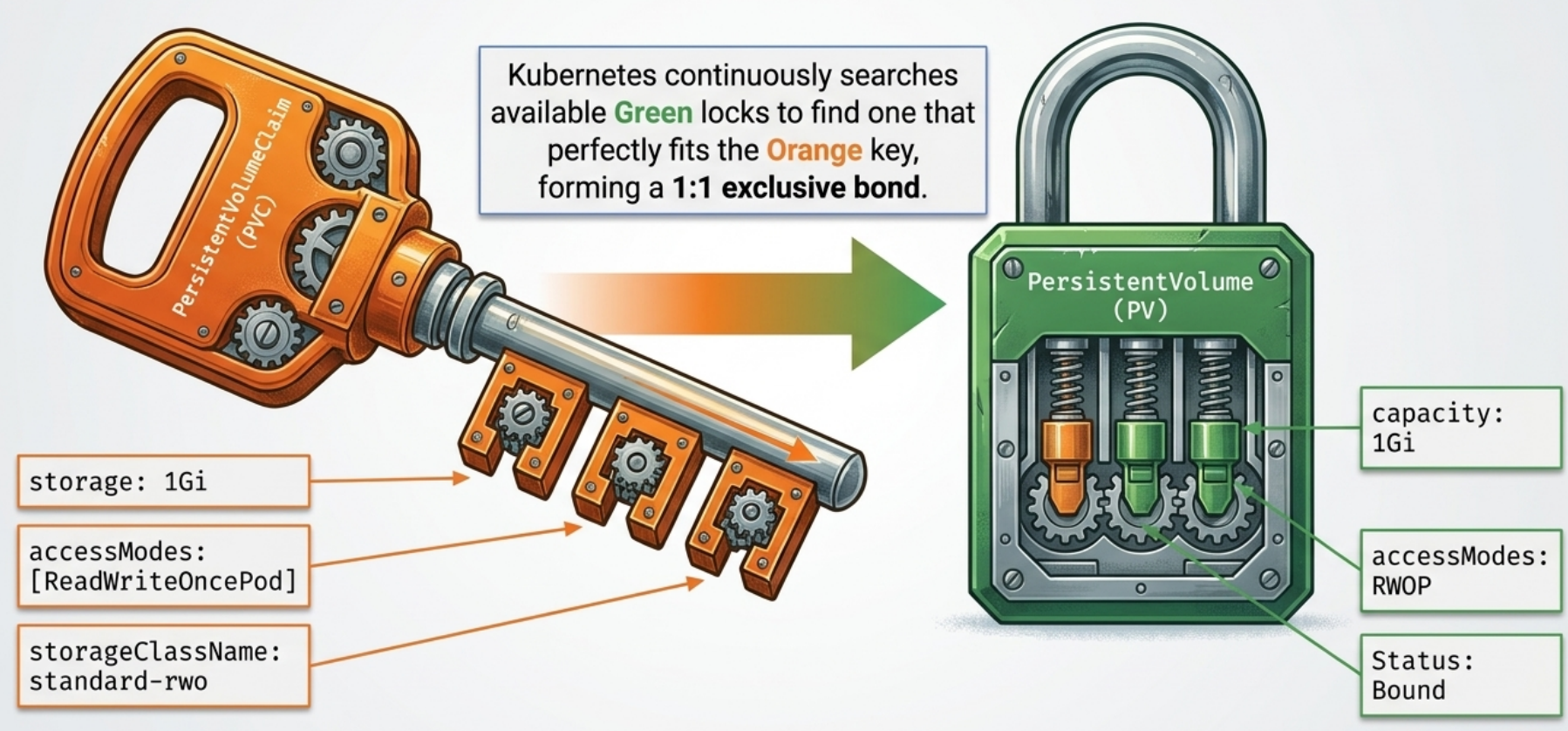
When a PVC is created, a control loop automatically searches for an existing, unbound PV to satisfy the claim based on four criteria:
- Storage Capacity: The PV’s capacity must be greater than or equal to the PVC’s requested size. A larger PV can bind to a smaller PVC, but the remaining capacity is wasted.
- Access Modes: The PV must support all access modes requested by the claim.
- StorageClass Match:
- Static: Set
storageClassName: ""in the PVC to force it to bypass dynamic provisioners and only look for statically created PVs without a class. - Dynamic: If a class is specified, the PVC only matches PVs of that class, or triggers the class’s provisioner if no match exists.
- Static: Set
- Volume Mode: The requested volume mode (
FilesystemvsBlock) must match.
The 1-to-1 Binding Rule
Section titled “The 1-to-1 Binding Rule”The relationship between a bound PVC and its PV is strictly one-to-one. Once bound, the PV is locked to that specific claim. Even if a 10Gi PV binds to a 2Gi PVC, the remaining 8Gi cannot be partitioned out to other claims.
Explicit Binding by Name
Section titled “Explicit Binding by Name”To bypass the automatic matching algorithm, you can force a PVC to connect to a specific PV by setting spec.volumeName:
spec: volumeName: postgres-data-pv # Bypasses automatic matching accessModes: [ReadWriteOnce] resources: requests: storage: 1GiFor this to succeed, the targeted PV must exist, be Available, and meet the capacity/access mode requirements. If not, the PVC remains stuck in Pending.
Access Modes
Section titled “Access Modes”Access modes control how many nodes (and pods) can mount the volume simultaneously:
| Mode | Short | Exclusivity | Typical storage |
|---|---|---|---|
ReadWriteOncePod | RWOP | Single pod across the entire cluster | Block storage, strict isolation |
ReadWriteOnce | RWO | Single node - multiple pods on that node can share | Block storage (EBS, PD) |
ReadWriteMany | RWX | Multiple nodes, read-write | NFS, file storage |
ReadOnlyMany | ROX | Multiple nodes, read-only | Any |
Key Distinctions
Section titled “Key Distinctions”RWOP vs RWO - the difference is the unit of exclusivity:
RWOP: only one pod anywhere in the cluster can mount the volume. If a second pod tries, it staysPendinguntil the first terminates.RWO: only one node can mount. Multiple pods scheduled on that same node can all read/write concurrently. Any pod on a different node gets aFailedAttachVolume/Multi-Attach error.
RWX depends on the storage backend - block storage (EBS, GCP PD) does not support RWX out of the box. You need a file storage backend (NFS, GCP Filestore) or an addon that provides file-based storage classes.
Storage Architecture Constrains Your Access Mode
Section titled “Storage Architecture Constrains Your Access Mode”The access mode you can request is determined by the physical storage type, not just by what you write in the PVC:
| Storage type | Supported access modes |
|---|---|
| Block storage (SAN, iSCSI, cloud block disks like EBS/GCP PD) | ReadWriteOnce (RWO), ReadWriteOncePod (RWOP) only |
| Shared file systems (NFS, GCP Filestore, AWS EFS) | ReadWriteMany (RWX), ReadOnlyMany (ROX) |
Requesting RWX on a block storage backend will leave the PVC Pending indefinitely - the CSI driver simply doesn’t support it.
Pre-Populating ROX Volumes (PVC Cloning)
Section titled “Pre-Populating ROX Volumes (PVC Cloning)”A ReadOnlyMany volume provisioned dynamically starts empty, which is useless. Use dataSourceRef to clone it from an existing PVC at provisioning time:
apiVersion: v1kind: PersistentVolumeClaimmetadata: name: shared-read-onlyspec: accessModes: - ReadOnlyMany volumeMode: Filesystem resources: requests: storage: 10Gi dataSourceRef: # clone content from this existing PVC kind: PersistentVolumeClaim name: source-data-pvcVolume Mode
Section titled “Volume Mode”spec.volumeMode controls how the storage is presented inside the container:
| Mode | How it appears in the container | Use case |
|---|---|---|
Filesystem (default) | Formatted filesystem mounted as a directory | Most workloads |
Block | Raw block device - no filesystem, maximum I/O performance | High-perf databases, custom storage engines |
spec: volumeMode: Block # exposed as /dev/xvda inside the containerStatic vs Dynamic Provisioning
Section titled “Static vs Dynamic Provisioning”| Static | Dynamic | |
|---|---|---|
| Who creates the disk | Admin manually | CSI driver automatically |
| Who creates the PV | Admin manually | CSI driver automatically |
| Admin effort | High - one PV per disk | Low - configure StorageClass once |
| Sizing | Rigid - PVC binds to nearest fitting PV (may waste space) | Precise - carves exactly the requested size |
| Portability | Low - PVCs must match specific labels/sizes | High - same PVC works on any cluster with a matching SC name |
| Default reclaim | Retain | Delete |
| Best for | Node-local disks, bare-metal, existing NAS | Cloud environments (EBS, GCP PD, Azure Disk) |
Static Provisioning Lifecycle
Section titled “Static Provisioning Lifecycle”- Admin provisions the physical disk (NFS share, cloud disk, local directory)
- Admin creates PV manifest pointing to the disk - sets capacity, access modes, and storage class
- Developer creates PVC requesting matching size and access mode
- Kubernetes binds - scans available PVs; PV capacity must be ≥ PVC request; access modes must satisfy PVC; first match wins; PV becomes exclusively
Bound - Pod mounts the PVC via its volume spec
After PVC is deleted (with Retain policy):
- PV transitions to
Released- data is safe but PV cannot be re-bound - A new PVC will remain
Pendingindefinitely, blocked by the oldclaimRefmetadata - Admin must manually release it:
- Option A - Delete and recreate the PV object (doesn’t touch physical files; just removes the Kubernetes pointer). Fresh PV →
Available - Option B - Edit the live PV and remove the
spec.claimRefblock → status immediately flips toAvailable
- Option A - Delete and recreate the PV object (doesn’t touch physical files; just removes the Kubernetes pointer). Fresh PV →
Dynamic Provisioning - Full Lifecycle
Section titled “Dynamic Provisioning - Full Lifecycle”Dynamic provisioning eliminates the need for admins to pre-create volumes. The flow when WaitForFirstConsumer is set:
flowchart TD


    1["[1] kubectl apply Pod+PVC+SC"]:::highlight
    2["[2] PVC enters Pending"]
    Wait("WaitForFirstConsumer<br/><i>holds provisioning</i>"):::waiting
    3["[3] Scheduler picks a node for the Pod"]
    4["[4] StorageClass controller detects pending PVC,<br/>invokes CSI plugin"]
    5["[5] CSI plugin calls cloud API →<br/>physical disk created in pod's zone"]
    6["[6] CSI reports back →<br/>controller creates PV object in cluster"]
    7["[7] PVC binds to PV<br/>(status: Bound)"]:::highlight
    8["[8] kubelet mounts disk into container<br/>at mountPath"]:::highlight

    1 --> 2
    Wait -.->|Blocks| 2
    2 --> 3
    3 --> 4
    4 --> 5
    5 --> 6
    6 --> 7
    7 --> 8
CSIStorageCapacity - Smarter Provisioning Decisions
Section titled “CSIStorageCapacity - Smarter Provisioning Decisions”CSIStorageCapacity is a cluster-scoped API object that CSI drivers publish to report how much capacity is available per topology zone. The scheduler uses this data to make smarter pod placement decisions when using WaitForFirstConsumer.
Without it: The scheduler may place a pod on a node in a zone where the CSI driver cannot provision the requested disk size, leaving the PVC in Pending after the pod is already scheduled.
With it: If a zone has insufficient capacity, the scheduler skips that zone and picks one that can accommodate the PVC - preventing a difficult-to-diagnose stuck state.
kubectl get csistoragecapacities -A # view per-zone capacity objects published by CSI driversNode-Local PersistentVolumes
Section titled “Node-Local PersistentVolumes”Some workloads need ultra-low latency or direct hardware access - network-attached storage adds too much overhead. Node-local PVs provision storage on a worker node’s own disk.
Why Not Just Use hostPath?
Section titled “Why Not Just Use hostPath?”Problem with hostPath | Local PV solution |
|---|---|
| Pod reschedules to a different node → loses data | Scheduler guarantees pods are always placed on the node owning the PV |
| Any user can mount arbitrary host paths | Only admin-approved PV objects are claimable; regular users cannot specify raw host paths |
Setting Up Local Storage (Admin)
Section titled “Setting Up Local Storage (Admin)”1. Create the physical directory on the node
Section titled “1. Create the physical directory on the node”SSH into (or exec onto) the specific worker node that will own the volume, then create the directory:
# SSH into a cloud node (e.g. GKE, EKS, AKS, bare-metal):ssh user@worker-node-01sudo mkdir -p /mnt/disks/local-vol01sudo chmod 777 /mnt/disks/local-vol01
# On a local dev cluster where nodes are containers (e.g. kind, k3d):docker exec worker-node-01 mkdir -p /mnt/disks/local-vol01
2. Create the StorageClass (no auto-provisioner)
Section titled “2. Create the StorageClass (no auto-provisioner)”apiVersion: storage.k8s.io/v1kind: StorageClassmetadata: name: local-storageprovisioner: kubernetes.io/no-provisioner # no automatic provisioningvolumeBindingMode: WaitForFirstConsumer # CRITICAL: delay until pod is scheduledWaitForFirstConsumer is mandatory for local storage - the scheduler must see both the pod’s requirements AND the volume’s nodeAffinity before choosing a node.
3. Create the PV with nodeAffinity (Strictly Mandatory)
Section titled “3. Create the PV with nodeAffinity (Strictly Mandatory)”apiVersion: v1kind: PersistentVolumemetadata: name: local-disk-node-01spec: capacity: storage: 10Gi accessModes: - ReadWriteOnce storageClassName: local-storage persistentVolumeReclaimPolicy: Retain local: path: /mnt/disks/local-vol01 # directory on the physical worker node nodeAffinity: # tells the scheduler which node owns this disk required: nodeSelectorTerms: - matchExpressions: - key: kubernetes.io/hostname operator: In values: - node-01 # name of the worker nodeThe nodeAffinity is what makes local PVs fundamentally different from hostPath - it lets the scheduler co-locate pods with their storage.
Claiming and Using Local Storage (Developer)
Section titled “Claiming and Using Local Storage (Developer)”apiVersion: v1kind: PersistentVolumeClaimmetadata: name: db-local-pvcspec: storageClassName: local-storage accessModes: - ReadWriteOnce resources: requests: storage: 1Gi # ≤ PV capacityThe PVC stays Pending until a pod references it. When a pod is created:
- Scheduler sees
WaitForFirstConsumer→ evaluates pod constraints alongside PVnodeAffinity - Scheduler picks the node that owns the local PV
- Kubernetes binds the PVC → PV
- Kubelet mounts the host directory into the container
Reclaiming Local Volumes
Section titled “Reclaiming Local Volumes”With Retain policy, deleting the PVC leaves the PV in Released - no new PVC can bind to it (data-leak protection). To reuse:
- Clean the physical files: SSH into the node and delete/archive old data
- Reset the PV pointer: either delete + recreate the PV object, or edit the live PV and remove
spec.claimRef
Complete Three-Way Manifest (Dynamic)
Section titled “Complete Three-Way Manifest (Dynamic)”# ----- StorageClass: defines the storage tier -----apiVersion: storage.k8s.io/v1kind: StorageClassmetadata: name: premium-ssdprovisioner: pd.csi.storage.gke.io # GKE block storage CSI drivervolumeBindingMode: WaitForFirstConsumer # provision after pod is scheduledreclaimPolicy: Delete # auto-delete disk when PVC is removedallowVolumeExpansion: trueparameters: type: pd-ssd # GCP SSD disk type---# ----- PersistentVolumeClaim: developer's storage request -----apiVersion: v1kind: PersistentVolumeClaimmetadata: name: app-pvcspec: accessModes: - ReadWriteOnce storageClassName: premium-ssd resources: requests: storage: 50Gi---# ----- Pod: mounts the PVC -----apiVersion: v1kind: Podmetadata: name: app-podspec: volumes: - name: app-storage persistentVolumeClaim: claimName: app-pvc # references the PVC by name (not the PV) containers: - name: app image: nginx:stable volumeMounts: - name: app-storage mountPath: /var/www/htmlkubectl apply -f storage-stack.yamlkubectl get pvc -w # watch Pending → Boundkubectl get pv # inspect the auto-created PVkubectl describe pod app-podEphemeral Persistent Volumes
Section titled “Ephemeral Persistent Volumes”An ephemeral PV is a CSI-backed temporary volume defined inline in the pod spec. No separate PVC object needed - Kubernetes creates and destroys it automatically with the pod.
spec: volumes: - name: scratch ephemeral: volumeClaimTemplate: spec: accessModes: [ReadWriteOnce] storageClassName: fast-ssd # omit to use cluster default resources: requests: storage: 10Gi containers: - name: app image: my-app:1.0 volumeMounts: - name: scratch mountPath: /mnt/scratchAuto-generated PVC naming: {pod-name}-{volume-name} - e.g., pod batch-job + volume scratch → PVC batch-job-scratch.
Lifecycle:
- Pod created → ephemeral volume controller detects the template → creates the PVC
- CSI provisions the PV → PVC binds → pod schedules → volume mounts
kubectl delete pod→ PVC deleted automatically →Deletereclaim policy → PV and physical disk cleaned up
Ephemeral PV vs emptyDir
Section titled “Ephemeral PV vs emptyDir”| Feature | emptyDir | Ephemeral PV |
|---|---|---|
| Storage topology | Node-local only | Node-local or network-attached (depends on SC) |
| Size enforcement | No hard limit | Fixed size limit (e.g., 10Gi) enforced |
| Resize | Not supported | Supported via allowVolumeExpansion |
| Snapshots | Not supported | Supported if CSI driver supports it |
| Storage class | Not applicable | Uses any configured StorageClass |
Volume Expansion
Section titled “Volume Expansion”When application data grows, resize an existing bound PVC without data loss - no need to clone or recreate.
Prerequisites:
- The
StorageClassmust haveallowVolumeExpansion: true - Volume size can only be increased - shrinking is not supported
Resize Workflow
Section titled “Resize Workflow”# Edit the PVC to request more capacity:spec: resources: requests: storage: 50Gi # was 10Gikubectl apply -f pvc.yamlkubectl describe pvc app-pvc # check for FileSystemResizePending conditionYou may see this condition immediately after applying:
Conditions: Type Status Message FileSystemResizePending True Waiting for user to (re-)start a pod to finish file system resize...This means the storage backend has expanded the disk, but the filesystem inside the container cannot resize while it’s mounted. Delete and recreate the pod - on restart, the kubelet expands the filesystem and the new capacity becomes visible.
Volume Snapshots
Section titled “Volume Snapshots”Kubernetes can take point-in-time backups of PVCs if the underlying CSI driver supports it. Snapshots use three resources mirroring the SC/PV/PVC pattern:
| Resource | Scope | Role |
|---|---|---|
VolumeSnapshotClass | Cluster | Which driver handles snapshots + deletion policy |
VolumeSnapshot | Namespace | Developer’s request for a specific PVC backup |
VolumeSnapshotContent | Cluster | Auto-created backend representation of the actual backup |
Taking a Snapshot
Section titled “Taking a Snapshot”Step 1 - Admin: create a VolumeSnapshotClass
apiVersion: snapshot.storage.k8s.io/v1kind: VolumeSnapshotClassmetadata: name: gcp-pd-snapshotsdriver: pd.csi.storage.gke.io # CSI driver that handles the snapshotdeletionPolicy: Delete # delete physical backup when VolumeSnapshot is deletedStep 2 - Developer: request a snapshot
apiVersion: snapshot.storage.k8s.io/v1kind: VolumeSnapshotmetadata: name: app-data-backup-1spec: volumeSnapshotClassName: gcp-pd-snapshots source: persistentVolumeClaimName: app-pvc # the PVC to back upMonitoring:
kubectl get vs        # vs = VolumeSnapshot shorthand# NAME                  READYTOUSE   RESTORESIZE   SNAPSHOTCONTENT# app-data-backup-1     true         50Gi          snapcontent-abc123
kubectl get vsc       # vsc = VolumeSnapshotContent (cluster-scoped)
READYTOUSE transitions from false → true when the backup completes. The auto-created VolumeSnapshotContent is the cluster-scoped backend representation (like a PV is the cluster-scoped backend of a PVC).
Restoring from a Snapshot
Section titled “Restoring from a Snapshot”Create a new PVC pointing to the snapshot via dataSourceRef:
apiVersion: v1kind: PersistentVolumeClaimmetadata: name: app-data-restoredspec: accessModes: - ReadWriteOnce resources: requests: storage: 50Gi dataSourceRef: apiGroup: snapshot.storage.k8s.io # REQUIRED for snapshots (not needed for PVC clones) kind: VolumeSnapshot name: app-data-backup-1If the StorageClass uses WaitForFirstConsumer, restoration is deferred until a pod references the new PVC and is scheduled.
Volume Group Snapshots
Section titled “Volume Group Snapshots”For multi-volume stateful applications (e.g., a database with separate PVCs for data and WAL logs), snapshotting each volume independently can leave an inconsistent state - the data snapshot may be seconds ahead of the WAL log snapshot.
Volume Group Snapshots (Beta, K8s 1.32+) allow taking crash-consistent, atomic snapshots of multiple PVCs simultaneously using two new resources:
# Step 1 - Admin: define which CSI driver handles group snapshotsapiVersion: groupsnapshot.storage.k8s.io/v1beta1kind: VolumeGroupSnapshotClassmetadata: name: gcp-group-snapshotsdriver: pd.csi.storage.gke.iodeletionPolicy: Delete---# Step 2 - Developer: trigger a group snapshot targeting a label selectorapiVersion: groupsnapshot.storage.k8s.io/v1beta1kind: VolumeGroupSnapshotmetadata: name: db-consistent-backupspec: volumeGroupSnapshotClassName: gcp-group-snapshots source: selector: matchLabels: app: my-database # snapshots ALL PVCs with this label atomicallykubectl get volumegroupsnapshot # check statuskubectl get volumegroupsnapshotcontent # inspect the cluster-scoped backend objectVolumeAttributesClass (VAC)
Section titled “VolumeAttributesClass (VAC)”A VolumeAttributesClass (Beta, K8s 1.31+) lets you modify storage performance parameters on an existing volume without recreating it - the equivalent of changing disk IOPS or throughput tier post-provisioning.
The core problem it solves: StorageClasses are immutable. Once a volume is provisioned, you could not change iopsPerGB or throughput without deleting the PVC and recreating it (with data loss risk). VAC separates mutable performance attributes from the immutable StorageClass.
Workflow
Section titled “Workflow”# Step 1 - Admin: define performance tiers as VolumeAttributesClass objectsapiVersion: storage.k8s.io/v1beta1kind: VolumeAttributesClassmetadata: name: high-iopsdriverName: ebs.csi.aws.comparameters: iops: "10000" throughput: "500"---apiVersion: storage.k8s.io/v1beta1kind: VolumeAttributesClassmetadata: name: standard-iopsdriverName: ebs.csi.aws.comparameters: iops: "3000" throughput: "125"# Step 2 - Developer: reference VAC in PVC at creation timespec: storageClassName: fast-ssd volumeAttributesClassName: standard-iops # start at standard tier resources: requests: storage: 50Gi# Step 3 - Upgrade tier in place (edit PVC - no data loss, no recreation)spec: volumeAttributesClassName: high-iops # CSI driver applies change non-disruptivelyStatefulSet PVC Retention Policy
Section titled “StatefulSet PVC Retention Policy”When a StatefulSet creates volumes via volumeClaimTemplates, those PVCs are not automatically deleted by default when the StatefulSet scales down or is deleted. This leads to orphaned storage that accumulates cost indefinitely.
The persistentVolumeClaimRetentionPolicy field (Stable, K8s 1.32) controls this lifecycle explicitly:
apiVersion: apps/v1kind: StatefulSetmetadata: name: postgresspec: replicas: 3 persistentVolumeClaimRetentionPolicy: whenDeleted: Retain # keep PVCs when StatefulSet is deleted (safe default) whenScaled: Delete # auto-delete PVCs for pods that scale down volumeClaimTemplates: - metadata: name: data spec: accessModes: [ReadWriteOnce] storageClassName: fast-ssd resources: requests: storage: 50Gi| Policy field | Value | Behaviour |
|---|---|---|
whenDeleted | Retain (default) | PVCs survive StatefulSet deletion - data is safe, manual cleanup required |
whenDeleted | Delete | PVCs deleted automatically when StatefulSet is deleted |
whenScaled | Retain (default) | PVCs for scaled-down replicas persist - safe but costly over time |
whenScaled | Delete | PVCs deleted when a pod is removed due to scale-down |
Checking the policy on an existing StatefulSet:
kubectl get sts postgres -o jsonpath='{.spec.persistentVolumeClaimRetentionPolicy}'# → {"whenDeleted":"Retain","whenScaled":"Delete"}Quick Reference
Section titled “Quick Reference”| Object | API Group | Short | Scope | Immutable? | Created by |
|---|---|---|---|---|---|
StorageClass | storage.k8s.io/v1 | sc | Cluster | ✅ Yes | Admin |
PersistentVolume | v1 | pv | Cluster | No | Auto (dynamic) or Admin (static) |
PersistentVolumeClaim | v1 | pvc | Namespace | Partially | Developer |
VolumeSnapshotClass | snapshot.storage.k8s.io/v1 | - | Cluster | No | Admin |
VolumeSnapshot | snapshot.storage.k8s.io/v1 | vs | Namespace | No | Developer |
VolumeSnapshotContent | snapshot.storage.k8s.io/v1 | vsc | Cluster | No | Auto |
| Configuration | Options |
|---|---|
| Access modes | ReadWriteOncePod (1 pod), ReadWriteOnce (1 node), ReadWriteMany (N nodes), ReadOnlyMany |
| Volume mode | Filesystem (default), Block (raw device) |
| Reclaim policy | Delete (default dynamic), Retain (default static), Recycle (deprecated) |
| Binding mode | Immediate, WaitForFirstConsumer |
Troubleshooting
Section titled “Troubleshooting”| Symptom | Likely cause | Diagnostic | Fix |
|---|---|---|---|
PVC stuck in Pending | No matching StorageClass, or CSI driver not installed | kubectl describe pvc → Events | Check SC name; verify CSI driver pods in kube-system |
PVC stuck in Pending (dynamic, no error) | CSI driver cannot allocate capacity in zone | kubectl get csistoragecapacities -A | Check zone capacity; switch to WaitForFirstConsumer |
Pod stuck in ContainerCreating | PVC not yet Bound | kubectl get pvc | Wait for binding; check SC binding mode |
| Mount failure: zone mismatch | Disk provisioned in wrong zone (Immediate mode) | kubectl describe pod → Events | Use WaitForFirstConsumer binding mode |
PVC stuck in Released after PVC delete | Retain reclaim policy - PV not reusable | kubectl get pv | Delete PV and recreate, or remove spec.claimRef from PV |
Multi-Attach error on pod | RWO volume attached to a different node | kubectl describe pod | Ensure pods land on the same node, or switch to RWX storage |
| CSI driver errors | Driver not installed or misconfigured | kubectl get pods -n kube-system | grep csi | Install driver; check driver-specific docs |
| Volume resize not working | allowVolumeExpansion: false in StorageClass | kubectl get sc -o yaml | Recreate SC with allowVolumeExpansion: true; resize PVC |
Resize stuck at FileSystemResizePending | Filesystem can’t resize while mounted | kubectl describe pvc | Delete and recreate the pod; kubelet resizes FS on restart |
Snapshot READYTOUSE: false | Snapshot in progress or driver doesn’t support it | kubectl describe volumesnapshot → Events | Wait; check CSI driver capabilities |
| Pod on wrong node (local PV) | Missing or wrong nodeAffinity in PV | kubectl get pv -o yaml | Correct nodeAffinity to match the node hosting the disk |
| PVC binds to dynamic PV instead of static | storageClassName not set to "" in PVC - default SC provisioner takes over | kubectl describe pvc → StorageClass field | Set storageClassName: "" explicitly to force static binding |
| StatefulSet PVCs not deleted on scale-down | persistentVolumeClaimRetentionPolicy.whenScaled is Retain (default) | kubectl get sts -o yaml | Set whenScaled: Delete in StatefulSet spec |
CKA Exam Strategies
Section titled “CKA Exam Strategies”Speed and accuracy are essential for the CKA exam. Keep these strategies in mind when working with storage:
- Use Short-Forms: Always use built-in aliases to save time:
pv,pvc, andsc. - No Imperative PV Creation: There is no
kubectl create pvcommand. You must write or copy a YAML manifest and apply it. - Reveal Volume Mode: Standard
kubectl get pvoutput hides the volume mode (FilesystemvsBlock). Usekubectl get pv -o wideto see theVOLUMEMODEcolumn. - Inspect StorageClasses:
kubectl get storageclasslists all available classes - look for the(default)marker to identify which class is auto-applied to PVCs with nostorageClassName. Usekubectl describe storageclass <name>to inspect reclaim policy, provisioner, and binding mode. - Fast JSONPath Extraction: Use
jsonpathto quickly inspect critical PV configurations without scrolling through full YAML outputs:- Check access modes:
kubectl get pv postgres-data-pv -o jsonpath='{.spec.accessModes}' - Check reclaim policy:
kubectl get pv postgres-data-pv -o jsonpath='{.spec.persistentVolumeReclaimPolicy}'
- Check access modes:
- Practice Failure Scenarios: Create a PVC requesting
10Giagainst a5Gistatic PV. Watch it get stuck inPending. This muscle memory is invaluable for troubleshooting exam scenarios.