
DaemonSets & StatefulSets
Two specialized workload controllers for use cases that fall outside the standard Deployment pattern: DaemonSets run exactly one Pod per node (node-level daemons), while StatefulSets manage ordered, identity-stable replicas for stateful clustered applications like databases and key-value stores.
DaemonSets
Section titled “DaemonSets”A DaemonSet ensures that exactly one Pod runs on each eligible node in the cluster. Unlike a Deployment where you specify a replica count and the Scheduler distributes Pods however it likes, DaemonSets let the cluster topology drive the Pod count – as nodes join or leave, the controller automatically creates or removes Pods.
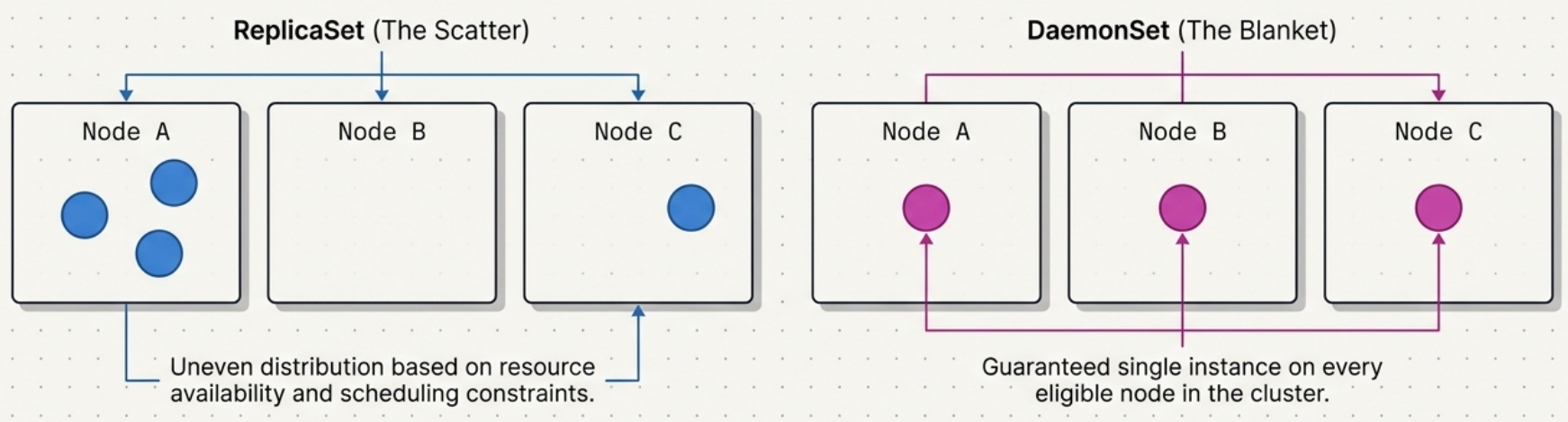
When to choose DaemonSet over Deployment: Deployments optimize for desired count across the cluster (some nodes might run 3 replicas, others 0). DaemonSets optimize for per-node coverage – every matching node gets exactly one.
DaemonSet Manifest Template
Section titled “DaemonSet Manifest Template”apiVersion: apps/v1kind: DaemonSetmetadata: name: node-agent namespace: monitoring labels: app: node-agentspec: # --- Selector (must match spec.template.metadata.labels – immutable after creation) --- selector: matchLabels: app: node-agent
# --- Update strategy --- updateStrategy: type: RollingUpdate # default; use OnDelete for critical infra (CNI, CSI drivers) rollingUpdate: maxSurge: 0 # default: 0 – prevents port/lock conflicts on host maxUnavailable: 1 # default: 1 – replace one node's pod at a time minReadySeconds: 10 # wait 10s after a pod is Ready before moving to the next node
template: metadata: labels: app: node-agent # must match spec.selector.matchLabels above
spec: # --- Restrict to a node subset (optional; omit to target all nodes) --- nodeSelector: kubernetes.io/os: linux # built-in label – available on every node # node-role.kubernetes.io/worker: "" # uncomment to skip control plane nodes explicitly
# --- Tolerations (required to deploy on tainted nodes like control plane) --- tolerations: - operator: Exists # wildcard: tolerates ALL taints on any node # More restrictive alternative: # - key: node-role.kubernetes.io/control-plane # operator: Exists # effect: NoSchedule
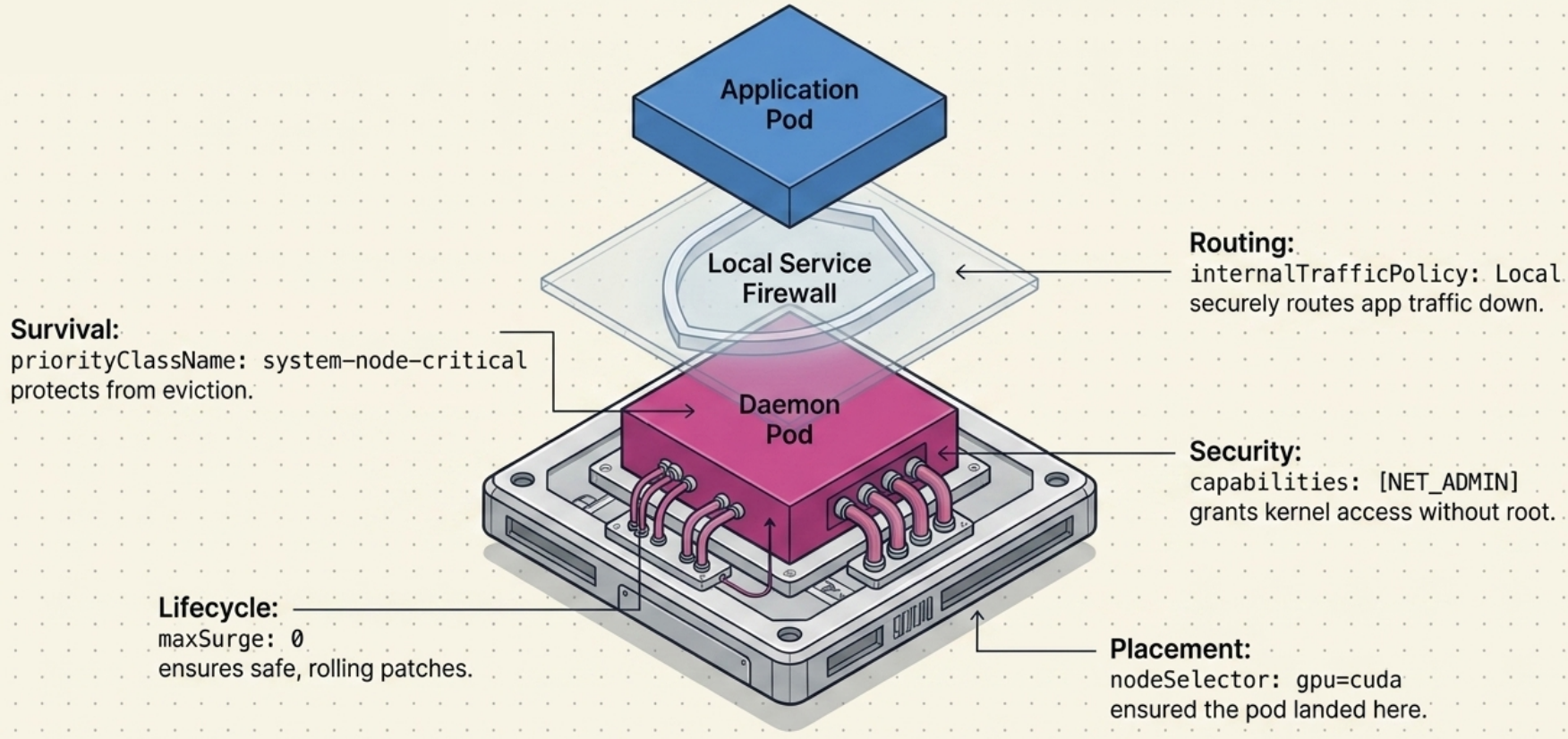
# --- Eviction protection (system-level daemons should survive resource pressure) --- priorityClassName: system-node-critical # integer: 2,000,001,000 # priorityClassName: system-cluster-critical # use when pod can reschedule to another node
# --- Host namespace access (grant only what's needed) --- # hostNetwork: true # pod shares node IP – needed when binding to node ports directly # hostPID: true # access host process tree – needed for low-level monitoring # hostIPC: true # access host IPC namespace – rarely needed
containers: - name: agent image: my-org/node-agent:1.0.0 imagePullPolicy: IfNotPresent
# --- Host port mapping (exposes container port on the node's IP) --- ports: - name: metrics containerPort: 8080 hostPort: 8080 # bind directly to node IP:8080
# --- Narrow security context (prefer capabilities over privileged: true) --- securityContext: # privileged: true # full kernel access – only for kube-proxy / eBPF agents capabilities: add: - SYS_PTRACE # example: needed for profiling agents drop: - ALL # drop all capabilities first, then add back only what's needed readOnlyRootFilesystem: true
# --- Resource limits (always set – prevents a daemon from starving workload pods) --- resources: requests: cpu: "50m" memory: "64Mi" limits: cpu: "200m" memory: "256Mi"
# --- Inject node identity via Downward API (useful for local Service clients) --- env: - name: NODE_NAME valueFrom: fieldRef: fieldPath: spec.nodeName - name: NODE_IP valueFrom: fieldRef: fieldPath: status.hostIP
# --- Mount host filesystem paths (e.g., to read node logs or lock files) --- volumeMounts: - name: host-logs mountPath: /var/log/host # inside the container readOnly: true - name: host-run mountPath: /run/host readOnly: true
livenessProbe: httpGet: path: /healthz port: 8080 initialDelaySeconds: 10 periodSeconds: 30
readinessProbe: httpGet: path: /ready port: 8080 initialDelaySeconds: 5 periodSeconds: 10
# --- Host filesystem volumes --- volumes: - name: host-logs hostPath: path: /var/log # actual path on the node type: Directory - name: host-run hostPath: path: /run type: Directory
terminationGracePeriodSeconds: 30Common Workloads
Section titled “Common Workloads”| Category | Examples | Why DaemonSet? |
|---|---|---|
| Log collection | Fluentd, Logstash, Filebeat | Must read logs from every node’s filesystem |
| System monitoring | Prometheus node exporter, Datadog agent | Node-level CPU, memory, disk metrics |
| Cluster networking | kube-proxy, Calico, Cilium, kindnet | Network rules must exist on every node |
| Storage | CSI node drivers, local volume managers | Storage attachments are node-local |
| Hardware / GPU | CUDA device plugins, GPU drivers | Hardware is node-specific |
| Security | Falco, Sysdig agent | Host-level syscall monitoring |
Why DaemonSets over systemd? All Kubernetes-native tooling – kubectl rollout, resource limits, RBAC, monitoring – works uniformly with DaemonSets. No separate configuration management layer needed.
The Reconciliation Loop
Section titled “The Reconciliation Loop”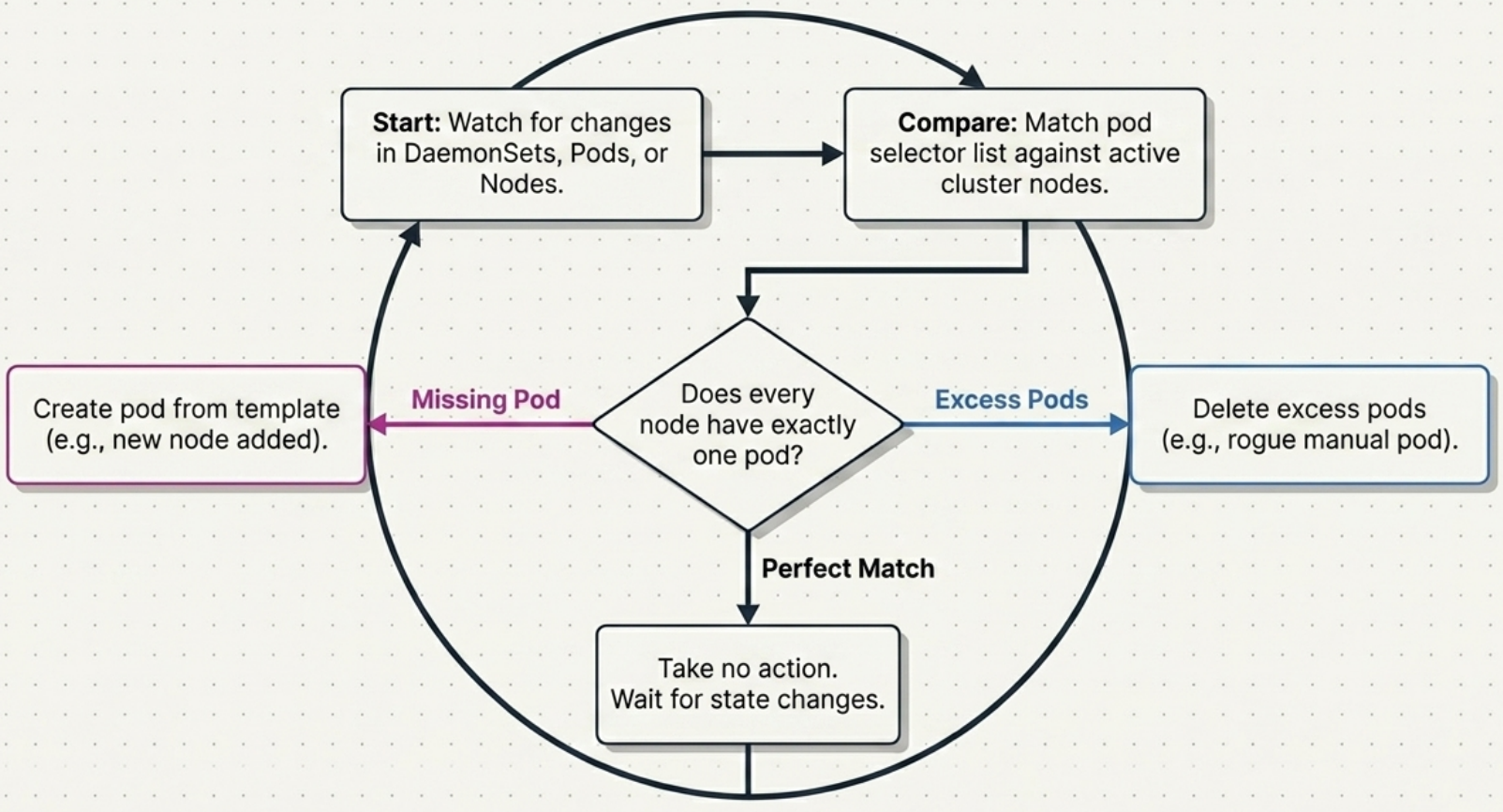
The DaemonSet controller watches DaemonSets, Pods, and Nodes. On every reconciliation pass it ensures exactly one Pod per eligible node:
| Scenario | Cause | Controller action |
|---|---|---|
| Pod missing on a node | New node joined, or daemon Pod crashed/deleted | Creates a new Pod from the template for that node |
| Excess Pod on a node | Manually created matching Pod | Deletes the excess Pod |
| Node removed | Node deregistered from cluster | Deletes the orphaned Pod |
| Balanced (one per node) | Normal operation | No action |
The .status section tracks: desiredNumberScheduled, currentNumberScheduled, numberReady, and numberAvailable (ready for at least spec.minReadySeconds).
Scheduling Behavior
Section titled “Scheduling Behavior”Targeting Node Subsets
Section titled “Targeting Node Subsets”A DaemonSet deploys to every eligible node by default. Use nodeSelector in the Pod template spec to restrict to a subset:
spec: template: spec: nodeSelector: gpu: cuda # only nodes labeled gpu=cuda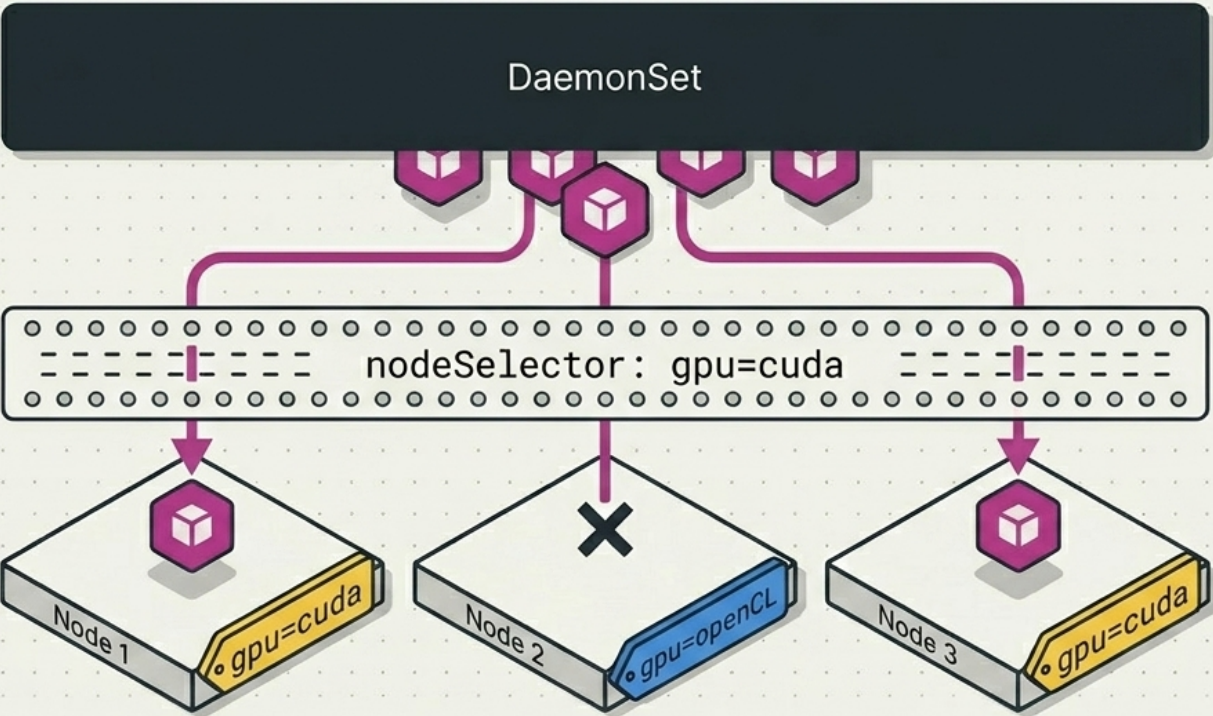
The node selector is mutable. Adding a label to a node (kubectl label node <name> gpu=cuda) triggers Pod creation on that node; removing the label triggers deletion. Standard system labels (kubernetes.io/arch, kubernetes.io/os, kubernetes.io/hostname) are automatically applied to every node.
Heterogeneous clusters (mixed architectures):
| Option | When to use |
|---|---|
| Single DaemonSet + multi-arch image | Image is the only difference between arch variants |
Two separate DaemonSets with kubernetes.io/arch selector | Pods differ in resource limits or config, not just the image |
Control Plane Nodes
Section titled “Control Plane Nodes”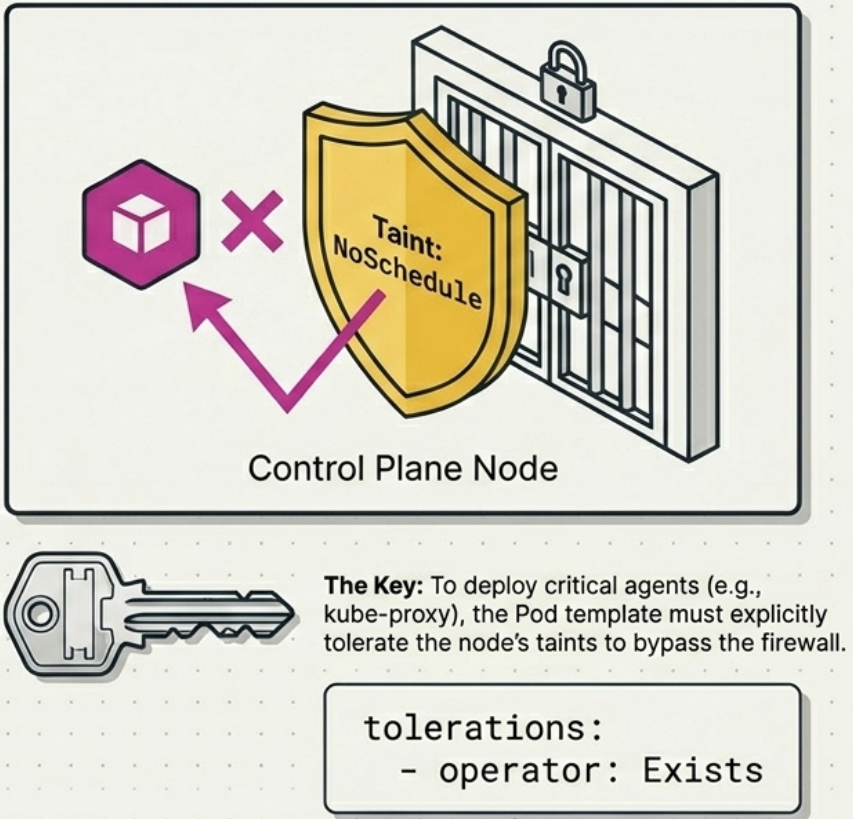
By default, DaemonSets skip control plane nodes – they carry taints that repel general workloads. For infrastructure daemons that must run on every node (CNI plugins, kube-proxy), add a wildcard toleration in the Pod template:
spec: template: spec: tolerations: - operator: Exists # tolerates all taints – deploys on every node including control planeScheduling Implementation
Section titled “Scheduling Implementation”Modern Kubernetes delegates DaemonSet placement to the Scheduler via nodeAffinity (requiredDuringSchedulingIgnoredDuringExecution). This ensures taints, resource constraints, and custom affinity rules are evaluated before placement – superseding the historical spec.nodeName approach that bypassed the Scheduler entirely.
Update Strategies
Section titled “Update Strategies”| Strategy | Behaviour | Key parameters | Use when |
|---|---|---|---|
RollingUpdate (default) | Replaces Pods automatically, one node at a time | maxSurge (default: 0), maxUnavailable (default: 1), minReadySeconds | Standard updates |
OnDelete | Nothing happens until you manually delete a Pod | – | Core infrastructure (CNI, storage drivers) where silent failures must be verified manually |
Why maxSurge: 0 by default: Most daemon workloads bind to host ports or acquire system-level locks (e.g., xtables.lock). A surge Pod would fail to bind and stall the entire update indefinitely.
Why OnDelete for critical daemons: If a broken CNI plugin version passes readiness probes but silently breaks pod networking, RollingUpdate propagates the failure across the entire cluster node-by-node. With OnDelete you update one node, verify thoroughly, and proceed manually.
Host Access
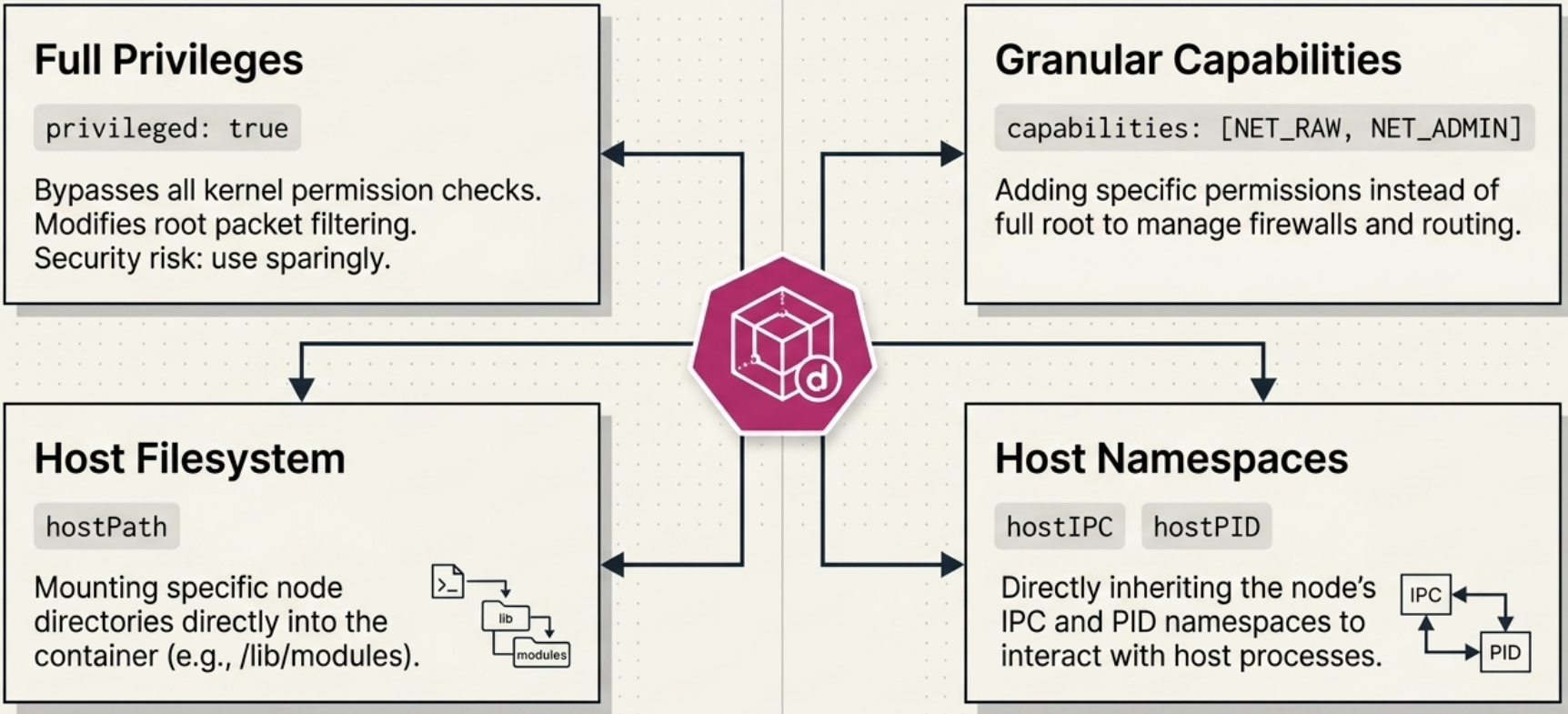
Section titled “Host Access”Node agents frequently need host-level privileges unavailable to regular Pods. All of the following are configured in the Pod template spec:
| Access type | Configuration | Production example |
|---|---|---|
| Full kernel access | securityContext.privileged: true | kube-proxy – modifies iptables rules |
| Specific capabilities | securityContext.capabilities.add: [NET_ADMIN, NET_RAW] | kindnet – manages routes without full root |
| Host filesystem | hostPath volume | kube-proxy – reads /run/xtables.lock, /lib/modules |
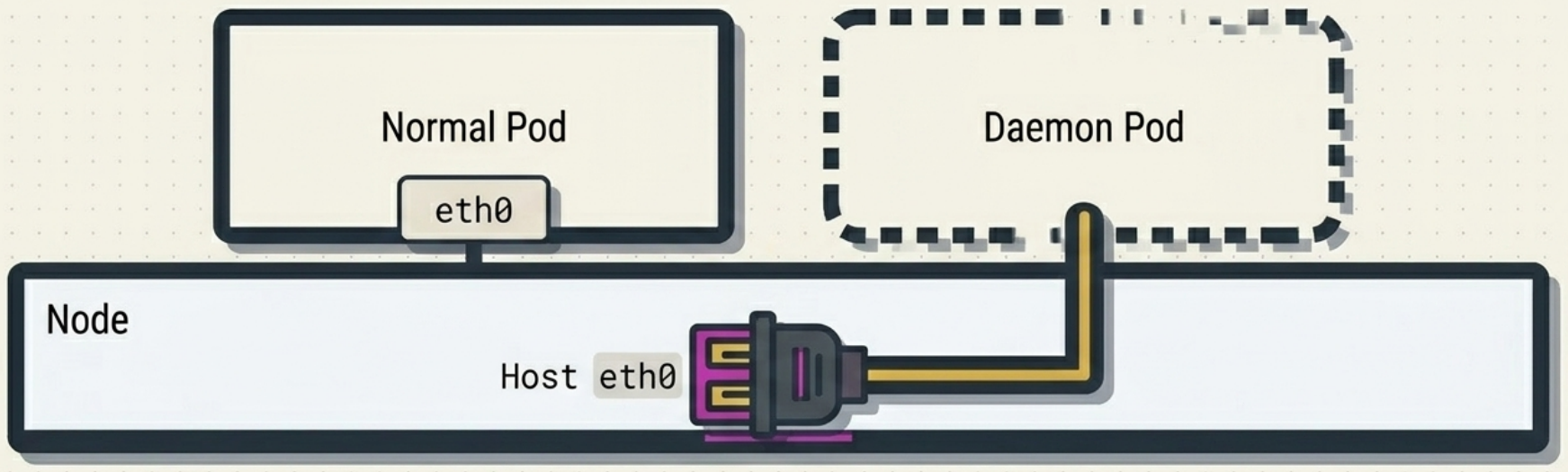
| Host network namespace | hostNetwork: true | Pod shares node IP; no container IP assigned |
| Host PID / IPC namespaces | hostPID: true, hostIPC: true | Monitoring daemons needing host-level process visibility |
Priority Classes
Section titled “Priority Classes”System daemon Pods should not be evicted under resource pressure. Assign a built-in priority class in the Pod template:
spec: template: spec: priorityClassName: system-node-critical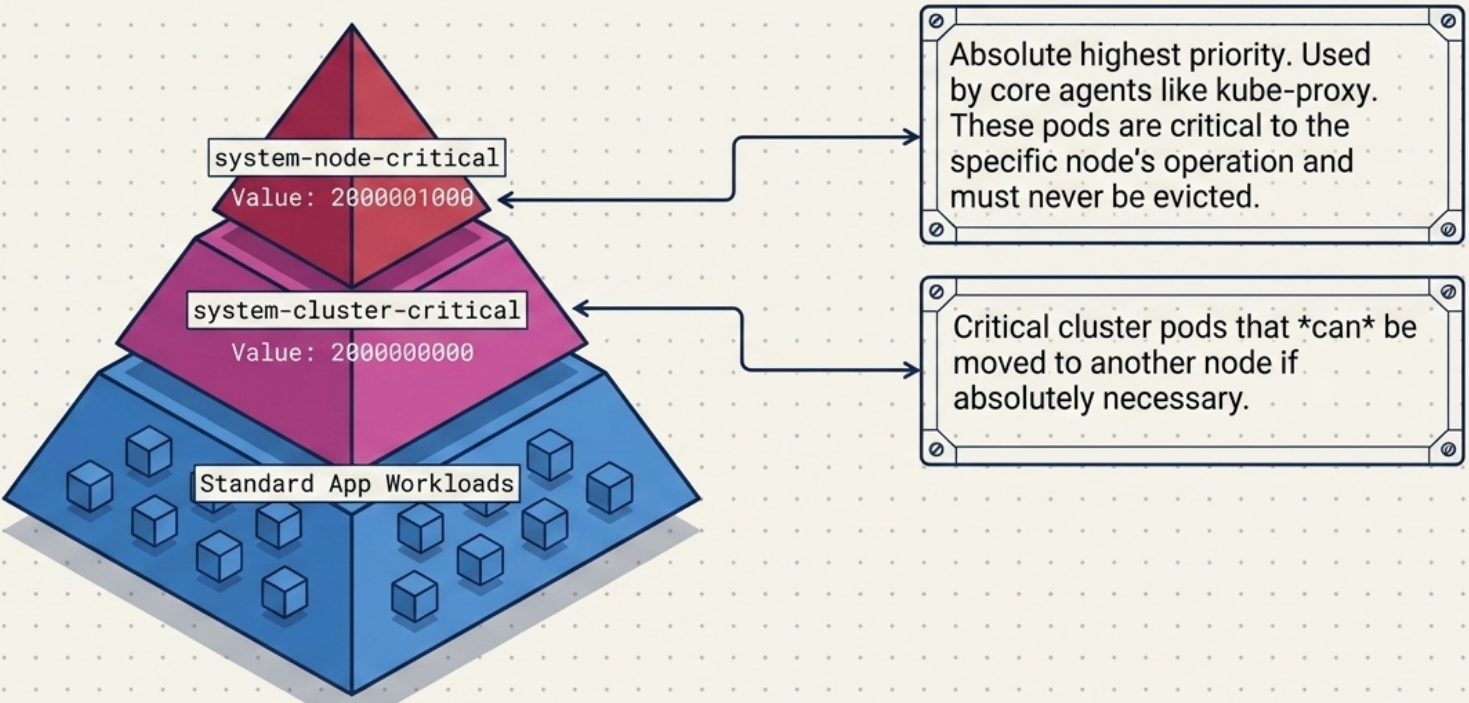
| Priority class | Integer value | Use when |
|---|---|---|
system-node-critical | 2,000,001,000 | Pod must stay on its node (e.g., kube-proxy, CSI node driver) |
system-cluster-critical | 2,000,000,000 | Pod is important but can be rescheduled to another node |
Communicating with Local Daemon Pods
Section titled “Communicating with Local Daemon Pods”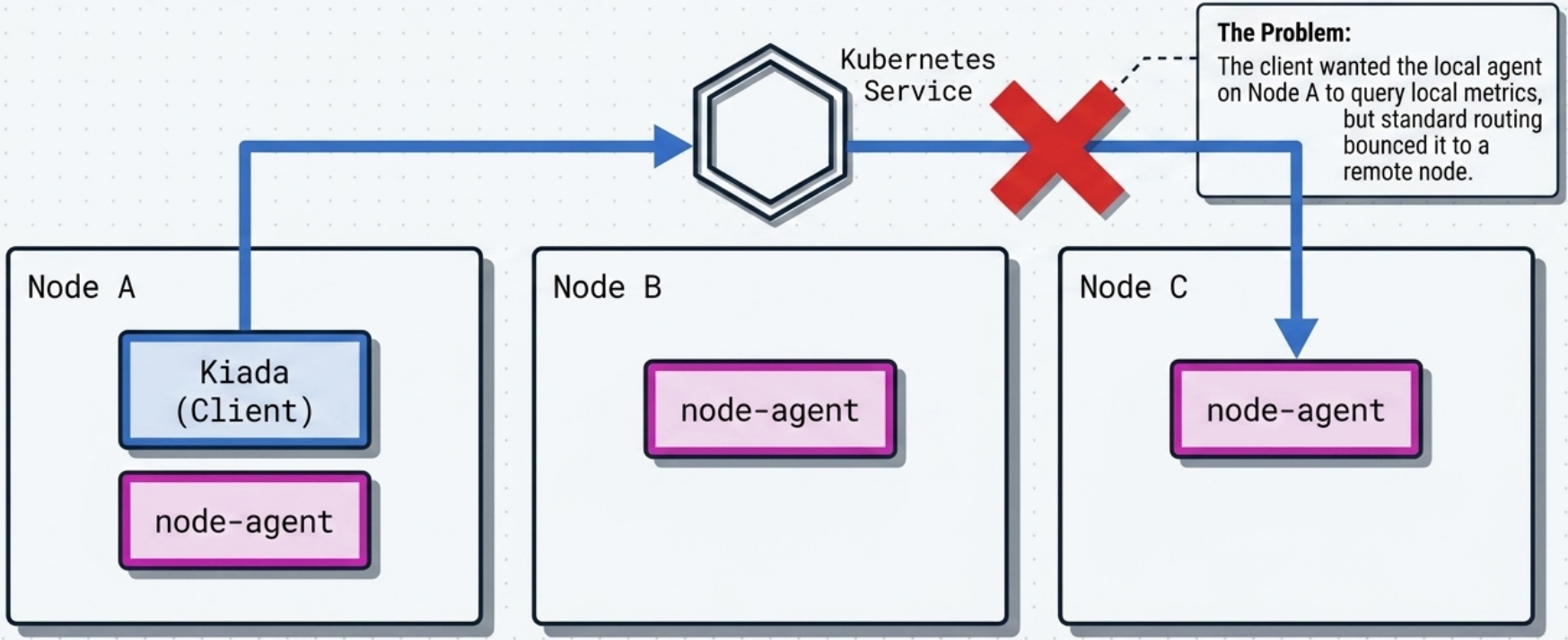
Daemon Pods provide node-local services (metrics, log aggregation). Standard Services randomly forward to any matching Pod in the cluster – defeating the purpose. Three approaches to enforce local routing:
Option 1 – hostPort: Map a container port directly to a host port. Clients use the Downward API to get the node’s IP at runtime:
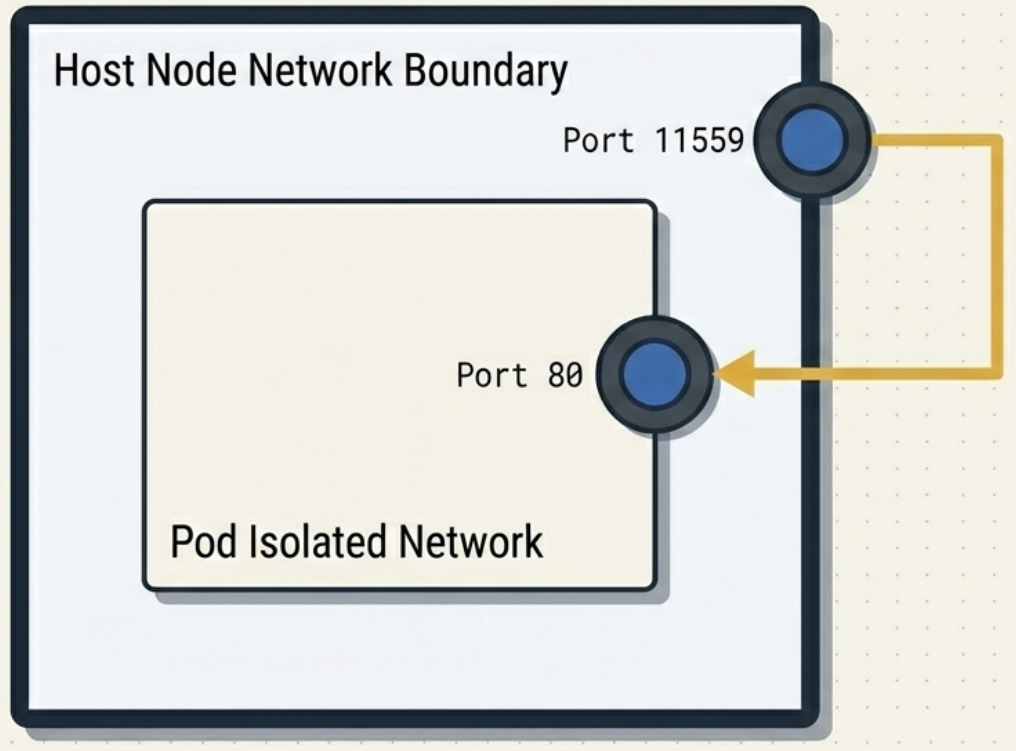
# DaemonSet container specports:  - containerPort: 80    hostPort: 11559
# Client Deployment – inject node IP via Downward APIenv:  - name: NODE_IP    valueFrom:      fieldRef:        fieldPath: status.hostIP  - name: DAEMON_URL    value: http://$(NODE_IP):11559
Option 2 – hostNetwork: true: Pod runs in the host network namespace, binding directly to node ports. Client still needs status.hostIP. Higher security risk than hostPort.
Option 3 – Local Service (recommended): Standard Service with internalTrafficPolicy: Local:
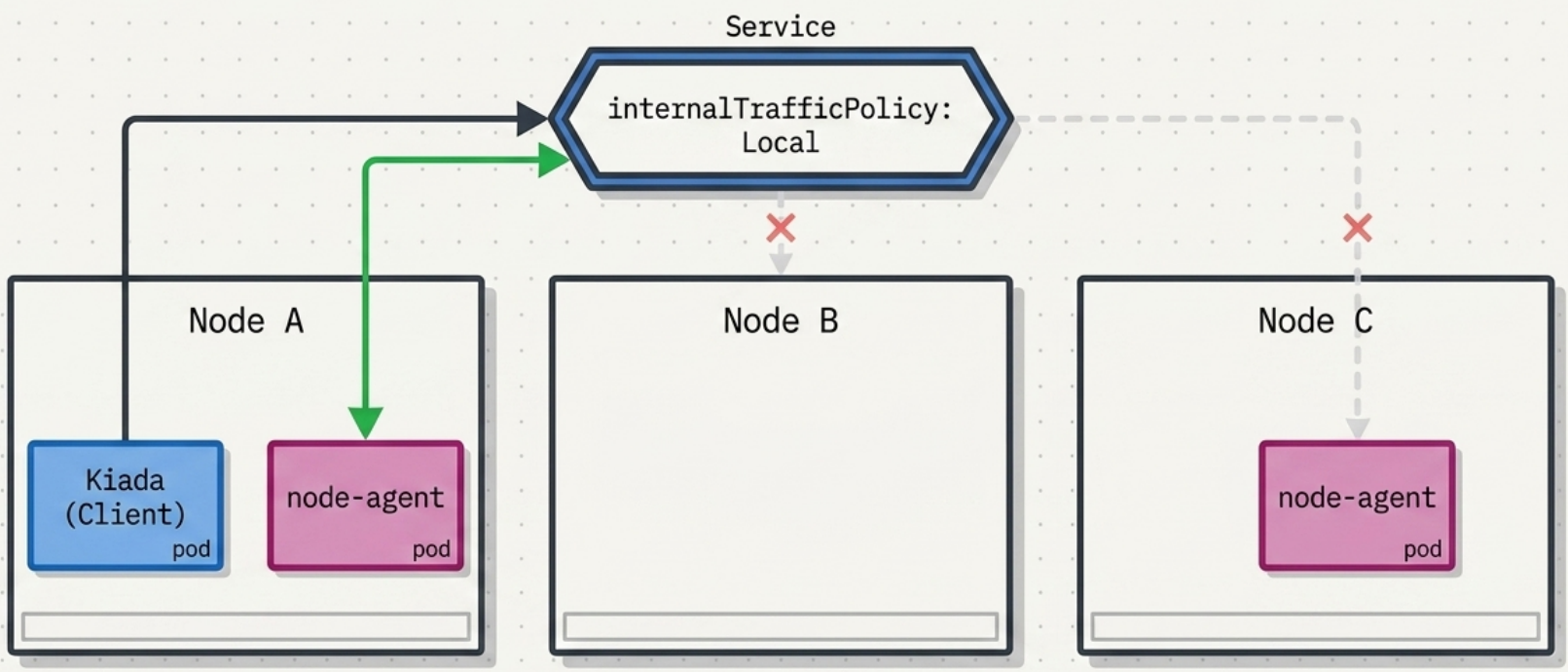
apiVersion: v1kind: Servicespec: internalTrafficPolicy: Local # only routes to Pods on the same node as the client selector: app: node-agent ports: - port: 80hostPort | hostNetwork | Local Service | |
|---|---|---|---|
| Network isolation | Port-level only | None – shares host namespace | Full container isolation |
| Client config | Downward API (status.hostIP) | Downward API (status.hostIP) | Standard DNS name |
| External visibility | Exposed via node IP:port | Exposed via node IP:port | Cluster-internal only |
| Security risk | Minimal | High | Lowest |
StatefulSets
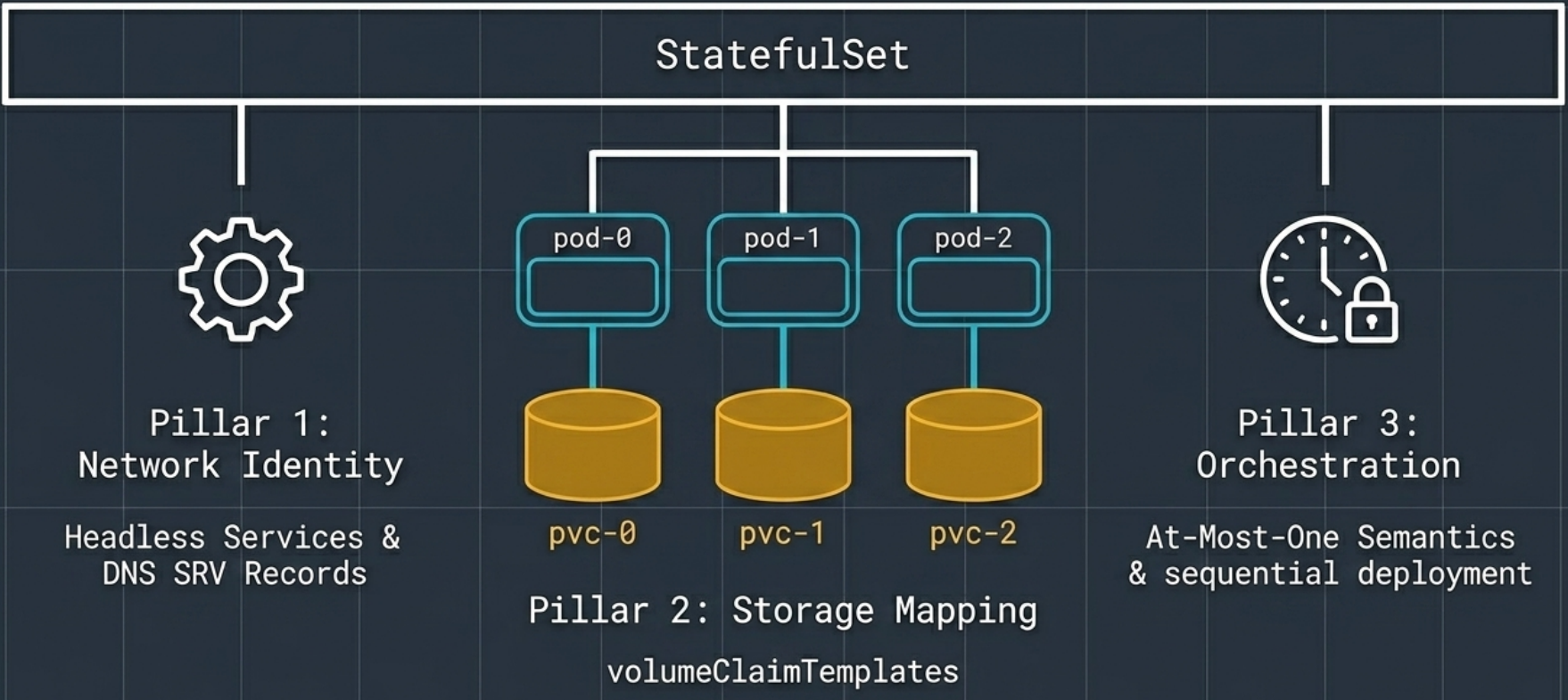
Section titled “StatefulSets”A StatefulSet is the controller for stateful applications – workloads that create and save valuable data. Unlike a Deployment, which treats all Pods as interchangeable, a StatefulSet gives each replica a permanent, predictable identity that survives failures, restarts, rescheduling, and scaling events. This is built on three pillars:
| Pillar | Mechanism | What it provides |
|---|---|---|
| 1 – Network Identity | Headless Service + DNS SRV records | Each pod gets a stable, predictable FQDN (e.g. my-db-0.my-db-headless.default.svc.cluster.local) that survives rescheduling |
| 2 – Storage Mapping | volumeClaimTemplates | One dedicated PVC per replica (pvc-0, pvc-1, pvc-2) – permanently bound to the pod with the same ordinal |
| 3 – Orchestration | At-Most-One semantics + sequential startup | Pods start and stop in strict order; two pods with the same identity can never run simultaneously |
Common stateful workloads: databases (PostgreSQL, MySQL), key-value stores (Redis, etcd), message brokers (Kafka), and any application that persists client session state.
StatefulSet Manifest Template
Section titled “StatefulSet Manifest Template”A StatefulSet is almost always paired with a headless Service (its governing Service). Both are shown here:
# ── 1. Governing headless Service ────────────────────────────────────────────apiVersion: v1kind: Servicemetadata:  name: my-db-headless  namespace: defaultspec:  clusterIP: None # headless – no virtual IP, no load-balancing  selector:    app: my-db  ports:    - name: db      port: 5432  publishNotReadyAddresses: true # register DNS immediately – required for bootstrap quorum---# ── 2. Optional: standard client Service (only routes to Ready pods) ─────────apiVersion: v1kind: Servicemetadata:  name: my-db  namespace: defaultspec:  selector:    app: my-db  ports:    - name: db      port: 5432---# ── 3. StatefulSet ────────────────────────────────────────────────────────────apiVersion: apps/v1kind: StatefulSetmetadata:  name: my-db  namespace: defaultspec:  # --- Governing headless Service (provides DNS subdomain for pod hostnames) ---  serviceName: my-db-headless # must match the headless Service name above
  replicas: 3
  # --- Selector (must match spec.template.metadata.labels – immutable after creation) ---  selector:    matchLabels:      app: my-db
  # --- Pod creation / teardown order ---  podManagementPolicy: OrderedReady # default: sequential start/stop with readiness gate  # podManagementPolicy: Parallel    # all pods start/stop simultaneously (use for bootstrap deadlock workaround)
  # --- Update strategy ---  updateStrategy:    type: RollingUpdate # default; reverse-ordinal, one pod at a time    rollingUpdate:      partition: 0 # default: 0 (full rollout); increase to stage/canary      # partition: 2             # only pods with ordinal >= 2 are updated (canary = replicas-1)      # partition: 3             # equal to replicas = stage without triggering (dry-run updates)  minReadySeconds: 10 # cooldown between successive pod replacements
  # --- PVC lifecycle policy (defaults: both Retain – safest option) ---  persistentVolumeClaimRetentionPolicy:    whenScaled: Retain # keep PVCs when scaling down (reattaches on scale-up)    whenDeleted: Retain # keep PVCs when StatefulSet is deleted    # whenScaled: Delete         # ⚠ auto-deletes PVCs on scale-down – risk of data loss
  template:    metadata:      labels:        app: my-db # must match spec.selector.matchLabels above
    spec:      # --- Stable hostname used in peer-discovery connection strings ---      # Each pod's FQDN: <pod-name>.<serviceName>.<namespace>.svc.cluster.local      # e.g. my-db-0.my-db-headless.default.svc.cluster.local
      containers:        - name: db          image: postgres:16          imagePullPolicy: IfNotPresent
          ports:            - name: db              containerPort: 5432
          # --- Environment (inject pod identity for self-aware clustering) ---          env:            - name: POD_NAME              valueFrom:                fieldRef:                  fieldPath: metadata.name # e.g. "my-db-1"            - name: POSTGRES_PASSWORD              valueFrom:                secretKeyRef:                  name: my-db-secret                  key: password
          # --- Resource limits (always set on stateful workloads) ---          resources:            requests:              cpu: "250m"              memory: "512Mi"            limits:              cpu: "1"              memory: "1Gi"
          # --- Mount the per-replica volume (provided by volumeClaimTemplates below) ---          volumeMounts:            - name: data # must match volumeClaimTemplates[].metadata.name              mountPath: /var/lib/postgresql/data
          livenessProbe:            exec:              command: ["pg_isready", "-U", "postgres"]            initialDelaySeconds: 30            periodSeconds: 10
          readinessProbe:            exec:              command: ["pg_isready", "-U", "postgres"]            initialDelaySeconds: 5            periodSeconds: 5
      # --- Allow time to flush writes and close connections before SIGKILL ---      terminationGracePeriodSeconds: 60
  # ── volumeClaimTemplates ──────────────────────────────────────────────────  # The StatefulSet controller creates one PVC per replica from this template.  # Naming: <template-name>-<pod-name>  →  data-my-db-0, data-my-db-1, data-my-db-2  # PVCs are NOT deleted when pods are deleted or scaled down (Retain policy above).  volumeClaimTemplates:    - metadata:        name: data # referenced in container.volumeMounts[].name      spec:        accessModes: ["ReadWriteOnce"] # one node at a time – standard for block storage        storageClassName: fast-ssd # omit to use cluster default StorageClass        resources:          requests:            storage: 20Gi
Controller Architecture
Section titled “Controller Architecture”A StatefulSet is a standard Kubernetes API resource managed by a control loop – but with a key architectural difference from Deployments: the StatefulSet controller directly manages its own self-healing, scaling, and rolling updates. It does not delegate to an underlying ReplicaSet.
| Controller | Self-healing via | Notes |
|---|---|---|
| Deployment | ReplicaSet controller | Two-layer architecture |
| StatefulSet | Direct management | Single-layer; enables strict ordering guarantees |
StatefulSets vs. Deployments
Section titled “StatefulSets vs. Deployments”| Capability | Deployment | StatefulSet |
|---|---|---|
| Pod identity | Random suffix (my-app-x7k2p) | Stable ordinal (my-app-0, my-app-1) |
| Pod startup order | Parallel (all at once) | Sequential (one at a time) |
| Scale-down order | Priority-based heuristic | Reverse ordinal (highest first) |
| Storage per Pod | Shared or none | Unique PVC per replica |
| Network identity | Single ClusterIP Service | Individual DNS hostnames via headless Service |
| Race conditions | Can occur during parallel startup | Prevented by sequential ordering |
The Sticky ID
Section titled “The Sticky ID”Every StatefulSet Pod has a sticky ID – the combination of its persistent name, DNS hostname, and volume binding. The StatefulSet controller guarantees this identity survives pod failures, restarts, rescheduling onto different nodes, and scaling events.
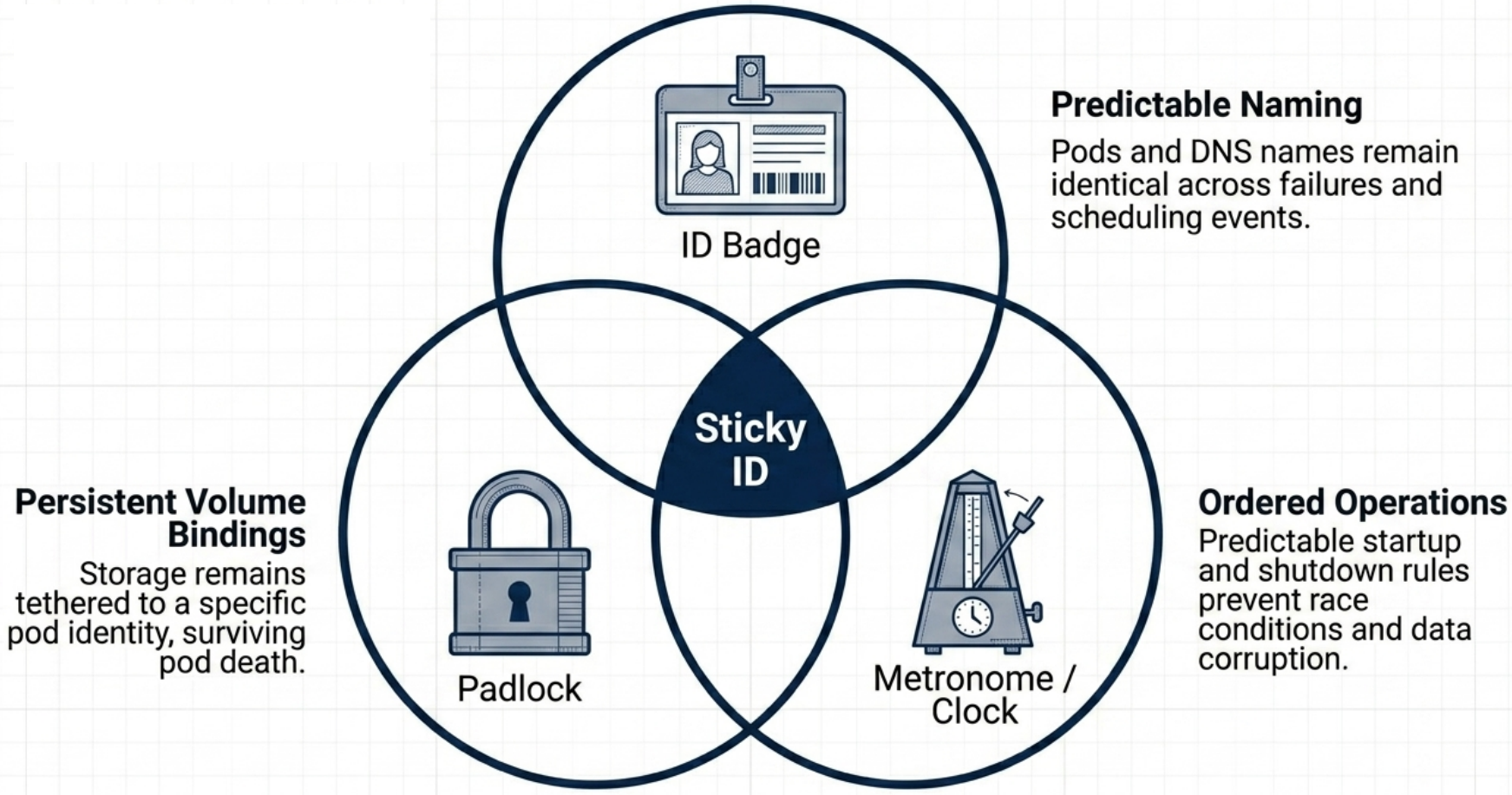
If replica my-db-1 crashes, its replacement is created with:
- The exact same name:
my-db-1 - The exact same DNS hostname:
my-db-1.my-db-headless.default.svc.cluster.local - Reconnected to the exact same PVC:
data-my-db-1
Pod Naming
Section titled “Pod Naming”Pods receive names using the pattern <StatefulSetName>-<integer>, where the integer is a zero-based ordinal index:
StatefulSet: my-db replicas: 3→ my-db-0→ my-db-1→ my-db-2Ordered Lifecycle
Section titled “Ordered Lifecycle”StatefulSets enforce strict sequential ordering across all lifecycle operations – creation, scaling, updates, and shutdown. This is what prevents the race conditions common in Deployments, where all Pods start simultaneously.
Startup Sequence
Section titled “Startup Sequence”Pods are created one at a time, in ascending ordinal order. The controller starts my-db-0 and waits for it to be Running and Ready (all containers active, readiness probe passing) before starting my-db-1:
# Watch sequential startupkubectl get pods --watch# my-db-0 0/1 Pending → ContainerCreating → Running ← must be Ready first# my-db-1 0/1 (creation starts only after my-db-0 is Ready)# my-db-2 0/1 (creation starts only after my-db-1 is Ready)In practice, each Pod can take ~30 seconds depending on container init time and storage attachment speed.
Scaling
Section titled “Scaling”| Direction | Order | Rule |
|---|---|---|
| Scale up (3 → 5) | Ascending: my-db-3 first, then my-db-4 | Each new Pod must reach Running+Ready before the next starts |
| Scale down (5 → 3) | Descending: my-db-4 first, then my-db-3 | Each Pod must fully terminate before the next is removed |
Eliminating parallel terminations is critical for clustered stateful workloads – simultaneous shutdowns can break consensus algorithms (e.g., Raft, Paxos) or cause data loss.
# Scale up – Pods are created sequentially with stable nameskubectl scale statefulset <name> --replicas=5
# Scale down – Pods are terminated in reverse-ordinal orderkubectl scale statefulset <name> --replicas=3
# Watch the sequential transitions in real timekubectl get pods -wPod Management Policy
Section titled “Pod Management Policy”The default OrderedReady policy enforces all sequential rules. Switching to Parallel speeds up scaling at the cost of ordering guarantees:
spec: podManagementPolicy: Parallel # default: OrderedReady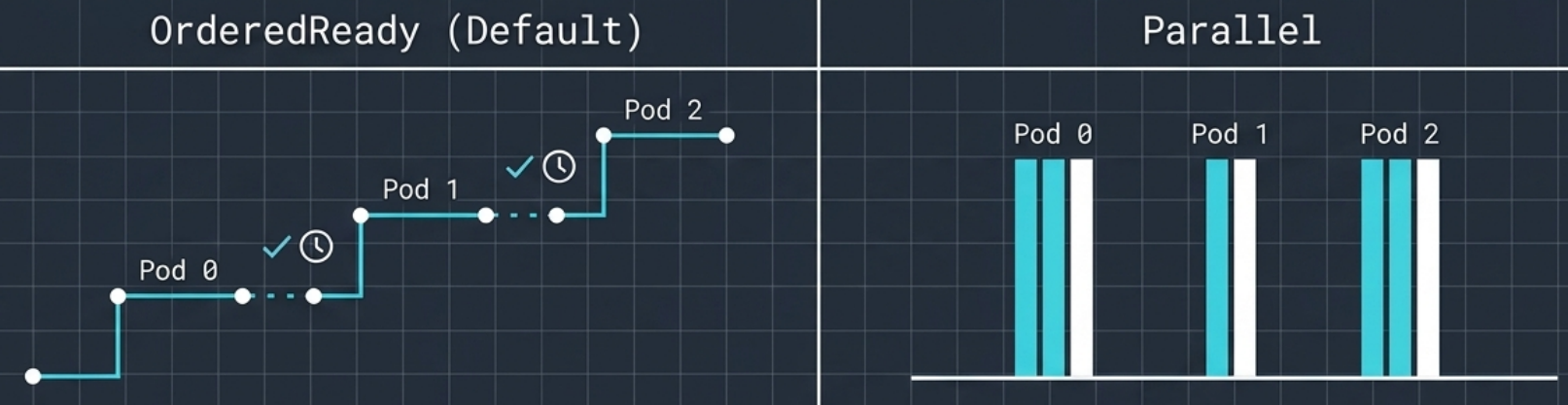
| Policy | Scaling behaviour | Rollout behaviour |
|---|---|---|
OrderedReady | Sequential – one at a time | Sequential reverse-ordinal |
Parallel | Simultaneous – all at once | Still sequential reverse-ordinal |
Bootstrap deadlock under OrderedReady: If the first Pod (my-db-0) fails its readiness probe while waiting for peers to form a quorum (common in databases requiring 2+ members before they become healthy), the controller refuses to start subsequent Pods – a circular dependency. Two resolutions:
- Temporarily switch to
Parallelto bring all Pods up simultaneously, letting them discover each other via DNS - Adjust the readiness probe to check basic process availability (not cluster health) until the quorum is formed, then restore the strict health check
Storage
Section titled “Storage”PVC Templates
Section titled “PVC Templates”Instead of a single shared volume, StatefulSets use spec.volumeClaimTemplates to automatically generate a unique Persistent Volume Claim for each replica. This requires a StorageClass for dynamic provisioning:
spec: volumeClaimTemplates: - metadata: name: data spec: accessModes: ["ReadWriteOnce"] storageClassName: fast-ssd resources: requests: storage: 10GiFor a StatefulSet named my-db with 3 replicas, this provisions:
| Pod | PVC auto-created |
|---|---|
my-db-0 | data-my-db-0 |
my-db-1 | data-my-db-1 |
my-db-2 | data-my-db-2 |
PVC naming pattern: <volumeClaimTemplate-name>-<StatefulSetName>-<ordinal>
Decoupled Lifecycle
Section titled “Decoupled Lifecycle”Pods and their PVCs have completely independent lifecycles – volumes outlive Pods:
| Event | Pod | PVC |
|---|---|---|
| Pod crashes | Deleted, then recreated with same name | Unaffected – stays Bound |
Scale down (my-db-2 removed) | Pod terminated | data-my-db-2 stays Bound (shows Used by: <none>) |
Scale back up (my-db-2 recreated) | New my-db-2 Pod starts | Automatically reattaches to existing data-my-db-2 |
| StatefulSet deleted | Pods removed | PVCs remain – must be deleted manually |
PVC Retention Policy
Section titled “PVC Retention Policy”If your workload does not need to preserve data after scale-down or deletion, you can automate PVC cleanup:
spec: persistentVolumeClaimRetentionPolicy: whenScaled: Delete # auto-delete PVCs when scaling down whenDeleted: Retain # keep PVCs when the StatefulSet itself is deleted| Field | Retain (default) | Delete |
|---|---|---|
whenScaled | PVCs survive scale-down; reattached on scale-up | PVCs permanently deleted on scale-down |
whenDeleted | PVCs survive StatefulSet deletion | PVCs deleted along with the StatefulSet |
Data Seeding
Section titled “Data Seeding”The correct approach is a dedicated, single-run importer Pod with restartPolicy: OnFailure. It connects to the primary replica via the headless Service’s SRV DNS and imports data once. The database’s internal replication propagates it to all secondaries automatically.
Peer Discovery
Section titled “Peer Discovery”Stateful clustered workloads (databases, consensus systems) need replicas to communicate directly with specific peers, bypassing load balancers. StatefulSets use a headless Service as their governing Service to enable this.
Headless Service
Section titled “Headless Service”A headless Service has spec.clusterIP: None – it has no virtual IP and performs no load-balancing. Instead, it registers individual DNS records for each Pod directly:
apiVersion: v1kind: Servicemetadata: name: my-db-headlessspec: clusterIP: None # ← disables the ClusterIP "head" selector: app: my-db ports: - port: 5432Declare it as the governing Service in the StatefulSet via spec.serviceName:
spec: serviceName: my-db-headless # this headless Service manages the DNS subdomainpublishNotReadyAddresses: By default, DNS records are only registered after a Pod passes its readiness probe. For distributed databases that must discover peers before they can become Ready (e.g., bootstrapping a MongoDB quorum), add this field to the headless Service:
spec: clusterIP: None publishNotReadyAddresses: true # register DNS immediately, even for unready PodsDual-service design pattern: Production stateful deployments commonly pair two Services:
| Service | Type | Purpose |
|---|---|---|
| Governing headless Service | clusterIP: None + publishNotReadyAddresses: true | Internal peer discovery – Pods find each other during bootstrap |
| Standard client Service | ClusterIP or LoadBalancer | Client traffic – only routes to fully Ready Pods |
DNS Hostnames
Section titled “DNS Hostnames”The combination of a headless Service and a StatefulSet generates a fully predictable FQDN for every replica:
<pod-name>.<governing-service-name>.<namespace>.svc.cluster.localFor my-db + governing service my-db-headless in the default namespace:
| Pod | FQDN |
|---|---|
my-db-0 | my-db-0.my-db-headless.default.svc.cluster.local |
my-db-1 | my-db-1.my-db-headless.default.svc.cluster.local |
my-db-2 | my-db-2.my-db-headless.default.svc.cluster.local |
Under the Hood: DNS Records
Section titled “Under the Hood: DNS Records”A headless Service used with any pod selector returns the IPs of matching pods when queried – but that’s all. The per-pod hostname DNS records (<pod-name>.<service>.<namespace>.svc.cluster.local) are a StatefulSet-exclusive feature:
| Setup | DNS behaviour |
|---|---|
| Headless Service (standalone, no StatefulSet) | Service name → list of current Pod IPs (A records). No per-pod hostname records. |
| Headless Service as governing Service of a StatefulSet | Service name → list of Pod IPs AND individual A records per pod, addressable by stable hostname |
This per-pod hostname record is what gives StatefulSet Pods their stable network identity. Deleting and rescheduling my-db-0 onto a different node updates the A record to the new IP – clients using the hostname never need to know the IP changed.
When a client queries the headless Service name, cluster DNS returns the full topology:
- SRV records – one per active Pod matching the selector; maps the headless Service hostname to individual Pod FQDNs
- A records – each individual Pod hostname resolves to its current cluster IP
# Verify from inside the clusterdig SRV my-db-headless.default.svc.cluster.local# Answer section: Pod FQDNs# Additional section: Pod FQDNs → current cluster IPsRolling Updates
Section titled “Rolling Updates”Reverse-Ordinal Progression
Section titled “Reverse-Ordinal Progression”StatefulSet rollouts always proceed from the highest ordinal downward to 0, one Pod at a time:
# Rollout order for my-db with 3 replicas:1. Terminate + replace my-db-2 → wait for Running+Ready2. Terminate + replace my-db-1 → wait for Running+Ready3. Terminate + replace my-db-0If a newly updated replica fails its readiness check, the rollout halts immediately – healthy, older-version replicas continue serving traffic across the rest of the cluster.
Staged Rollouts with partition
Section titled “Staged Rollouts with partition”The partition field gates which Pods receive the update. Only Pods whose ordinal is greater than or equal to the partition value are updated:
partition value | Effect |
|---|---|
Equal to or higher than replicas | Stage without triggering – template is updated internally, zero pods are replaced |
replicas - 1 | Canary – only the highest-ordinal Pod is updated |
0 (default) | Full rollout – all Pods are updated |
Workflow:
# 1. Stage: set partition = replicas to update the template without triggering any replacementkubectl patch sts my-db -p '{"spec":{"updateStrategy":{"rollingUpdate":{"partition":3}}}}'
# 2. Canary: lower to replicas-1 to update only the highest-ordinal Podkubectl patch sts my-db -p '{"spec":{"updateStrategy":{"rollingUpdate":{"partition":2}}}}'
# 3. Verify the canary, then complete: set partition to 0 to roll out all remaining Podskubectl patch sts my-db -p '{"spec":{"updateStrategy":{"rollingUpdate":{"partition":0}}}}'
Partition safety – what happens if you delete a Pod while partitioned:
| Pod’s ordinal vs partition | Pod deleted by you | Replacement uses |
|---|---|---|
| Below partition (old version) | kubectl delete pod my-db-0 | Old template – partition protects it |
| Above or equal to partition (new version) | kubectl delete pod my-db-2 | New template |
Observing partition state via .status:
kubectl get sts my-db -o yaml# status:# replicas: 3 – total pods# readyReplicas: 3 – pods passing readiness probes# currentReplicas: 2 – pods on the OLD revision# updatedReplicas: 1 – pods on the NEW revision# currentRevision: my-db-6c48bdd8df# updateRevision: my-db-6945968d9Update Strategies
Section titled “Update Strategies”| Strategy | Behaviour | Use when |
|---|---|---|
RollingUpdate (default) | Replaces Pods one at a time, reverse-ordinal, with readiness gate | Standard controlled rollouts |
OnDelete | Controller only replaces a Pod after you manually delete it | Full manual control; surgical canary testing on individual replicas |
spec: updateStrategy: type: OnDelete # you control when each Pod is replaced by deleting it manuallyWhat makes OnDelete different from RollingUpdate:
- Any order – you are not forced to delete in reverse-ordinal order. You can update
my-db-0first, thenmy-db-2, thenmy-db-1if your workload requires it - Any pace – pause for minutes, hours, or days between individual pod updates
- Readiness is your responsibility – if you delete a pod and its replacement fails readiness, the controller doesn’t block you from deleting the next pod. You decide whether to proceed
- Rollback is also semi-automatic –
kubectl rollout undoreverts the template, but you must manually delete each pod to apply the older template. Nothing happens automatically
Revision History and Rollbacks
Section titled “Revision History and Rollbacks”Unlike Deployments (which track history via secondary ReplicaSets), StatefulSets store update history in ControllerRevision objects – immutable snapshots of the Pod template at each revision point:
# Monitor rollout progress in real time (hangs if any Pod fails readiness)kubectl rollout status sts <name>
# View revision historykubectl rollout history sts <name>
# Inspect the underlying ControllerRevision objectskubectl get controllerrevisions
# Roll back to the previous revisionkubectl rollout undo sts <name>
# Roll back to a specific revision numberkubectl rollout undo sts <name> --to-revision=<number>
Rollbacks follow the same update strategy as forward updates – reverse-ordinal, one Pod at a time, with a readiness gate. Rolling updates do not support maxSurge or maxUnavailable – exactly one Pod is replaced at a time.
minReadySeconds: Add a cooldown delay between individual Pod replacements. The controller waits this many seconds after a Pod becomes Ready before proceeding to the next:
spec: minReadySeconds: 30 # wait 30 seconds after each Pod is Ready before replacing the nextFailure Scenarios
Section titled “Failure Scenarios”Clean Pod Failures
Section titled “Clean Pod Failures”When a StatefulSet Pod crashes or is manually deleted, the controller schedules a replacement with the same name on any available node and reconnects it to the same PVC:
# Simulate a failurekubectl delete pod my-db-0
# Watch the recoverykubectl get pods --watch# my-db-0   Terminating → Pending → ContainerCreating → Running
# Confirm the same volume is reattachedkubectl describe pod my-db-0 | grep ClaimName# ClaimName: data-my-db-0
At-Most-One Semantics and Node Failures
Section titled “At-Most-One Semantics and Node Failures”StatefulSets enforce at-most-one execution: two Pods with the same name cannot run concurrently in the same namespace. When a node goes NotReady, its Pods transition to Terminating – but the StatefulSet controller deliberately refuses to automatically schedule replacements. The original containers on the unreachable node are still running; creating a replacement would violate at-most-one, risking two Pods writing to the same volume simultaneously.
To relocate a Pod after confirming the node is truly offline:
kubectl delete pod <pod-name> --force --grace-period=0Scheduling deadlocks after force deletion:
| Storage type | Symptom | Resolution |
|---|---|---|
| Local volumes | Pod stuck Pending – FailedScheduling: volume node affinity conflict | Node must come back online; or delete Pod + PVC if the app can rebuild state from peers |
| Network-attached volumes | Pod stuck ContainerCreating – FailedAttachVolume: Multi-Attach error | Volume still attached to dead node; restore connectivity, or delete Pod + PVC if app supports replication from scratch |
Safe Decommissioning
Section titled “Safe Decommissioning”Deleting a StatefulSet object directly does not terminate Pods in an orderly sequence and does not clean up storage. Always follow this protocol:
# Step 1: Scale to zero – triggers safe, sequential, reverse-ordinal shutdownkubectl scale sts my-db --replicas=0
# Step 2: Delete the StatefulSet controller objectkubectl delete sts my-db
# Step 3: Delete the governing headless Servicekubectl delete svc my-db-headless
# Step 4: Manually delete PVCs to release backend storage (prevents cloud billing surprises)kubectl delete pvc data-my-db-0 data-my-db-1 data-my-db-2
# Step 5: Delete the StorageClass if it is no longer neededkubectl delete sc fast-ssdOperators
Section titled “Operators”StatefulSets automate the infrastructure layer – stable naming, ordered lifecycle, PVC binding, and rolling updates. They cannot handle application-level operational tasks:
- Reconfiguring cluster membership when a database replica is scaled out or removed
- Triggering leader re-election after a node failure
- Running schema migrations before a version upgrade
- Bootstrapping quorum in a fresh cold-start scenario
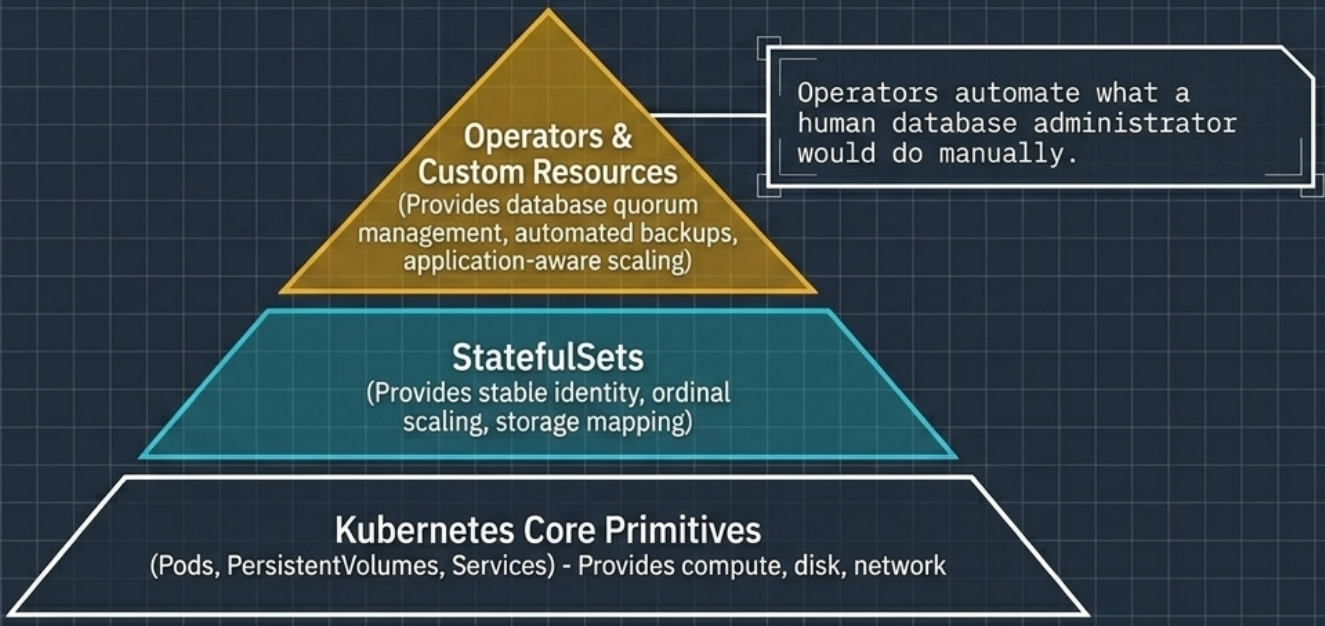
A Kubernetes Operator is an application-specific custom controller that encodes these operational procedures in code. Operators are typically built by the same team that develops the software – they have the deepest domain knowledge on how to deploy, scale, and recover that specific application.
The Operator Pattern
Section titled “The Operator Pattern”Operators extend the Kubernetes API by registering Custom Resource Definitions (CRDs) – new object types specific to the application (e.g., MongoDBCommunity, PostgresCluster, KafkaCluster). Users declare desired state via these custom resources; the Operator’s reconciliation loop provisions and manages the underlying standard Kubernetes objects:
User applies: MongoDBCommunity resource ↓ Kubernetes API stores the CR ↓ Operator watches CR via reconciliation loop ↓ Operator creates: StatefulSet + Services + Secrets + ConfigMaps ↓ Operator continuously monitors child resources and reverts any manual drift back to the CR's declared stateOperator Lifecycle
Section titled “Operator Lifecycle”# Install the Operator (typically via Helm or kubectl apply)kubectl apply -f operator-manifests/
# Declare desired state via custom resource – Operator handles StatefulSet creation,# peer discovery setup, and cluster initialization automaticallykubectl apply -f my-db-cluster.yaml
# Scale by updating the CR field (e.g., members: 5), not kubectl scalekubectl edit mongodbcommunity my-db
# Cleanup – deleting the CR triggers cascading deletion of all child resourceskubectl delete mongodbcommunity my-dbFinding Operators
Section titled “Finding Operators”OperatorHub.io catalogs community and vendor-supported Operators for most major stateful applications (PostgreSQL, Kafka, Elasticsearch, Redis, Cassandra, etcd). The Operator Lifecycle Manager (OLM) handles Operator installation, versioning, and dependency management within the cluster.