
Ingress API (Legacy)
Every web-facing Kubernetes workload needs a way in from the internet. A LoadBalancer Service works, but costs you one cloud load balancer per service - 30 apps means 30 public IPs, 30 billing items, 30 quota slots. Ingress collapses all of that behind a single entry point by operating at Layer 7, where it can read hostnames and URL paths and route accordingly.
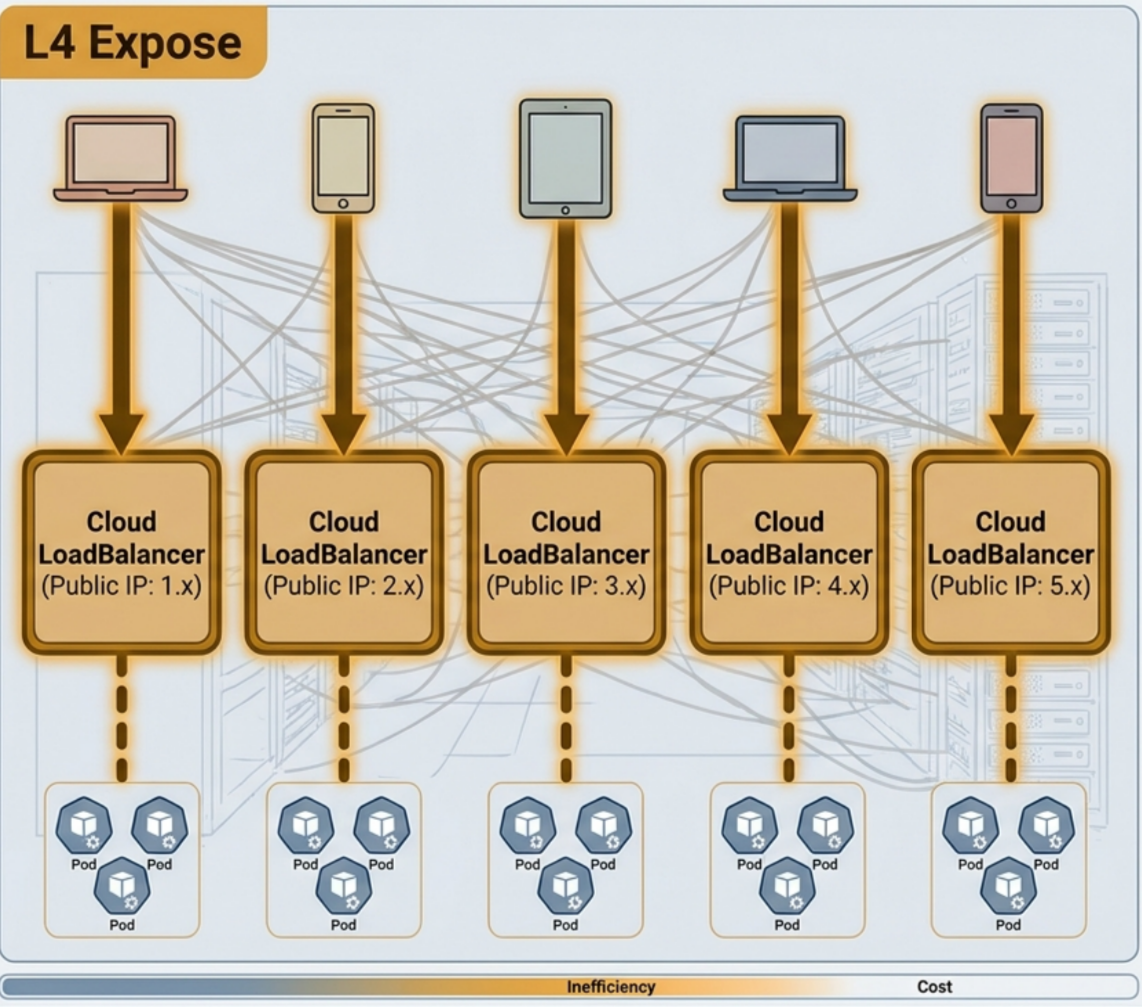
Two generations of Kubernetes ingress infrastructure:
- Ingress API - the original L7 routing mechanism, GA since Kubernetes 1.19. Stable and widely deployed, but monolithic and annotation-heavy for anything beyond basic routing.
- Gateway API - the next-generation replacement, developed by the Kubernetes Network SIG. Role-oriented, multi-protocol (L4-L7), and extensible without vendor annotations.
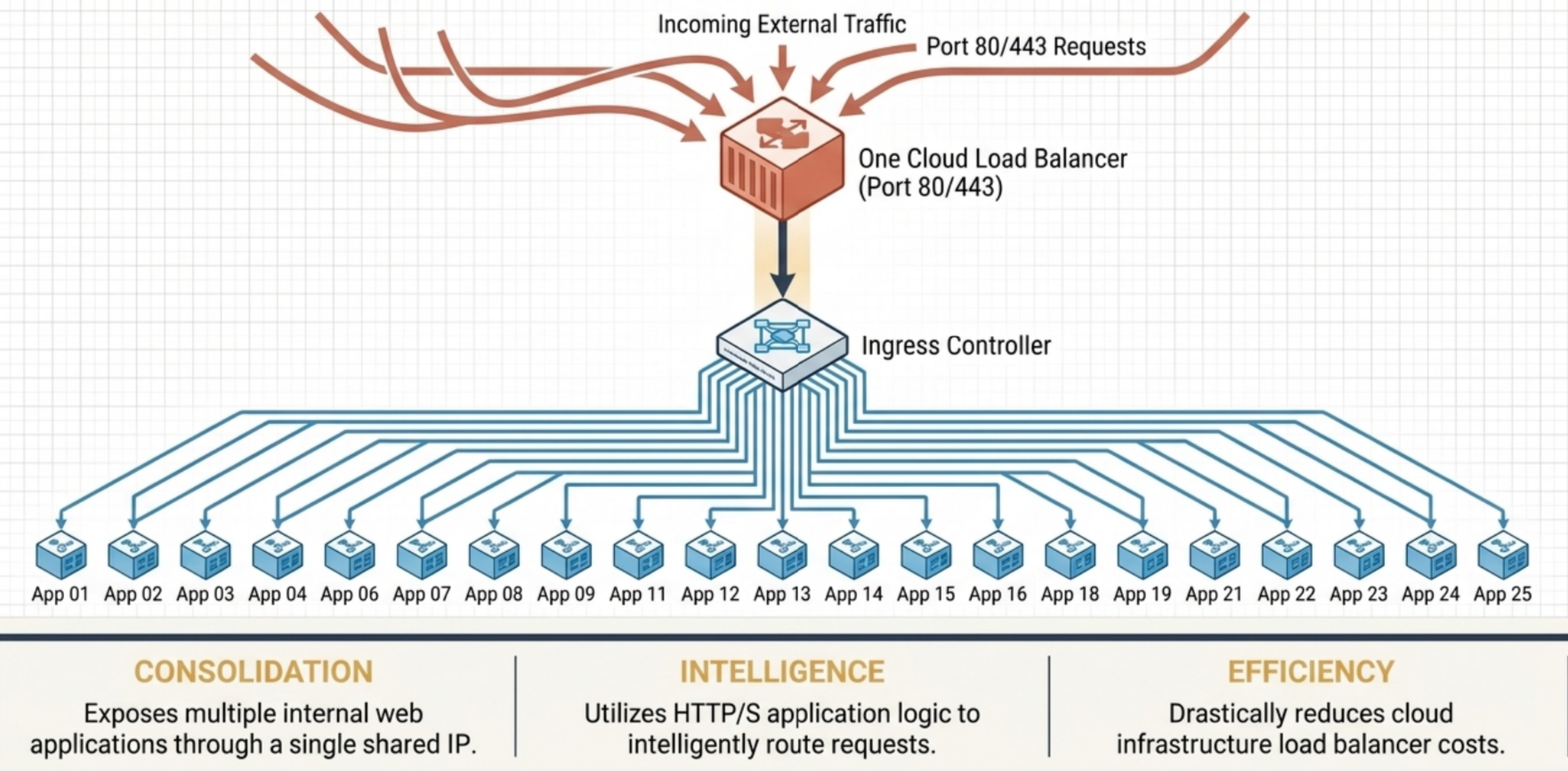
Key terms:
- Ingress (capital I) is the Kubernetes API resource (
networking.k8s.io/v1). Lowercase ingress just means incoming traffic. - Ingress controller is the reconciliation process that watches Ingress objects and configures the underlying proxy. Kubernetes ships none by default - you install one.
- Layer 7 aware: both Ingress and Gateway API operate at the HTTP application layer, routing on hostnames, paths, headers, and cookies - things a Layer 4 TCP balancer cannot see.
Why Ingress Exists
Section titled “Why Ingress Exists”Layer 4 vs. Layer 7 Load Balancing
Section titled “Layer 4 vs. Layer 7 Load Balancing”| Aspect | NodePort | LoadBalancer | Ingress |
|---|---|---|---|
| OSI layer | L4 Transport (TCP/UDP) | L4 Transport (TCP/UDP) | L7 Application (HTTP/HTTPS) |
| Entry point | High port (30000-32767) on every Node IP | Dedicated cloud LB IP per Service | Shared cloud LB IP - port 80/443 for all Services |
| Public IPs | None (use node IP + port) | One per Service | One shared across all Services |
| Routing logic | IP + port only | IP + port only | Host header, URL path, cookies, headers |
| Traffic target | Service ClusterIP (via kube-proxy) | Service ClusterIP (via kube-proxy) | Pod IPs directly (bypasses kube-proxy) |
| TLS termination | Not supported | Not supported | Native via spec.tls |
| Session affinity | Client IP only | Client IP only | Cookie-based (L7 inspection) |
| Cost & friction | Lowest cost - high client friction (raw ports) | High cost - 1:1 mapping limits | Highly efficient - 1-to-many mapping |
| Best use case | Local dev, testing, internal access | Single high-traffic or non-HTTP service | Microservices cluster with multiple web apps |
Ingress Architecture
Section titled “Ingress Architecture”Three distinct layers work together:
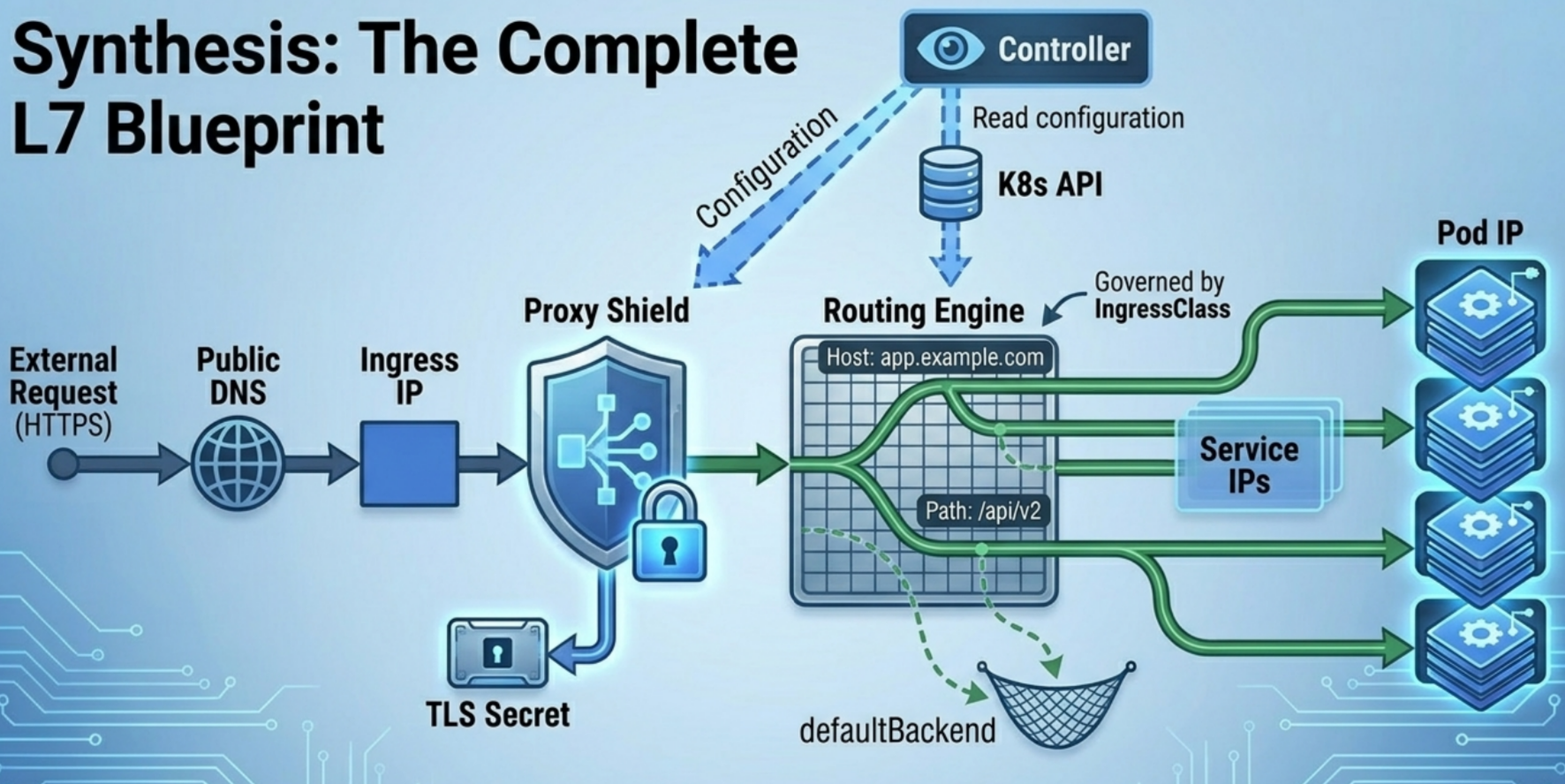
- Ingress API Object - the declarative spec: hostnames, paths, TLS secrets, backend Service references. Stored in the API server, processed by nothing on its own.
- Ingress Controller - the control-plane reconciliation loop. Watches the API server for Ingress, Service, and EndpointSlice changes, synthesizes proxy config, and applies it to the reverse proxy.
- L7 Reverse Proxy - the data-plane engine (Nginx, Envoy, HAProxy, cloud ALB). Physically terminates client connections and forwards HTTP requests to Pod IPs.
flowchart TD
    subgraph ControlPlane["Control Plane"]
        API["☸️ Kubernetes API Server<br/><code>Ingress</code> · <code>Service</code> · <code>EndpointSlice</code>"]
        IC["⚙️ Ingress Controller<br/><i>Reconciliation loop · synthesizes config</i>"]
        API -->|"watch stream"| IC
    end
    subgraph DataPlane["Data Plane"]
        Proxy["🔀 L7 Reverse Proxy<br/><i>Nginx / Envoy / HAProxy / Cloud ALB</i>"]
        Pods["📦 Target Pod(s)<br/><i>Direct Pod IP routing</i>"]
        Proxy -->|"bypasses ClusterIP & kube-proxy"| Pods
    end
    Client["👤 Client"] -->|"HTTP / HTTPS request"| Proxy
    IC -->|"generates / reconfigures"| Proxy
Reconciliation Loop
Section titled “Reconciliation Loop”The controller continuously watches three API resources:
Ingress- routing rules and TLS configService- port mapping and selector metadataEndpointSlice- live Pod IP list
On any change, it merges the Ingress spec with current Pod IPs and reconfigures the proxy. When an Ingress is deleted, the controller removes the corresponding proxy rules and any associated resources.
Controller + Proxy Deployment Topologies
Section titled “Controller + Proxy Deployment Topologies”- Co-located (common open-source setup): Controller and proxy run as two processes in the same Pod (e.g., community Nginx Ingress Controller).
- Cloud-managed (external topology): An in-cluster controller interface talks to cloud infrastructure to provision external load balancers (GKE GLBC, AWS ALB Controller, Azure AGIC).
No Default Controller
Section titled “No Default Controller”Unlike Deployments or ReplicaSets, Kubernetes does not ship a built-in Ingress controller. You must install one:
| Cloud / Tool | Controller |
|---|---|
| GKE | GLBC (GCE L7 Load Balancer) |
| AWS EKS | AWS Load Balancer Controller |
| Azure AKS | AGIC (Application Gateway Ingress Controller) |
| Self-managed | Nginx Ingress (k8s.io/ingress-nginx), Traefik, Contour, Ambassador, HAProxy |
Installing (Local Dev)
Section titled “Installing (Local Dev)”kind:
# kind cluster must map host ports 80/443 and label the control-plane node ingress-ready=truekubectl apply -f https://raw.githubusercontent.com/kubernetes/ingress-nginx/main/deploy/static/provider/kind/deploy.yamlminikube:
minikube addons enable ingressminikube tunnel # required to reach LoadBalancer/Ingress IPs from host OSJourney of Ingress Request
Section titled “Journey of Ingress Request”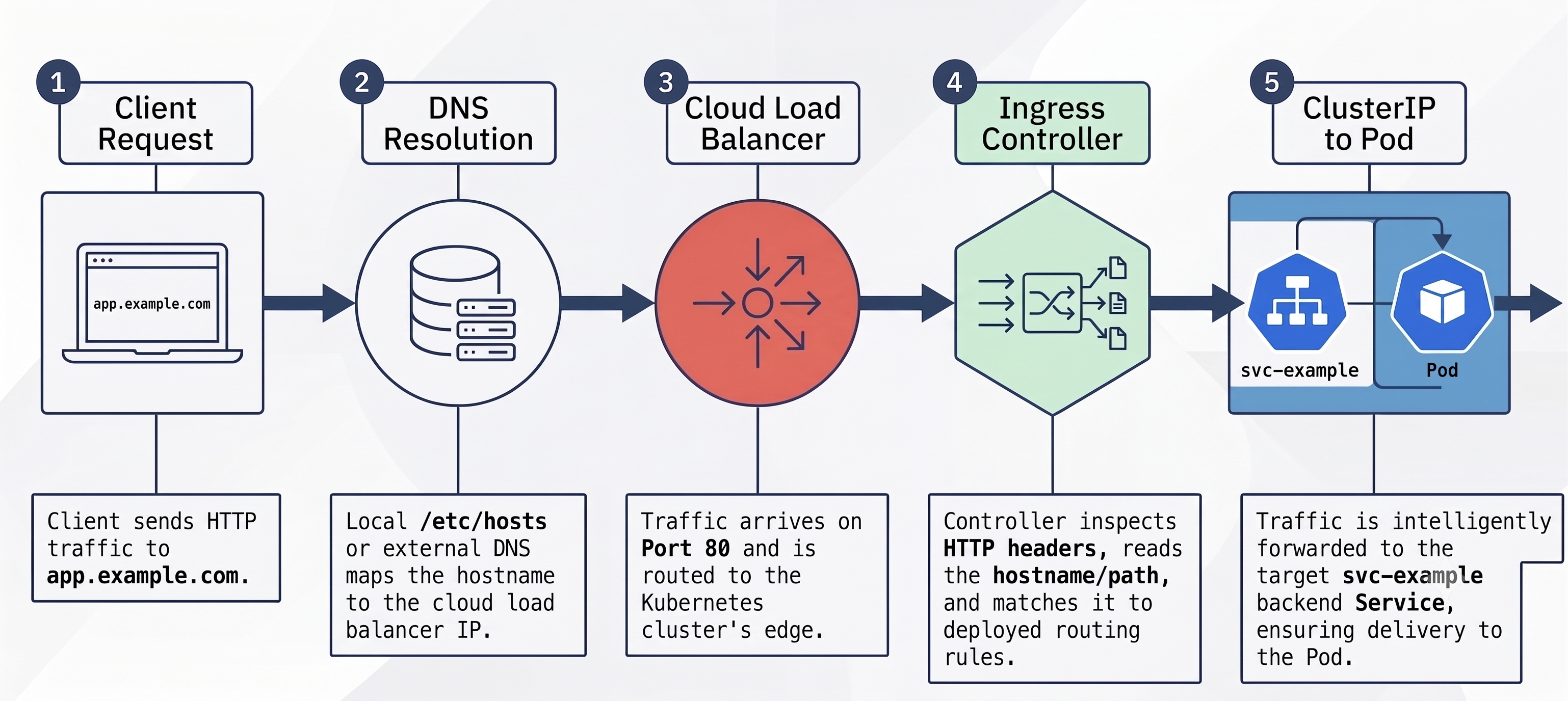
IngressClass
Section titled “IngressClass”IngressClass is a cluster-scoped resource that links an Ingress object to a specific controller implementation. It replaced the legacy kubernetes.io/ingress.class annotation (deprecated).
apiVersion: networking.k8s.io/v1kind: IngressClassmetadata: name: nginxspec: controller: k8s.io/ingress-nginx # unique string identifying the controller processBinding an Ingress to a Class
Section titled “Binding an Ingress to a Class”spec: ingressClassName: nginx # set in the Ingress spec, not metadataControllers ignore Ingress objects that don’t match their class - critical when running multiple controllers in the same cluster.
Setting the Default Class
Section titled “Setting the Default Class”An Ingress without ingressClassName uses the cluster default:
apiVersion: networking.k8s.io/v1kind: IngressClassmetadata: name: nginx annotations: ingressclass.kubernetes.io/is-default-class: "true" # marks as defaultspec: controller: k8s.io/ingress-nginxClass Parameters (Advanced)
Section titled “Class Parameters (Advanced)”Controllers that need structured configuration (beyond annotations) use spec.parameters to reference a CRD instance:
# IngressClass referencing AWS-specific parametersapiVersion: networking.k8s.io/v1kind: IngressClassmetadata: name: aws-albspec: controller: ingress.k8s.aws/alb parameters: apiGroup: elbv2.k8s.aws kind: IngressClassParams name: my-alb-params---# The CRD holding AWS ALB settingsapiVersion: elbv2.k8s.aws/v1beta1kind: IngressClassParamsmetadata: name: my-alb-paramsspec: scheme: internal # internal vs internet-facing ALB ipAddressType: dualstack tags: - key: org value: my-orgkubectl get ingressclasseskubectl describe ingressclass nginxIngress Resources
Section titled “Ingress Resources”Backend Service Preparation
Section titled “Backend Service Preparation”The Ingress controller routes to ClusterIP Services. The Service does not need to be NodePort or LoadBalancer - it just needs to exist:
apiVersion: v1kind: Servicemetadata: name: webspec: type: ClusterIP # Ingress handles external exposure selector: app: web ports: - name: http port: 80 targetPort: 8080 - name: https port: 443 targetPort: 8443Basic Ingress Manifest
Section titled “Basic Ingress Manifest”apiVersion: networking.k8s.io/v1kind: Ingressmetadata: name: web-ingress # name it after the host/domain, not the appspec: ingressClassName: nginx # selects the controller; see IngressClass section rules: - host: app.example.com # matched against HTTP Host header http: paths: - pathType: Prefix path: / backend: service: name: web port: number: 80Imperative Creation
Section titled “Imperative Creation”Fastest way to create an Ingress - useful as a starting point that you then edit for annotations:
# Rule format: <host>/<path>=<service>:<port>kubectl create ingress web-ingress \  --rule="app.example.com/=web:80" \  --rule="app.example.com/api=api-service:8080"
# Generate YAML template without creating (add annotations before applying)kubectl create ingress web-ingress \ --rule="app.example.com/=web:80" \ --dry-run=client -o yaml > ingress.yaml# Edit ingress.yaml to add annotations, then:kubectl apply -f ingress.yaml- HTTP port 80 is implied when no TLS Secret is referenced.
- Specifying
tls=mysecretin the rule adds port 443 automatically. - Annotations (e.g. rewrite-target, affinity) cannot be set via
--ruleflags - always use dry-run + edit for those.
Inspecting Ingress Objects
Section titled “Inspecting Ingress Objects”# List all Ingresses (ing is the official shorthand)kubectl get ing# NAME CLASS HOSTS ADDRESS PORTS AGE# web-ingress nginx app.example.com 11.22.33.44 80 30s
# Full rule breakdown - shows live Pod IPs when healthykubectl describe ing web-ingress# Rules:# Host Path Backends# ---- ---- --------# app.example.com / web:80 (10.244.1.4:8080, 10.244.2.3:8080)# Events:# Normal Sync 5m nginx-ingress-controller Scheduled for sync
# Extract the public IPkubectl get ing web-ingress -o jsonpath='{.status.loadBalancer.ingress[0].ip}'The ADDRESS field may take a few minutes to appear in cloud environments while the load balancer provisions. If it stays empty, the controller is not picking up the Ingress - check ingressClassName and that the controller pod is running.
Endpoint error - most common misconfiguration:
Rules: Host Path Backends ---- ---- -------- app.example.com / web:80 (<error: endpoints "web" not found>)Causes and fixes:
- Service doesn’t exist -
kubectl create service clusterip web --tcp=80:8080 - No matching pods - check Service selector matches Pod labels:
kubectl get ep web - Port mismatch - Service port in Ingress rule must match the Service’s exposed port, not the container port
Always check the Events section at the bottom of kubectl describe ing - Warning events show sync failures.
Routing Rules
Section titled “Routing Rules”Path-Based Routing
Section titled “Path-Based Routing”Route different URL paths under one hostname to different backend Services:
spec: rules: - host: api.example.com http: paths: - path: /orders # Exact: /orders only pathType: Exact backend: service: name: orders port: name: http - path: /catalog # Prefix: /catalog, /catalog/items, etc. pathType: Prefix backend: service: name: catalog port: name: httpPath Matching Types
Section titled “Path Matching Types”pathType | Behaviour | Example |
|---|---|---|
Exact | Case-sensitive exact character match | /foo matches /foo only, not /foo/ or /foobar |
Prefix | Element-by-element match split on / | /foo matches /foo, /foo/bar, /foo/ but NOT /foobar |
ImplementationSpecific | Controller-defined logic (regex, wildcards) | GKE: /foo/* wildcard; Citrix: custom HTTPRoute |
Prefix matching detail - element splitting:
Rule: /foo elements: ["foo"]/foo/bar elements: ["foo", "bar"] -> MATCH (first element = "foo")/foobar elements: ["foobar"] -> NO MATCH ("foobar" != "foo")/foo/ trailing slash ignored -> MATCHA catch-all prefix rule uses / - matches every path.
Multi-Host Consolidation
Section titled “Multi-Host Consolidation”Combine multiple virtual hosts into one Ingress to share a single public IP:
apiVersion: networking.k8s.io/v1kind: Ingressmetadata: name: main-ingressspec: ingressClassName: nginx rules: # Virtual host 1 - host: app.example.com http: paths: - path: / pathType: Prefix backend: service: name: web port: name: http # Virtual host 2 - path-based - host: api.example.com http: paths: - path: /orders pathType: Exact backend: service: name: orders port: name: http - path: /catalog pathType: Prefix backend: service: name: catalog port: name: httpWildcard Host Matching
Section titled “Wildcard Host Matching”The host field accepts *.domain.tld wildcards - one DNS label only:
| Rule host | Matches | Does NOT match |
|---|---|---|
app.example.com | app.example.com | api.example.com, foo.app.example.com |
*.example.com | app.example.com, api.example.com | example.com, foo.app.example.com |
| (omitted) | Any host header | - |
Precedence: exact host rules always win over matching wildcard rules.
Default Backend
Section titled “Default Backend”Traffic that matches no host or path rule goes to the default backend. Without one, the proxy returns HTTP 404:
spec: defaultBackend: # catch-all for unmatched requests service: name: fallback port: name: http rules: - host: app.example.com # ...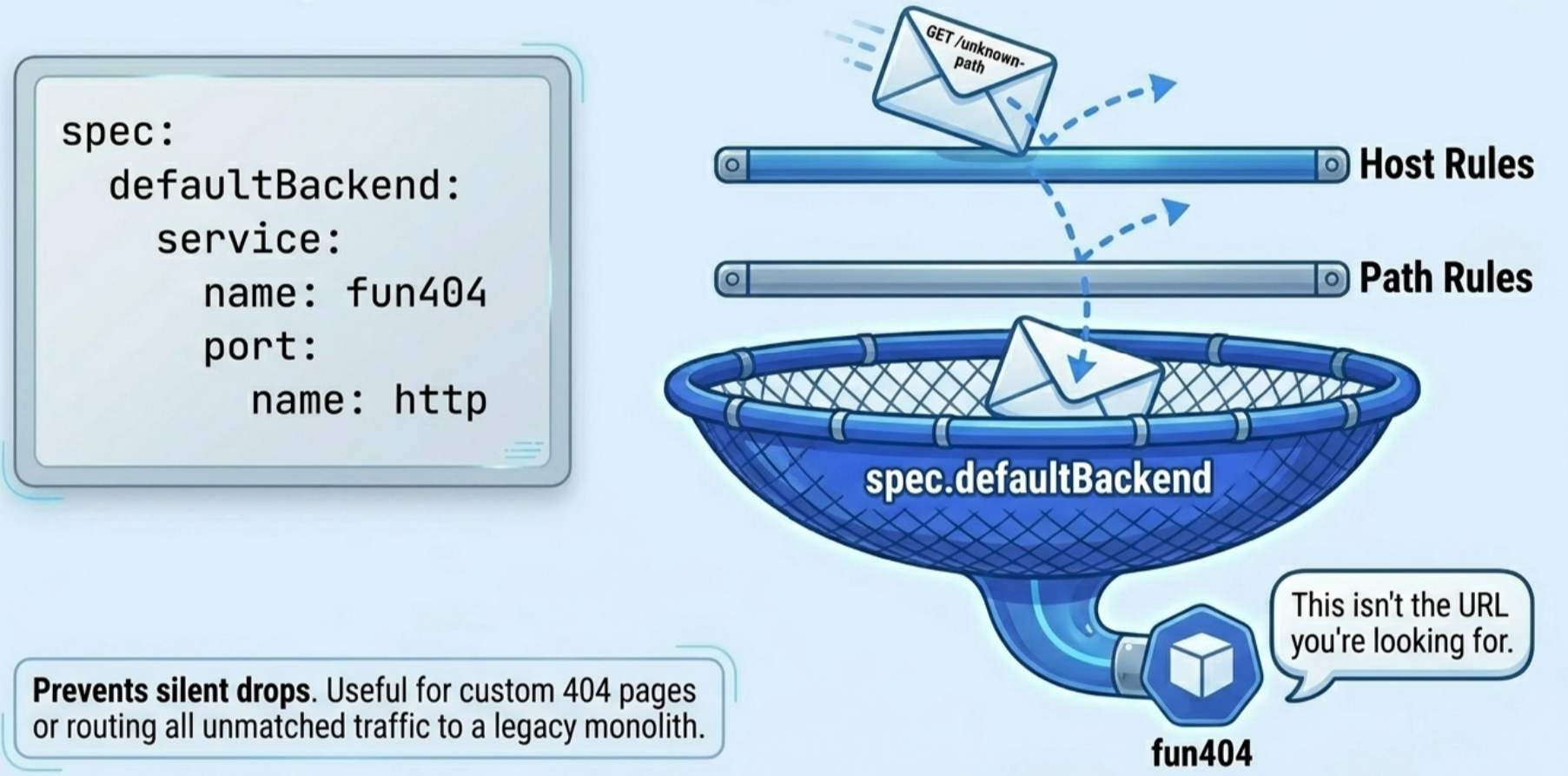
A rules-free Ingress (only defaultBackend, no spec.rules) exposes a single service with full L7 features (TLS, cookie affinity, header rewrites) - useful if you need those without a LoadBalancer Service.
Testing Ingress Locally
Section titled “Testing Ingress Locally”Because Ingress routing is virtual-host-based, querying the raw IP without a Host header will not match any rule.
curl --resolve
Section titled “curl --resolve”Injects a hostname-to-IP mapping into curl’s local DNS cache without touching system files:
# Replace 11.22.33.44 with output of: kubectl get ing -o jsonpath='{.items[0].status.loadBalancer.ingress[0].ip}'curl --resolve app.example.com:80:11.22.33.44 http://app.example.com -v
# Path-based routescurl --resolve api.example.com:80:11.22.33.44 http://api.example.com/orderscurl --resolve api.example.com:80:11.22.33.44 http://api.example.com/catalog/items
/etc/hosts (Browser Testing)
Section titled “/etc/hosts (Browser Testing)”# /etc/hosts (Linux/macOS) or C:\Windows\System32\drivers\etc\hosts (Windows)11.22.33.44 app.example.com api.example.comEnvironment-Specific IP Resolution
Section titled “Environment-Specific IP Resolution”| Cluster type | Address behaviour | Fix |
|---|---|---|
| minikube (VM) | ADDRESS may show localhost - only valid inside VM | Run minikube ip for actual VM IP; run minikube tunnel |
| kind (Docker) | Host ports 80/443 mapped via control-plane node config | Use 127.0.0.1 in --resolve or /etc/hosts |
| Cloud (GKE/EKS/AKS) | Real public IP, may take 1-3 minutes to appear | Wait; verify controller pod is running |
Testing with wget
Section titled “Testing with wget”wget is a useful alternative to curl for quick Ingress path testing, particularly for verifying Exact vs. Prefix pathType behaviour:
# Exact match - returns 200 OKwget app.example.com/api --timeout=5 --tries=1
# Trailing slash with Exact pathType - returns 404 Not Found# Fix: change pathType to Prefix in the Ingress manifestwget app.example.com/api/ --timeout=5 --tries=1
If app.example.com doesn’t resolve locally, add it to /etc/hosts first (see section above).
TLS Termination
Section titled “TLS Termination”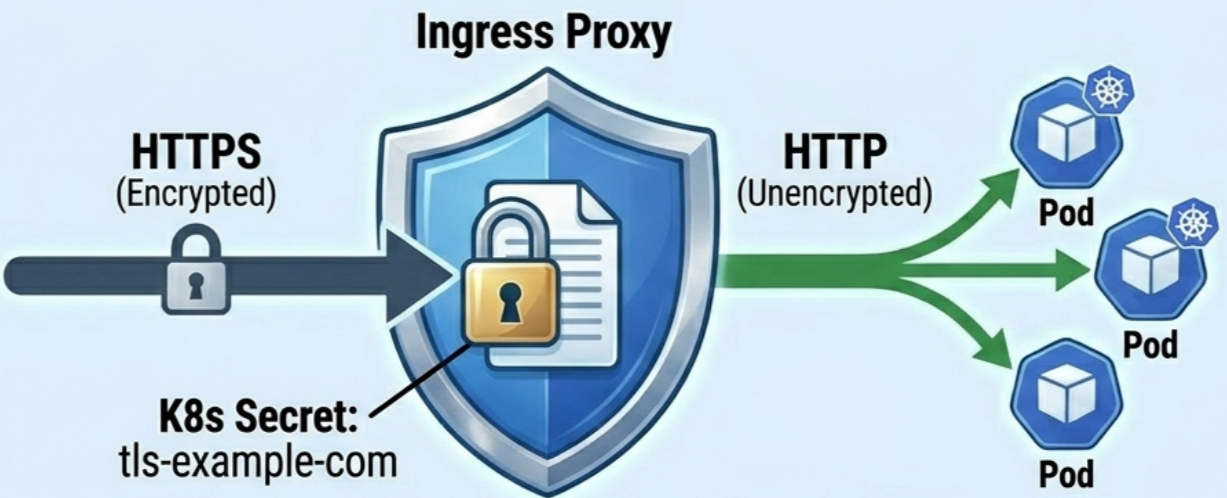
The Ingress proxy decrypts HTTPS at the entry point and forwards plain HTTP to backend Pods. Backend apps need no TLS logic.
Client (HTTPS :443) -> Ingress Proxy (terminates TLS) -> HTTP -> Backend PodStep 1: Create a TLS Secret
Section titled “Step 1: Create a TLS Secret”# Generate a self-signed cert (dev/testing only)openssl req -x509 -newkey rsa:2048 -keyout tls.key -out tls.crt \ -sha256 -days 365 -nodes \ -subj '/CN=*.example.com' \ -addext 'subjectAltName = DNS:*.example.com'
# Store in Kubernetes as type kubernetes.io/tlskubectl create secret tls tls-example-com --cert=tls.crt --key=tls.keyThe Secret contains tls.crt (PEM certificate) and tls.key (PEM private key).
Step 2: Reference in the Ingress
Section titled “Step 2: Reference in the Ingress”apiVersion: networking.k8s.io/v1kind: Ingressmetadata: name: main-ingressspec: tls: - secretName: tls-example-com # references the Secret hosts: # must match cert CN/SAN - app.example.com - api.example.com rules: - host: app.example.com http: paths: - path: / pathType: Prefix backend: service: name: web port: name: httpspec.tls is an array - attach multiple Secrets for different domain/cert combinations in one Ingress.
Step 3: Test
Section titled “Step 3: Test”curl https://app.example.com --resolve app.example.com:443:11.22.33.44 -k -v# -k skips cert validation for self-signed; remove -k in productionTLS Termination vs. TLS Passthrough
Section titled “TLS Termination vs. TLS Passthrough”| TLS Termination | TLS Passthrough | |
|---|---|---|
| Decryption at | Ingress proxy | Backend Pod |
| Pod traffic | Unencrypted HTTP | Encrypted HTTPS |
| Cert management | Centralized in K8s Secret | Per-pod (volumes, app code) |
| L7 inspection | Full (path, cookies, headers) | None (proxy can’t see payload) |
| API support | Standard spec.tls field | Vendor annotations only (e.g. nginx.ingress.kubernetes.io/ssl-passthrough: "true") |
| Controller flag | Default enabled | Must enable --enable-ssl-passthrough in Nginx |
Use TLS termination unless you specifically need end-to-end encryption to the Pod.
Production DNS and TLS Automation
Section titled “Production DNS and TLS Automation”In a cloud cluster, two tools eliminate manual certificate and DNS management entirely:
- ExternalDNS - watches
IngressandServiceresources, automatically creates and updates A/CNAME records in your DNS provider (Route53, Cloud DNS, Cloudflare, etc.) to point to the load balancer IP. - cert-manager - manages the full lifecycle of TLS certificates: requests, DNS-01/HTTP-01 ACME challenges, renewal, and storing certs as Kubernetes Secrets.
cert-manager
Section titled “cert-manager”# Install cert-manager (Helm)helm repo add jetstack https://charts.jetstack.iohelm install cert-manager jetstack/cert-manager \ --namespace cert-manager --create-namespace \ --set crds.enabled=trueDefine a ClusterIssuer for Let’s Encrypt (shared across all namespaces):
apiVersion: cert-manager.io/v1kind: ClusterIssuermetadata: name: letsencrypt-prodspec: acme: server: https://acme-v02.api.letsencrypt.org/directory email: ops@example.com privateKeySecretRef: name: letsencrypt-prod-account-key solvers: - http01: # HTTP-01: valid for non-wildcard, publicly reachable ingress: ingressClassName: nginx # For wildcard certs use dns01 solver instead: # - dns01: # route53: # region: us-east-1 # hostedZoneID: ZXXXXXXXXXXXXXAnnotate an Ingress to trigger automatic certificate issuance:
apiVersion: networking.k8s.io/v1kind: Ingressmetadata: name: web-ingress annotations: cert-manager.io/cluster-issuer: letsencrypt-prod # triggers cert-managerspec: ingressClassName: nginx tls: - hosts: - app.example.com secretName: app-example-com-tls # cert-manager populates this rules: - host: app.example.com http: paths: - path: / pathType: Prefix backend: service: name: web port: number: 80cert-manager detects the annotation, creates a Certificate resource, completes the ACME challenge, and stores the cert in app-example-com-tls. The Ingress controller picks it up automatically.
# Monitor certificate lifecyclekubectl get certificateskubectl describe certificate app-example-com-tlskubectl get certificaterequestsExternalDNS
Section titled “ExternalDNS”Automates DNS record creation when Ingress/Service resources appear:
apiVersion: apps/v1kind: Deploymentmetadata: name: external-dns namespace: external-dnsspec: template: spec: containers: - name: external-dns image: registry.k8s.io/external-dns/external-dns:v0.15.1 args: - --source=ingress # also: service, gateway-httproute - --domain-filter=example.com - --provider=aws # or: google, cloudflare, azure - --policy=upsert-only # never delete records - --registry=txt # TXT records for ownership tracking - --txt-owner-id=my-cluster- ExternalDNS reads the
spec.rules[].hostvalues from Ingress resources and creates A records pointing to the load balancer IP. - Use
--source=gateway-httprouteto support Gateway APIHTTPRouteresources. - Scope it with
--domain-filterto avoid touching DNS zones you don’t own. - Use
--policy=upsert-onlyto prevent accidental deletion in production.
Automated Workflow (cert-manager + ExternalDNS together)
Section titled “Automated Workflow (cert-manager + ExternalDNS together)”flowchart TD
S1["1️⃣ Developer creates Ingress<br/><i>Includes hostnames & cert-manager annotation</i>"]
S2["2️⃣ ExternalDNS reads hostnames<br/><i>Creates DNS A record pointing to Load Balancer IP</i>"]
S3["3️⃣ cert-manager starts ACME HTTP-01 challenge<br/><i>Provisions temporary challenge path on Ingress</i>"]
S4["4️⃣ Let's Encrypt validates challenge<br/><i>Verifies domain ownership & issues certificate</i>"]
S5["5️⃣ cert-manager stores certificate<br/><i>Writes cert + private key to Kubernetes TLS Secret</i>"]
S6["6️⃣ Ingress controller mounts Secret<br/><i>TLS terminated · HTTPS live 🔒</i>"]
S1 --> S2
S2 --> S3
S3 --> S4
S4 --> S5
S5 --> S6
Total manual steps: zero after initial setup.
Annotations and Advanced Customisation
Section titled “Annotations and Advanced Customisation”The core Ingress spec is intentionally minimal (spec.rules, spec.tls, spec.defaultBackend, spec.ingressClassName). Advanced proxy features use metadata.annotations with vendor-prefixed keys - controllers ignore annotations not meant for them.
Common Capabilities via Annotations
Section titled “Common Capabilities via Annotations”| Capability | Nginx annotation | Use case |
|---|---|---|
| Cookie session affinity | nginx.ingress.kubernetes.io/affinity: "cookie" | Stateful sessions without client IP dependency |
| Session cookie name | nginx.ingress.kubernetes.io/session-cookie-name: "SID" | Custom cookie name |
| URL rewriting | nginx.ingress.kubernetes.io/rewrite-target: / | Strip /api/v1 prefix before forwarding |
| SSL passthrough | nginx.ingress.kubernetes.io/ssl-passthrough: "true" | End-to-end TLS to pod |
| HTTP auth | nginx.ingress.kubernetes.io/auth-type: basic | Protect endpoints at proxy level |
| HTTPS redirect | nginx.ingress.kubernetes.io/ssl-redirect: "true" | Force HTTP -> HTTPS |
Cookie-Based Session Affinity Example
Section titled “Cookie-Based Session Affinity Example”apiVersion: networking.k8s.io/v1kind: Ingressmetadata: name: web-ingress annotations: nginx.ingress.kubernetes.io/affinity: "cookie" nginx.ingress.kubernetes.io/session-cookie-name: "SESSION"spec: ingressClassName: nginx rules: - host: app.example.com http: paths: - path: / pathType: Prefix backend: service: name: web port: number: 80How it works:
- First request: proxy picks a Pod, returns
Set-Cookie: SESSION=<hash>; Path=/ - Client sends
Cookie: SESSION=<hash>on all subsequent requests - Proxy reads cookie and pins to the same Pod
CRD-Based Configuration (Cloud Controllers)
Section titled “CRD-Based Configuration (Cloud Controllers)”Some controllers (GKE GLBC, AWS ALB) use Custom Resource Definitions instead of annotations for strongly-typed configuration:
GKE BackendConfig: attach to a Service via annotation, configure session affinity or health checks in the CRD:
# Service references BackendConfig by nameapiVersion: v1kind: Servicemetadata: name: web annotations: cloud.google.com/backend-config: '{"default": "web-backend-cfg"}'spec: type: ClusterIP selector: app: web ports: - name: http port: 80 targetPort: 8080---# BackendConfig holds the actual policyapiVersion: cloud.google.com/v1kind: BackendConfigmetadata: name: web-backend-cfgspec: sessionAffinity: affinityType: GENERATED_COOKIEThis decouples backend policy from the Ingress manifest - any Ingress routing to web automatically picks up the config.
Resource Backends
Section titled “Resource Backends”Instead of routing to a standard Service, an Ingress rule can route to a Custom Resource - used by controllers like Citrix that implement advanced routing logic in their own CRDs:
spec: ingressClassName: citrix rules: - host: example.com http: paths: - pathType: ImplementationSpecific # required for custom backends backend: resource: # replaces backend.service apiGroup: citrix.com kind: HTTPRoute name: my-route-configThe referenced HTTPRoute CRD holds the actual routing rules and capabilities specific to the Citrix controller.
Ingress Limitations
Section titled “Ingress Limitations”The Ingress API works well for basic HTTP/HTTPS routing but hits a ceiling in production multi-team environments:
- Vendor annotation proliferation: Advanced features (traffic splitting, rate limiting, header manipulation, canary routing) are only available via controller-specific annotations. These annotations are non-portable - switching controllers breaks configuration.
- Weak multi-tenancy: A single monolithic Ingress object mixes infrastructure config (listeners, TLS certs) with application routing rules. There’s no clean RBAC boundary between cluster operators and app teams.
- Protocol lock-in: Ingress is designed for HTTP/HTTPS only. gRPC, TCP, and UDP routes require custom extensions or a separate service mesh.
- Monolithic design: All routing logic for an application lives in one object. At scale, Ingress objects become large, difficult to own across teams, and error-prone to edit.
The Gateway API was created to solve all four of these problems.
Migrate to Gateway API
Section titled “Migrate to Gateway API”The Gateway API is the official successor to Ingress and solves the limitations described above – role-oriented ownership, multi-protocol support (L4–L7), and standardised filters replacing vendor annotations.