
Jobs & CronJobs
Standard Kubernetes controllers (Deployments, StatefulSets, DaemonSets) are built for continuously running workloads – when a container exits, they restart it. Jobs invert this contract: they manage run-to-completion tasks, ensuring a specified number of pods finish successfully before the Job is considered done. CronJobs wrap Jobs with a scheduling layer, creating new Job objects on a cron schedule.
Why Jobs Over Standalone Pods?
Section titled “Why Jobs Over Standalone Pods?”You can run a finite task with a bare Pod by setting restartPolicy: OnFailure. But:
- If the node fails, the Pod is gone – Kubernetes won’t reschedule it
- If the Pod is accidentally deleted, the task is lost
- You’d have to manually supervise it from start to finish
A Job delegates these responsibilities to the control plane. The Job controller automatically recreates pods on node failures, tracks successful completions, and enforces retry limits.
Key Characteristics
Section titled “Key Characteristics”| Property | Behaviour |
|---|---|
| Success-driven lifecycle | The Job runs until a specified number of pods complete successfully |
| Immutable pod template | Cannot modify the Pod template after creation – delete and recreate instead |
| Immediate execution | Pods start as soon as the Job is created (no native scheduling – use CronJob) |
| Auto label selector | The controller generates unique controller-uid and job-name labels – you don’t need to define spec.selector |
| Completed pods are kept | Pods aren’t auto-deleted so you can inspect logs – manage with TTL or history limits |
The Job Manifest
Section titled “The Job Manifest”Jobs belong to the batch API group, so their apiVersion is always batch/v1. This matters when using kubectl api-resources or writing automation that filters by group.
apiVersion: batch/v1kind: Jobmetadata: name: db-initspec: completions: 1 # successful pod completions required (default: 1) parallelism: 1 # pods allowed to run concurrently (default: 1) backoffLimit: 6 # max retries before the Job is marked Failed (default: 6) activeDeadlineSeconds: 300 # hard time limit for the entire Job ttlSecondsAfterFinished: 60 # auto-delete Job + pods this many seconds after completion template: spec: restartPolicy: OnFailure # required – cannot be 'Always' containers: - name: import image: mongo:5 command: ["mongoimport", "..."]restartPolicy options – and what they actually mean:
| Policy | Who handles the failure | What happens |
|---|---|---|
OnFailure | Kubelet (node-local) | Container is restarted in the same pod on the same node – fast, no rescheduling overhead |
Never | Job controller | Entire pod is marked Failed; the controller creates a brand-new pod (potentially on a different node) |
Completions and Parallelism
Section titled “Completions and Parallelism”Running a Job more than once is necessary in two common situations:
- The container processes one item at a time (e.g., one database record, one file), so you need multiple runs to cover the full input dataset; or
- You want to distribute processing across multiple nodes to improve throughput. You can run those additional executions sequentially (one after the other) or in parallel (concurrently).
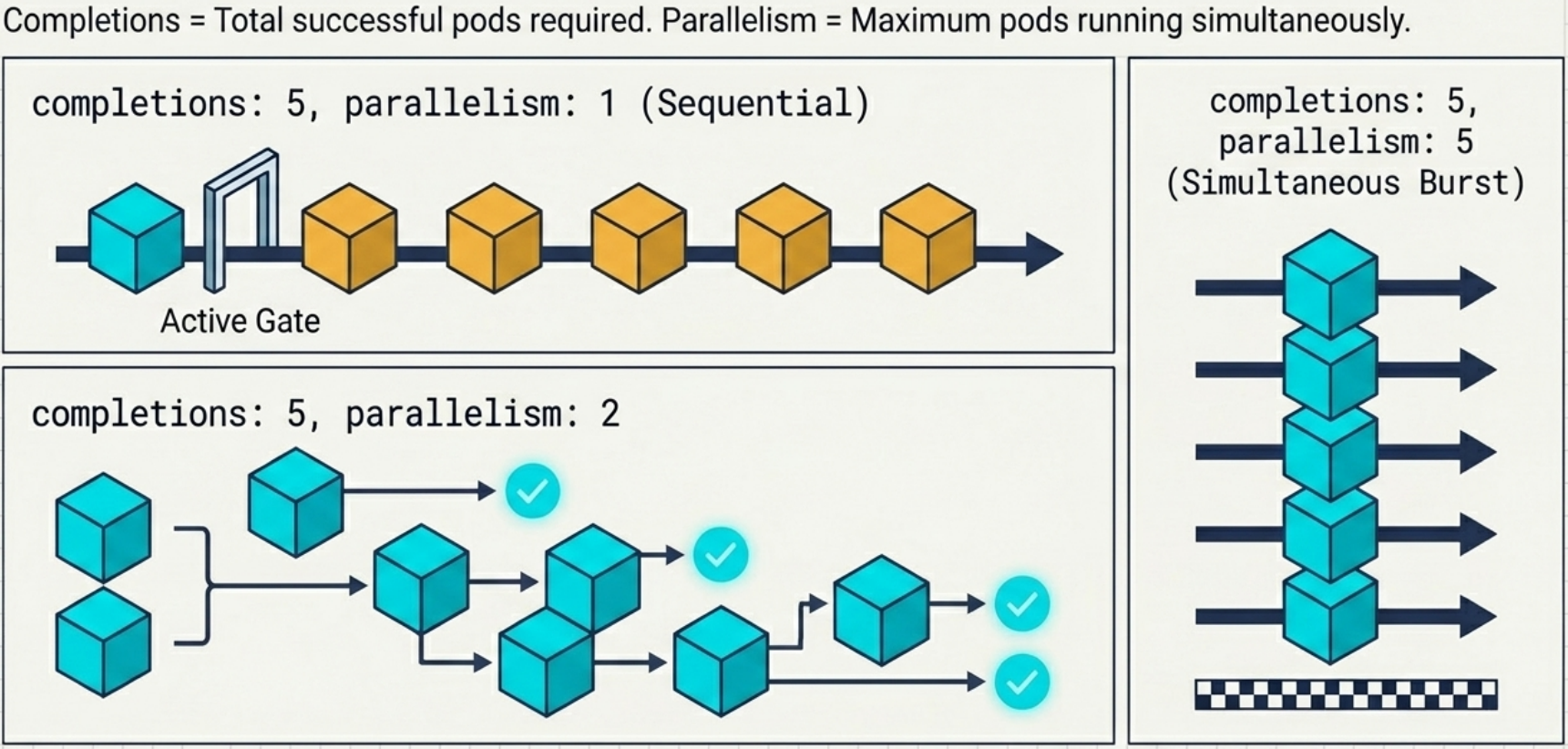
The combination of completions and parallelism controls execution shape:
spec.completions | spec.parallelism | Behaviour |
|---|---|---|
| Not set | Not set | Single pod; Job completes when that pod succeeds |
| Set (e.g., 5) | Not set | Sequential – one pod at a time, controller waits for success before creating the next |
| Not set | Set (e.g., 3) | 3 pods start simultaneously; only one needs to succeed for the Job to complete |
| Set to 5 | Set to 2 | Maintains up to 2 concurrent pods until 5 succeed; as each pod finishes, the next starts immediately |
| Set to 5 | Higher than 5 | Excess parallelism ignored – only 5 pods are ever created |
completions tracks successful completions – not total attempts. If pods fail and are retried, you may end up with more total pods than the completions value.
Failure Handling
Section titled “Failure Handling”The core reason for running tasks through a Job rather than directly through a plain Pod is that Kubernetes guarantees task completion even when individual pods or their nodes fail. This guarantee is implemented at two distinct levels:
- Pod level – handled by the Kubelet on the node where the pod runs
- Job level – handled by the Job controller watching from the control plane
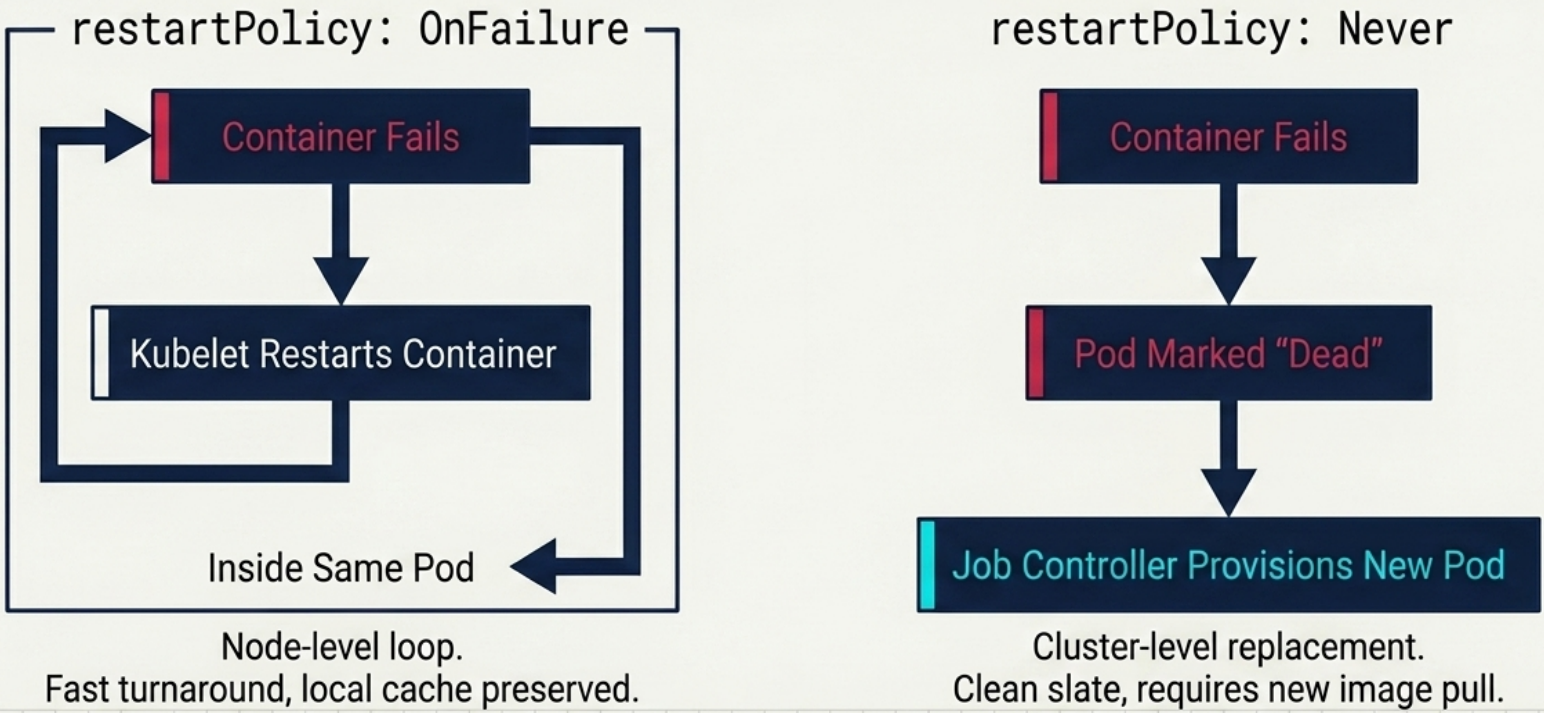
The restartPolicy in the Pod template is the switch that decides which level takes action when a container fails:
OnFailure→ the Kubelet restarts the failed container inside the same pod on the same node – no rescheduling overhead, same pod name, same PVC bindingsNever→ the Kubelet marks the pod asFailedand the Job controller schedules an entirely new pod (potentially on a different node). If the replacement pod lands on a node that doesn’t already have the image cached, the image must be pulled again before the container can start – this adds latency to each retry cycle
| Mechanism | Field | Behaviour |
|---|---|---|
| Container-level restart | restartPolicy: OnFailure | Kubelet restarts container in-place; RESTARTS counter increments |
| Pod-level retry | restartPolicy: Never | New pod scheduled by Job controller |
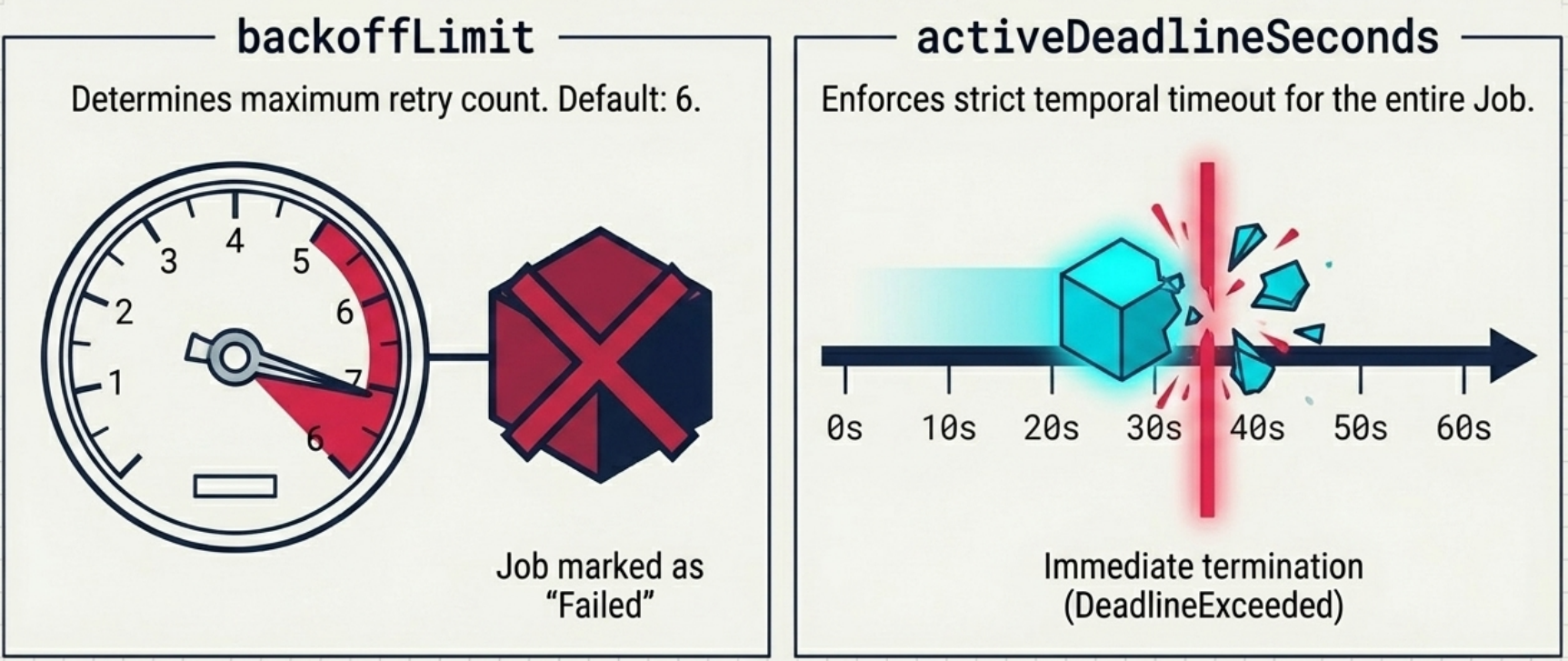
| Retry limit | spec.backoffLimit | Max failed pod attempts before Job is marked Failed (default: 6). Diagnose with BackoffLimitExceeded event |
| Time limit | spec.activeDeadlineSeconds | Hard wall-clock limit for the entire Job – overrides backoffLimit. Triggers DeadlineExceeded event |
| Exit-code rules | spec.podFailurePolicy | Map specific container exit codes to actions (FailJob, Count, Ignore) |
podFailurePolicy example – fail immediately on fatal exit code:
spec: podFailurePolicy: rules: - action: FailJob # skip retries entirely – mark Job as Failed immediately onExitCodes: containerName: main operator: In values: [123] # exit code 123 = unrecoverable errorCompletion Modes
Section titled “Completion Modes”When running multiple pods, you might want each pod to process a different slice of work – for example, month 1 through month 12 of sales data, or shards 0–99 of a dataset.
With the default behaviour (NonIndexed), all pods are identical clones, there’s no built-in way for a pod to know which part of the input it should handle.
Indexed mode solves this: each pod is assigned a unique zero-based integer that it can read at runtime to select its specific work item, without any external coordination.
The spec.completionMode field controls whether pods are identical or uniquely parameterized:
| Feature | NonIndexed (default) | Indexed |
|---|---|---|
| Pod identity | All pods are identical | Each pod gets a unique zero-based index |
| Completion condition | N pods succeed where N = completions | One pod succeeds for each index 0 to completions - 1 |
| Failure recovery | New identical replacement pod | New pod with the same index as the failed one |
| Index injection | None | JOB_COMPLETION_INDEX env var + batch.kubernetes.io/job-completion-index annotation |
Indexed mode – injecting the index:
spec:  completionMode: Indexed  completions: 12 # indices 0–11  parallelism: 3 # 3 pods run at a time  template:    spec:      containers:        - name: processor          env:            # Option A: controller injects this automatically            - name: COMPLETION_INDEX              value: "$(JOB_COMPLETION_INDEX)"
            # Option B: Downward API maps the annotation to any name            - name: MONTH              valueFrom:                fieldRef:                  fieldPath: metadata.annotations['batch.kubernetes.io/job-completion-index']
Pod naming in Indexed mode: <job-name>-<index>-<random> (e.g., process-2021-0-kptfr). The hostname omits the random suffix: process-2021-0.
Work Queue Patterns
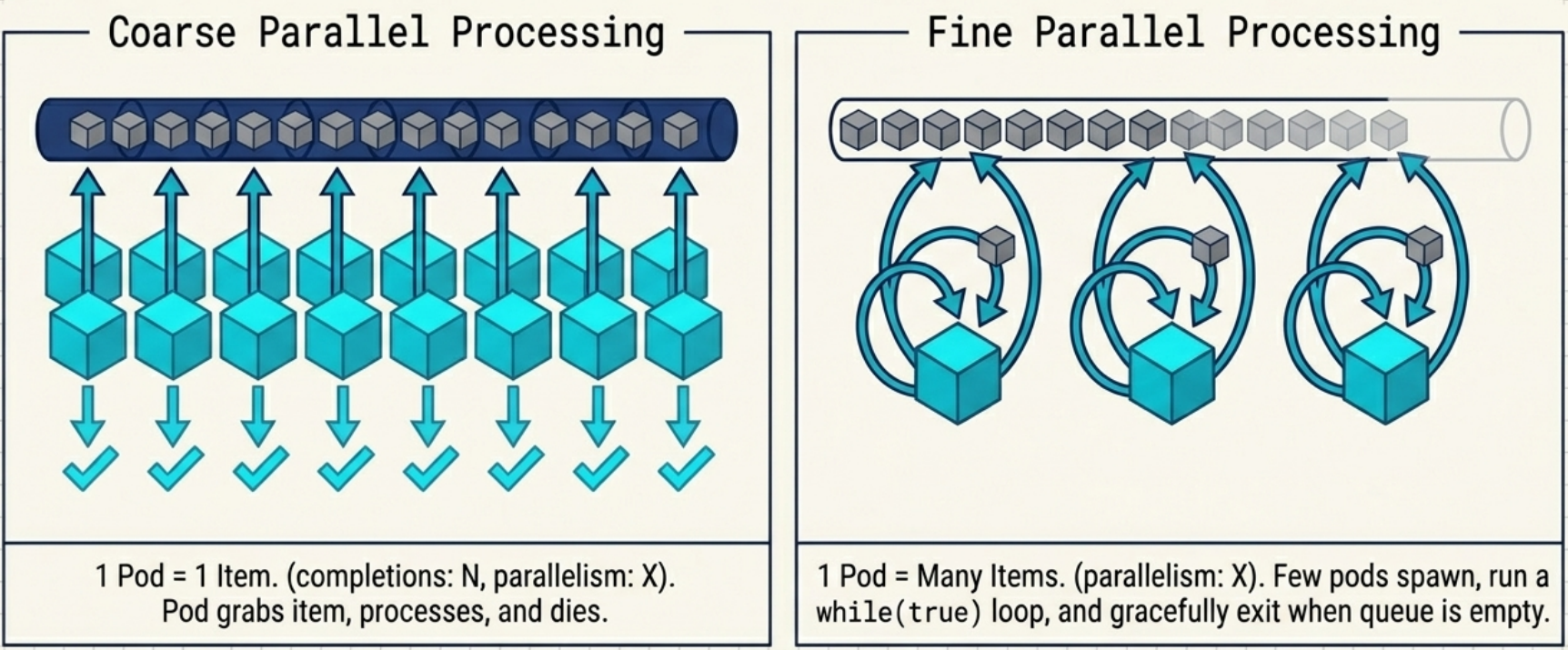
Section titled “Work Queue Patterns”When your workload pulls tasks from an external queue (database collection, message broker), use one of two architectures:
| Coarse Parallel Processing | Fine Parallel Processing | |
|---|---|---|
spec.completions | Must equal the number of queue items | Not set |
spec.parallelism | Controls concurrency | Defines the fixed pool size and total pod count |
| Pod behaviour | Pull one item, exit | Loop – pull items until queue is empty, then exit |
| Resource overhead | One pod scheduled per item (high) | Fixed pod pool processes all items (low) |
| Use when | Items have variable runtime; you want per-item retry isolation | Items are similar size; you want low scheduling overhead |
Pod-to-Pod Communication in Jobs
Section titled “Pod-to-Pod Communication in Jobs”Normally Job pods run independently and are unaware of peers. For batch tasks that require peer communication (e.g., distributed data processing), use this pattern:
- Set
completionMode: Indexed– gives pods predictable names and hostnames - Create a headless Service with
clusterIP: Noneand a selector targetingjob-name: <your-job> - Set
spec.template.spec.subdomainto match the headless Service name
This registers FQDNs for each pod: <job-name>-<index>.<headless-service>.<namespace>.svc.cluster.local.
Pods can then discover peers by constructing DNS names directly – no Kubernetes API queries needed, no RBAC required inside containers.
Sidecar Containers
Section titled “Sidecar Containers”Job pods can run sidecar containers (logging agents, proxies), but they introduce a critical issue:
The fix – native sidecars in initContainers with restartPolicy: Always:
spec: template: spec: restartPolicy: OnFailure initContainers: - name: log-collector image: fluentd:latest restartPolicy: Always # ← this is what makes it a native sidecar containers: - name: batch-worker image: my-worker:latest command: ["python", "process.py"]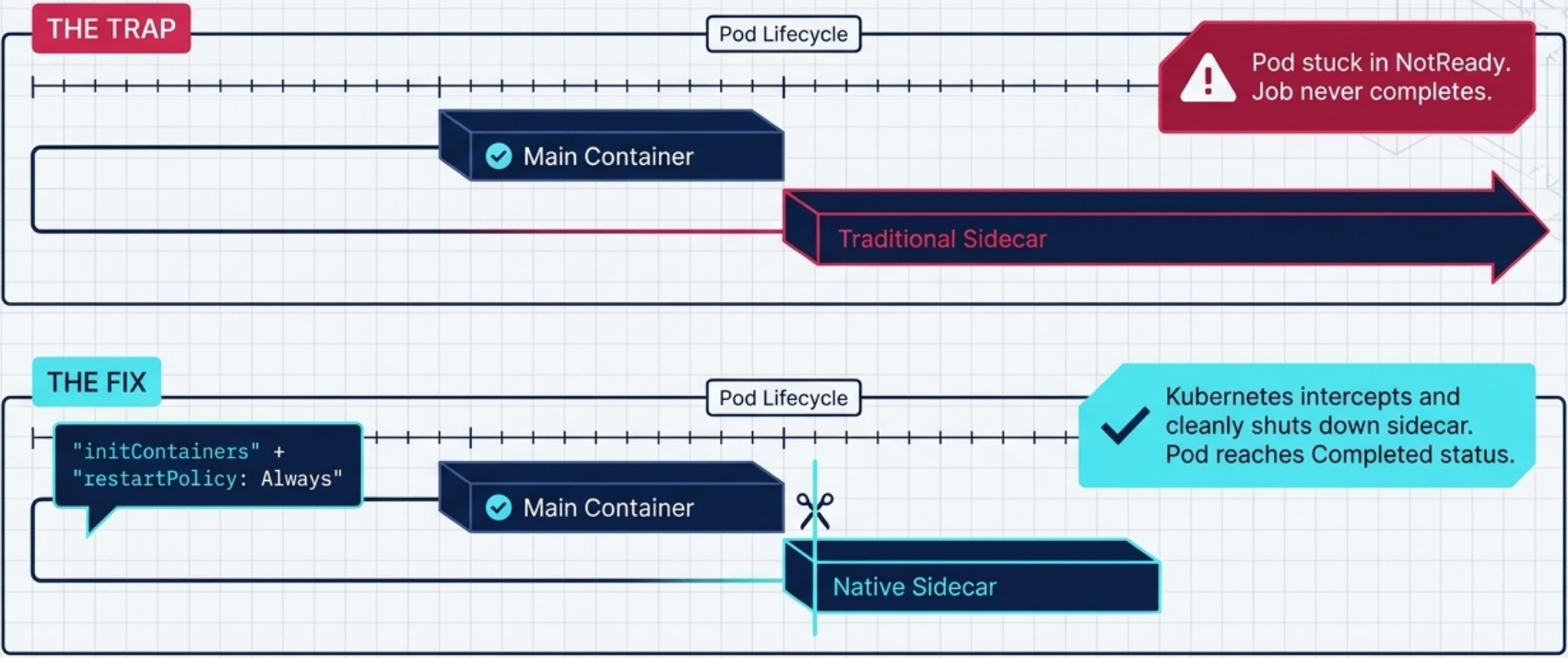
Lifecycle with native sidecar:
- Sidecar init container starts (marked
restartPolicy: Always, so it doesn’t block the main container) - Main
batch-workercontainer starts – both show2/2 Running - Main container completes → pod transitions to
Completed(1/2) - Kubelet automatically sends termination signal to the sidecar
- Sidecar exits → pod fully
Completed(0/2) → Job markedComplete
Job Operations
Section titled “Job Operations”# Check status and completion countskubectl get jobskubectl describe job <name> # start time, pod statuses, events (BackoffLimitExceeded, etc.)
# Access logs without knowing pod nameskubectl logs job/<name> --all-containers --prefix
# Find pods by auto-generated labelkubectl get pods -l job-name=<name>
# Create a Job in a suspended state (no pod is created until you resume it)# Set spec.suspend: true in the manifest, then apply and resume when ready
# Suspend a running Job (controller immediately terminates active pods + emits a Suspended Event)kubectl patch job <name> -p '{"spec":{"suspend": true}}'
# Resume a suspended Job (controller re-creates pods and continues from where it left off)kubectl patch job <name> -p '{"spec":{"suspend": false}}'
# Delete a Job at any time – even while its pods are still running# The controller terminates the running pods as part of cascade deletionkubectl delete job <name>
# Delete Job but keep pods (for post-mortem inspection)kubectl delete job <name> --cascade=orphanAuto-cleanup with TTL:
spec: ttlSecondsAfterFinished: 300 # delete Job + pods 5 minutes after completionCronJobs
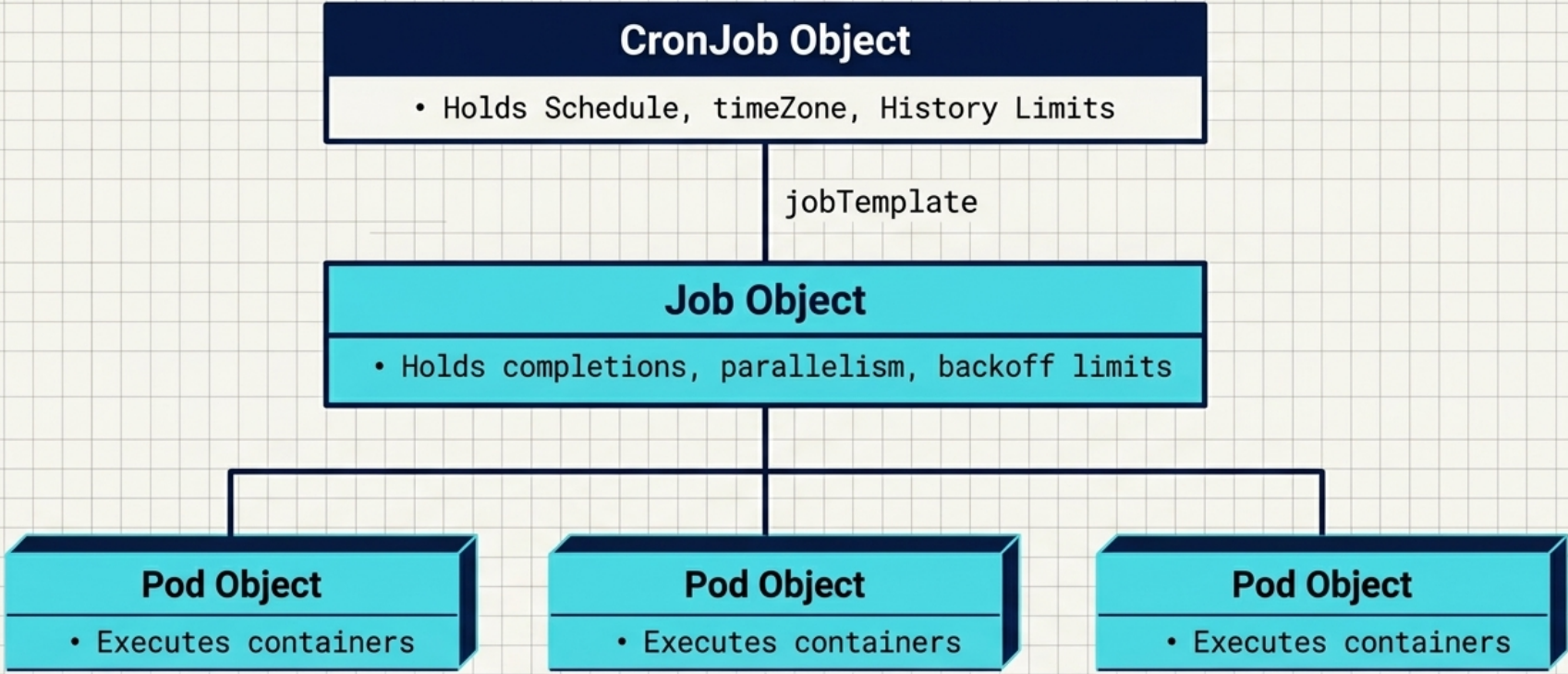
Section titled “CronJobs”A CronJob is a wrapper around the Job resource that creates new Job objects on a cron schedule. The controller manages the lifecycle of those child Jobs, cleaning up history according to configured limits.
Architecture
Section titled “Architecture”CronJob (schedule + jobTemplate) ↓ creates on schedule Job (completions, parallelism, pod template) ↓ creates Pods (run to completion)The CronJob Manifest
Section titled “The CronJob Manifest”apiVersion: batch/v1kind: CronJobmetadata: name: nightly-reportspec: schedule: "0 2 * * *" # 2am daily timeZone: "Asia/Kolkata" # optional – defaults to controller-manager's local TZ concurrencyPolicy: Forbid # how to handle overlapping runs successfulJobsHistoryLimit: 3 # keep last 3 successful Jobs (default: 3) failedJobsHistoryLimit: 1 # keep last 1 failed Job (default: 1) startingDeadlineSeconds: 60 # give up if Job can't start within 60s of schedule time jobTemplate: metadata: labels: app: nightly-report # must be explicit – CronJob does NOT auto-inject labels spec: template: metadata: labels: app: nightly-report spec: restartPolicy: OnFailure containers: - name: updater image: mongo:5 command: ["mongosh", "..."]Time zone behaviour
By default, the CronJob controller evaluates schedules using the time zone of the Controller Manager process – not your local time zone. This means if your control plane runs in a different region (e.g., UTC on a managed cloud cluster while your team expects IST or EST), your CronJob will fire at unintended local times. The timeZone field in spec makes the intent explicit:
spec: schedule: "0 2 * * *" timeZone: "Asia/Kolkata" # IANA time zone database names (e.g. "UTC", "America/New_York")If timeZone is omitted, the schedule is interpreted in the Controller Manager’s local time zone – which is typically UTC on cloud-managed clusters.
Schedule Syntax
Section titled “Schedule Syntax”Standard five-field crontab format (same syntax as Linux cron – see Task Scheduling for the full reference):
┌──────────── minute (0–59)│ ┌─────────── hour (0–23)│ │ ┌────────── day of month (1–31)│ │ │ ┌─────── month (1–12 or JAN–DEC)│ │ │ │ ┌──── day of week (0–6 or SUN–SAT)│ │ │ │ │* * * * *| Pattern | Meaning |
|---|---|
* | Match any value |
1-5 | Range (inclusive) |
1,3,5 | Specific values |
*/15 | Every 15th value (steps) |
0 2 * * 1-5 | 2am on weekdays |
Schedule aliases:
| Alias | Equivalent |
|---|---|
@hourly | 0 * * * * |
@daily / @midnight | 0 0 * * * |
@weekly | 0 0 * * 0 |
@monthly | 0 0 1 * * |
@yearly / @annually | 0 0 1 1 * |
Concurrency Policy
Section titled “Concurrency Policy”If a scheduled Job takes longer than the scheduling interval, concurrent runs can accumulate:
| Policy | Behaviour |
|---|---|
Allow (default) | Multiple Jobs can run concurrently |
Forbid | Skip the new run if the previous Job is still active; log JobAlreadyActive event |
Replace | Delete the active Job and immediately start a new one |
Start Deadline and Missed Runs
Section titled “Start Deadline and Missed Runs”If the control plane is overloaded or the controller manager goes offline, scheduled Jobs may be delayed or skipped entirely.
spec.startingDeadlineSeconds: If a Job can’t start within this many seconds of its scheduled time, it’s abandoned with a MissSchedule event.
Without a start deadline, after a controller outage the CronJob controller tries to catch up by running all missed executions (up to 100). If it detects more than 100 missed runs, it gives up and logs TooManyMissedTimes – setting a startingDeadlineSeconds prevents this catch-up storm by skipping stale runs.
History Limits
Section titled “History Limits”The controller auto-deletes old Jobs based on:
| Field | Default | Effect |
|---|---|---|
successfulJobsHistoryLimit | 3 | Keep the last N completed Jobs (and their pods for log inspection) |
failedJobsHistoryLimit | 1 | Keep the last N failed Jobs |
Setting both to 0 causes immediate cleanup of all finished Jobs. The associated pods are deleted when their parent Job is deleted.
CronJob Operations
Section titled “CronJob Operations”# List CronJobs (-o wide shows container images)kubectl get cjkubectl get cj -o wide
# Stream logs from the most recent runs (if you added custom labels)kubectl logs -l app=nightly-report --all-containers --prefix
# Manually trigger a one-off run without waiting for the schedulekubectl create job manual-run --from cronjob/nightly-report
# Check last scheduled and last successful timestampskubectl describe cj nightly-report# Look for: status.lastScheduleTime, status.lastSuccessfulTime
# List Jobs spawned by a CronJob (filter by your custom label)kubectl get jobs -l app=nightly-report# NAME COMPLETIONS DURATION AGE# nightly-report-27755219 1/1 36s 37s
# Suspend – stops the controller from scheduling new Jobs;# any Jobs already running are allowed to finish normallykubectl patch cj nightly-report -p '{"spec":{"suspend": true}}'
# After suspending, kubectl get cj shows SUSPEND=True while a Job may still be ACTIVE# NAME SCHEDULE TIMEZONE SUSPEND ACTIVE LAST SCHEDULE# nightly-report * * * * * <none> True 1 19s# → SUSPEND True + ACTIVE 1: the current Job finishes; no new Job starts until resumed
# Resume – controller begins scheduling Jobs again from the next scheduled slotkubectl patch cj nightly-report -p '{"spec":{"suspend": false}}'
# You can also CREATE a CronJob in a suspended state from the start# (set spec.suspend: true in the manifest and apply – no Jobs are scheduled until you resume)
# Delete CronJob and all its Jobs/podskubectl delete cj nightly-report
# Delete CronJob but preserve existing Jobs and podskubectl delete cj nightly-report --cascade=orphanThe Job name in the output follows a predictable pattern: <cronjob-name>-<unix-epoch-minutes>. The number suffix is the scheduled trigger time expressed as Unix Epoch Time converted to minutes – not a random ID. This makes it straightforward to correlate a Job to the exact schedule slot it was created for.
Testing a CronJob without waiting for its schedule
The --from flag on kubectl create job lets you trigger a one-off run from any CronJob at any time. This is the standard way to test a CronJob immediately rather than waiting for the next scheduled slot:
kubectl create job my-job --from cronjob/my-cronjobChecking whether the last run succeeded
kubectl get cj only shows the number of currently active Jobs and when the last Job was scheduled – it does not show whether the last Job completed successfully. To get success/failure status you have two options:
# Option 1 – list spawned Jobs directly (shows COMPLETIONS column)kubectl get jobs -l app=<your-label>
# Option 2 – read CronJob status in YAML (most detailed)kubectl get cj <name> -o yaml# Look for:#   status.lastScheduleTime:    when the last Job was triggered#   status.lastSuccessfulTime:  when the last Job actually completed successfully#   status.active:              list of currently running Job references
Troubleshooting
Section titled “Troubleshooting”| Symptom | Likely cause | Fix |
|---|---|---|
Job stuck at 0 completions, pod shows 1/2 Running | Sidecar in spec.containers prevents pod from completing | Move sidecar to initContainers with restartPolicy: Always |
Job status Failed, event BackoffLimitExceeded | Container keeps failing; hit retry limit | Check pod logs; fix the application error; delete and recreate the Job |
Job stuck running, event DeadlineExceeded | activeDeadlineSeconds expired | Job is in an infinite hang or deadlock; increase deadline or fix the root cause |
| CronJob skipping scheduled runs | Concurrency policy Forbid + previous Job still active | Either switch to Replace, scale up resources, or investigate why the Job is slow |
CronJob logs TooManyMissedTimes after control plane outage | No startingDeadlineSeconds; >100 missed runs detected | Set startingDeadlineSeconds to prevent catch-up storms |
| Pods accumulating after Job finishes | No TTL and high successfulJobsHistoryLimit | Set ttlSecondsAfterFinished or reduce history limits |
CronJob pods invisible to kubectl logs -l ... | No custom labels in jobTemplate | Add labels explicitly in both jobTemplate.metadata.labels and spec.template.metadata.labels |