
Volumes & Storage
Every container has its own isolated filesystem provided by its image. When a container crashes and Kubernetes recreates it, the new instance starts with a completely clean slate – anything written to the container’s local filesystem is gone. For stateful workloads this is a problem. Volumes solve it by providing storage that lives outside the container’s isolated layer.
| Container filesystem (no volume) | Kubernetes volume | |
|---|---|---|
| Isolation | Fully isolated – other containers cannot access it | Shareable – multiple containers in the same pod can mount it |
| On container crash/restart | All data lost; container starts with a clean slate | Data preserved; remounted into the new container instance |
| On pod deletion | Deleted | Deleted (unless backed by external PV) |
| Use cases | Short-term scratch, stateless operations | Data persistence, inter-container communication, decoupled config |
How Volumes Work
Section titled “How Volumes Work”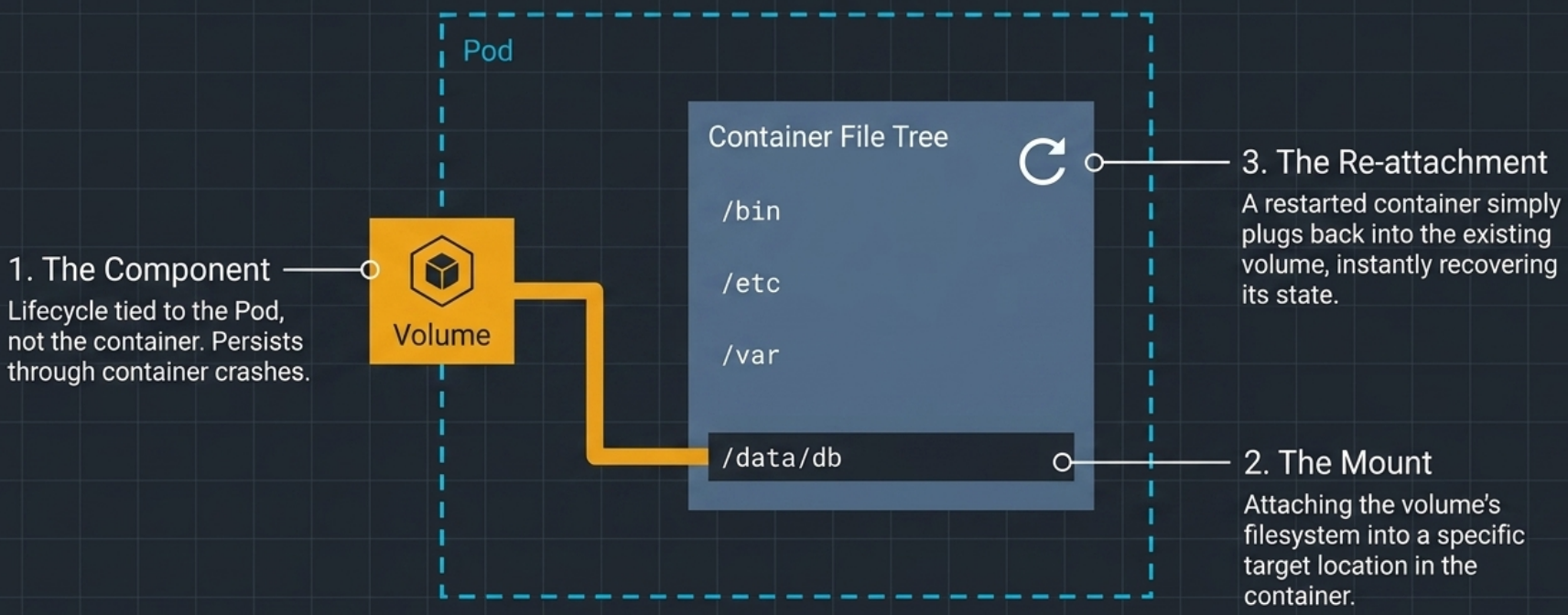
Volumes are not independent Kubernetes objects – they are sub-components of a pod, defined inside the pod spec. This means:
- Created before containers start: all volumes in a pod are provisioned during pod setup, before any container launches.
- Outlive container restarts: if a container crashes and is recreated, the volumes remain intact and are remounted into the new container instance.
- Deleted with the pod: when the entire pod is removed, its volumes are deleted too (unless backed by external persistent storage whose lifecycle is independent).
- Shared across containers in the same pod: multiple containers can mount the same volume, enabling file-based inter-container communication.

Mounting
Section titled “Mounting”Mounting is the act of attaching a volume’s filesystem to a specific path inside the container’s directory tree. After mounting, any file read or written at that path goes to the volume – not the container’s ephemeral layer.
Volume Types at a Glance
Section titled “Volume Types at a Glance”| Type | Lifecycle | Writable | Shared across pods? | Use case |
|---|---|---|---|---|
emptyDir | Pod | ✅ | ❌ | Scratch space, inter-container sharing |
hostPath | Node (external) | ✅ | Node-local only | System pods, node-level log access |
nfs | External (NFS server) | ✅ | ✅ | Shared persistent access across pods |
configMap | Pod (data from ConfigMap) | ❌ | ❌ | Config files, runtime flags |
secret | Pod (data from Secret) | ❌ | ❌ | Credentials, certs, keys |
downwardAPI | Pod (runtime metadata) | ❌ | ❌ | Pod name, namespace, resource limits |
projected | Pod (aggregated sources) | ❌ | ❌ | Combine CM + Secret + Downward API |
image | Pod (OCI image) | ❌ | ❌ | Seed static assets/DB scripts without init containers |
persistentVolumeClaim | External (PV lifecycle) | ✅ | Depends on access mode | Databases, durable application state |
ephemeral | Pod (inline PVC) | ✅ | ❌ | PVC-backed temp storage auto-deleted with pod |
csi | External | ✅ | Driver-dependent | Direct CSI plugin use without PVC layer |
emptyDir
Section titled “emptyDir”emptyDir is the simplest volume type – it creates an empty directory on the worker node just before the pod’s containers start. It persists data across container restarts within the same pod, but is permanently deleted when the pod is removed.
Use Cases
Section titled “Use Cases”- Crash-resistant scratch space – database working directories (e.g., MongoDB
/data/db) survive container crashes without external storage - Writable space for read-only root filesystems – when a container’s root FS is locked down,
emptyDirprovides a writable path - Inter-container file sharing – a writer container produces files, a reader container serves them, both mount the same volume
YAML Schema
Section titled “YAML Schema”spec: volumes: - name: cache-vol emptyDir: medium: Memory # omit for disk; "Memory" for tmpfs (RAM-backed) sizeLimit: 128Mi # critical when medium: Memory – prevents OOM containers: - name: app image: my-app:1.0 volumeMounts: - name: cache-vol mountPath: /var/cache/app readOnly: falseemptyDir field | Default | Effect |
|---|---|---|
medium | "" (node disk) | Set to Memory for tmpfs – RAM-backed, never written to disk |
sizeLimit | Unlimited | Caps storage use; essential for Memory volumes |
volumeMounts Options
Section titled “volumeMounts Options”| Field | Description |
|---|---|
mountPath | Absolute path inside the container where the volume appears |
readOnly | Restricts write access for this container only (default false) |
recursiveReadOnly | Enforces read-only recursively across all subdirectories (set "Enabled") – default is non-recursive |
subPath | Mount a specific subdirectory – isolates per-container access within a shared volume |
subPathExpr | Like subPath but resolves name from an env var |
mountPropagation | How host mounts nested below propagate: None / HostToContainer / Bidirectional |
Physical Location
Section titled “Physical Location”emptyDir is just a normal directory on the worker node:
/var/lib/kubelet/pods/<pod-UID>/volumes/kubernetes.io~empty-dir/<volume-name>/File I/O speed depends on the node’s underlying disk hardware (unless medium: Memory is used).
Seeding Data into emptyDir
Section titled “Seeding Data into emptyDir”Because emptyDir starts empty, applications that need pre-seeded files use one of two approaches:
Method A – Init Container
Section titled “Method A – Init Container”spec: volumes: - name: initdb emptyDir: {} - name: db-data emptyDir: {} initContainers: - name: seeder image: company/db-migrations:1.0 volumeMounts: - name: initdb mountPath: /initdb.d/ containers: - name: mongo image: mongo:7 volumeMounts: - name: db-data mountPath: /data/db - name: initdb mountPath: /docker-entrypoint-initdb.d/ readOnly: trueThe seeder init container copies scripts into initdb, then exits. MongoDB starts and finds the scripts in its init directory, executing them on first boot.
Method B – Inline Heredoc in Init Container
Section titled “Method B – Inline Heredoc in Init Container”For small config files, write content directly from the pod manifest:
initContainers: - name: config-writer image: busybox command: - sh - -c - | cat <<EOF > /mnt/config/app.conf db_host=mysql-service log_level=info EOF volumeMounts: - name: config-vol mountPath: /mnt/configMulti-Container Sharing
Section titled “Multi-Container Sharing”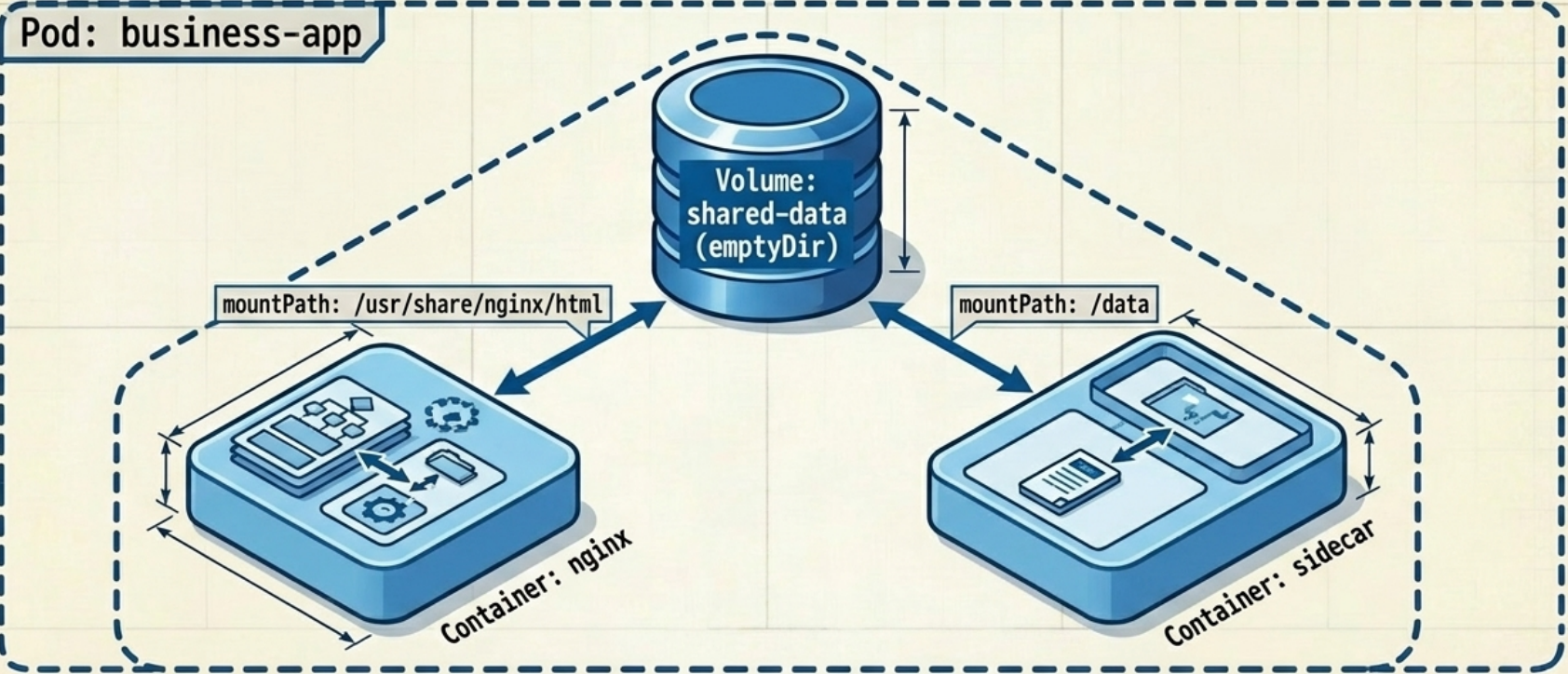
spec: volumes: - name: shared-data emptyDir: {} containers: - name: writer # writes files image: busybox:1.37.0 volumeMounts: - name: shared-data mountPath: /var/local/output - name: nginx # reads and serves files image: nginx:alpine volumeMounts: - name: shared-data mountPath: /usr/share/nginx/html readOnly: true # nginx cannot write – security isolationRead-Only Mounts
Section titled “Read-Only Mounts”Marking a mount readOnly is per-container – one container can write while another reads the same volume:
volumeMounts: - name: shared-data mountPath: /usr/share/nginx/html readOnly: true # this container cannot write # recursiveReadOnly: Enabled # also lock down all subdirectories| Field | Behaviour |
|---|---|
readOnly: true | Write operations from this container are blocked at the volume mount level |
recursiveReadOnly: "Enabled" | Also enforces read-only recursively on all subdirectory mounts beneath the path |
Attempting to write to a read-only mount returns: Read-only file system
Verifying Volumes in Practice
Section titled “Verifying Volumes in Practice”Use kubectl exec with the -c flag to target a specific container in a multi-container pod:
# Enter the writer containerkubectl exec shared-vol-demo -it -c writer -- /bin/sh
# Navigate to the mount path and create a filecd /var/local/outputtouch example.txtls# example.txt
# Exit, then enter the reader containerkubectl exec shared-vol-demo -it -c nginx -- /bin/sh
# The file created by the writer container should be visible herels /usr/share/nginx/html# example.txt ← data sharing confirmedhostPath
Section titled “hostPath”hostPath mounts a specific file or directory from the worker node’s physical filesystem directly into a container. The data is not portable – if the pod reschedules to a different node, it sees that node’s filesystem, not the original one’s.
Use Cases
Section titled “Use Cases”- System-level pods that need to read node logs, hardware devices, or node-agent sockets
- Tools that introspect the container runtime (e.g., monitoring agents)
Common exploitation vectors:
- Mount host
/→ container has full node root filesystem access - Mount
/var/run/docker.sock→ container can run arbitrary commands on the host with root privileges
spec: volumes: - name: host-root hostPath: path: /var/log/pods # host filesystem path type: Directory # optional validation type containers: - name: log-agent image: fluentd:latest volumeMounts: - name: host-root mountPath: /host-logsSupported type Values
Section titled “Supported type Values”The type field tells Kubernetes to validate the path before mounting. If the check fails, the pod will not start.
| Type | Behaviour |
|---|---|
"" (default) | No validation – mount whatever is at the path |
Directory | Fails if path is not an existing directory |
DirectoryOrCreate | Uses directory if it exists; creates it (mode 0755) otherwise |
File | Fails if path is not an existing file |
FileOrCreate | Uses file if it exists; creates it (mode 0644) otherwise |
BlockDevice | Path must be a block device |
CharDevice | Path must be a character device |
Socket | Path must be a UNIX domain socket |
To target a specific node in a multi-node cluster, pin the pod with spec.nodeName.
ConfigMap Volumes
Section titled “ConfigMap Volumes”While env vars are fine for short string values, multi-line files (nginx configs, TLS settings, app config files) should be projected as mounted files via a configMap volume. Each key in the ConfigMap becomes a file inside the mounted directory.
For creating ConfigMaps and injecting them as environment variables, see ConfigMaps & Secrets → Injecting ConfigMap Data.
Projecting All Keys
Section titled “Projecting All Keys”spec: volumes: - name: app-config configMap: name: app-config # all keys projected as files optional: true # pod starts even if ConfigMap is missing containers: - name: app image: my-app:1.0 volumeMounts: - name: app-config mountPath: /etc/appEach key in app-config appears as a file under /etc/app/.
Projecting Specific Keys Only
Section titled “Projecting Specific Keys Only”volumes: - name: proxy-config configMap: name: proxy-ssl-config items: - key: proxy.yaml # only this key is projected path: proxy.yaml # filename inside the volumeUnlisted keys are omitted entirely from the mounted directory.
Atomic Updates via Symbolic Links
Section titled “Atomic Updates via Symbolic Links”Unlike env vars (which are static after container start), files from a ConfigMap volume automatically update when the ConfigMap changes – typically within ~1 minute.
Kubernetes ensures the application never reads a half-written file by using atomic double-symlink updates:
- Projected files are symbolic links pointing into a hidden
..data/directory ..data/itself is a symlink to a timestamped snapshot directory- When the ConfigMap changes, Kubernetes writes new content into a fresh timestamped directory
- Then atomically swaps the
..data/symlink to point to the new snapshot – the switch is instantaneous
/etc/app/  proxy.yaml  →  ..data/proxy.yaml  ..data/     →  ..2024_08_15_12_00_00.123456789/                    proxy.yaml  (old content)
After update: ..data/ → ..2024_08_15_12_01_00.987654321/ ← atomic swap proxy.yaml (new content)Immutable ConfigMaps and Secrets
Section titled “Immutable ConfigMaps and Secrets”Setting immutable: true on a ConfigMap or Secret completely disables the kubelet’s update watch. Volume-mounted files from an immutable source are frozen permanently – the kubelet stops polling for changes.
apiVersion: v1kind: ConfigMapmetadata: name: app-config-v2 # must rename to update – treat like an image tagimmutable: true # kubelet stops watching; no more volume updatesdata: config.yaml: | feature_x: enabledConsequences for volume mounts:
- Files are never updated after initial mount, even if you
kubectl editthe CM (the API server rejects edits onceimmutable: trueis set) - To roll out a config change, create a new CM with a new name, update the Pod spec to reference the new name, and redeploy
- Performance benefit: reduces kube-apiserver load at scale – thousands of pods watching for CM updates generate significant traffic. Immutable CMs remove that polling entirely.
Secret Volumes
Section titled “Secret Volumes”Secret volumes work identically to ConfigMap volumes – each key becomes a file – with two important differences:
For creating Secrets, Secret types, and injecting them as environment variables, see ConfigMaps & Secrets → Injecting Secrets.
| Behaviour | Secret volume | ConfigMap volume |
|---|---|---|
| Volume spec field | secret: + secretName: | configMap: + name: |
| Storage on node | tmpfs (RAM only, never written to disk) | Node disk |
| Base64 decoding | Auto-decoded at mount time – app reads plain text | Not applicable |
spec: volumes: - name: tls-creds secret: secretName: app-tls # note: secretName, not name containers: - name: app image: my-app:1.0 volumeMounts: - name: tls-creds mountPath: /etc/tls readOnly: trueFile Permissions
Section titled “File Permissions”By default, files in ConfigMap/Secret volumes are created with mode 0644. Override at volume level or per-file:
volumes: - name: tls-creds secret: secretName: app-tls defaultMode: 0640 # applies to all files unless overridden items: - key: tls.key path: server.key mode: 0600 # private key: read-only for owner only - key: tls.crt path: server.crt # inherits defaultMode: 0640Granting Non-Root Processes Access (fsGroup)
Section titled “Granting Non-Root Processes Access (fsGroup)”Volume files are owned by root:root by default. If a container runs as a non-root user, it can’t read files with restricted permissions.
Set securityContext.fsGroup at the pod level to change the group ownership of volume files:
spec: securityContext: fsGroup: 101 # changes group ownership of ALL volume files to GID 101 containers: - name: proxy image: my-proxy:1.0 securityContext: runAsUser: 101 # proxy user UIDfsGroupChangePolicy – Avoid Slow Startups on Large Volumes
Section titled “fsGroupChangePolicy – Avoid Slow Startups on Large Volumes”By default (Always), Kubernetes recursively chowns every file in a mounted volume on each pod startup to apply the fsGroup. On volumes with thousands of files (e.g., a large database), this can take minutes, causing pod startup timeouts in production.
Set fsGroupChangePolicy: OnRootMismatch to skip the recursive chown if the root directory already has the correct group ownership:
spec: securityContext: fsGroup: 101 fsGroupChangePolicy: OnRootMismatch # Only chown if root dir permissions are wrong containers: - name: app image: my-app:1.0| Policy | Behaviour | When to use |
|---|---|---|
Always (default) | Recursively chowns all volume files on every pod start | First-run or when you cannot guarantee prior ownership |
OnRootMismatch | Skips recursive chown if root dir already has correct group | Recommended for large volumes (databases, ML model stores) |
Downward API Volumes
Section titled “Downward API Volumes”The Downward API can project pod metadata as files – useful when the metadata is too large for an env var (labels, annotations) or when a file-reading sidecar needs it.
For injecting Downward API data as environment variables and the full supported fields reference, see ConfigMaps & Secrets → Downward API.
spec: volumes: - name: pod-info downwardAPI: items: - path: name.txt fieldRef: fieldPath: metadata.name # resolves to the pod's name - path: namespace.txt fieldRef: fieldPath: metadata.namespace - path: mem-limit.txt resourceFieldRef: containerName: app # required for resourceFieldRef in volumes resource: limits.memory divisor: 1Mi # express in MiB containers: - name: app image: my-app:1.0 volumeMounts: - name: pod-info mountPath: /etc/pod-infoAll labels and annotations can only be projected as files (not env vars), making the Downward API volume the only way to expose them:
- path: labels fieldRef: fieldPath: metadata.labels # all labels as key="value" lines- path: annotations fieldRef: fieldPath: metadata.annotations # all annotationsProjected Volumes
Section titled “Projected Volumes”A projected volume aggregates multiple sources (ConfigMaps, Secrets, Downward API, ServiceAccount tokens) into a single directory. This solves a key limitation: normally mounting two separate volumes into the same directory hides the first volume’s contents.
Why Not Just Use subPath?
Section titled “Why Not Just Use subPath?”subPath lets you insert individual files from different volumes into the same directory, but it disables atomic updates. A projected volume mounts the entire directory as one unit, so all aggregated files update atomically when their sources change.
Annotated Manifest (Proxy Configuration)
Section titled “Annotated Manifest (Proxy Configuration)”spec: volumes: - name: etc-proxy projected: sources: # Source A: Proxy config from a ConfigMap - configMap: name: proxy-ssl-config items: - key: proxy.yaml path: proxy.yaml
# Source B: TLS credentials from a Secret - secret: name: app-tls items: - key: tls.crt path: certs/example-com.crt - key: tls.key path: certs/example-com.key mode: 0600 # private key: strict permissions
containers: - name: proxy image: my-proxy:1.0 volumeMounts: - name: etc-proxy mountPath: /etc/proxy readOnly: trueThe resulting /etc/proxy directory contains files from both sources:
/etc/proxy/ proxy.yaml ← from ConfigMap certs/ example-com.crt ← from Secret example-com.key ← from Secret (mode 0600)Supported sources types: configMap, secret, downwardAPI, serviceAccountToken.
The Built-In kube-api-access Volume
Section titled “The Built-In kube-api-access Volume”Kubernetes automatically injects a projected volume named kube-api-access-<random> into almost every pod. It contains:
| File | Source | Purpose |
|---|---|---|
token | serviceAccountToken | Authenticates the pod to the Kubernetes API |
ca.crt | configMap (cluster CA) | Verifies the API server’s TLS certificate |
namespace | downwardAPI | The pod’s active namespace |
If your pod doesn’t need to call the Kubernetes API, disable this bundle:
spec: automountServiceAccountToken: false # principle of least privilegeImage Volumes
Section titled “Image Volumes”An image volume mounts the filesystem of an OCI container image directly into a pod as a read-only volume – no init container or copy script needed.
Why It Exists
Section titled “Why It Exists”The traditional approach to seed static assets (DB scripts, LLM weights, static files) was:
- Create an init container image bundling the assets
- Mount an
emptyDir - Copy files from init container →
emptyDir - Main container reads from
emptyDir
image volumes skip steps 1–3 entirely.
Key Characteristics
Section titled “Key Characteristics”- Read-only – OCI image filesystems are static; write access is blocked
- Pull before containers start – the volume image is pulled first, before any container images
- Feature gate required (until K8s 1.36) –
ImageVolumemust be explicitly enabled; Alpha in 1.31–1.32, Beta in 1.33–1.35. GA planned for 1.36.
Annotated YAML
Section titled “Annotated YAML”spec: volumes: - name: initdb image: reference: company/db-seeds:1.0 # OCI image containing seed SQL scripts pullPolicy: Always - name: db-data emptyDir: {} # separate writable volume for MongoDB data
containers: - name: mongo image: mongo:7 volumeMounts: - name: db-data mountPath: /data/db - name: initdb mountPath: /docker-entrypoint-initdb.d/ readOnly: true # image volumes are always read-onlyVerifying volume contents:
kubectl describe pod db-seeder # shows image pull order: volume image pulled firstkubectl exec db-seeder -c mongo -- ls /docker-entrypoint-initdb.d/PersistentVolumeClaim Volumes
Section titled “PersistentVolumeClaim Volumes”For durable external storage (databases, shared uploads), reference a PersistentVolumeClaim from the pod:
spec: volumes: - name: db-storage persistentVolumeClaim: claimName: postgres-pvc # must exist in the same namespace containers: - name: postgres image: postgres:16 volumeMounts: - name: db-storage mountPath: /var/lib/postgresql/dataThe PVC decouples the pod from the physical storage – it can bind to block, file, or NFS backends transparently. The data survives pod deletion and rescheduling.
See the Persistent Volumes page for StorageClasses, PV/PVC lifecycle, access modes, and dynamic provisioning.
Ephemeral Inline Volumes
Section titled “Ephemeral Inline Volumes”An ephemeral volume behaves like a PVC-backed volume but is defined inline in the pod spec – no separate PVC object needed. It is deleted automatically when the pod is removed.
spec: volumes: - name: scratch ephemeral: volumeClaimTemplate: spec: accessModes: [ReadWriteOnce] storageClassName: fast-ssd resources: requests: storage: 5GiUse this when you need CSI-backed storage with temporary lifecycle – e.g., large scratch space for a batch job.
CSI Direct Volumes & Legacy Types
Section titled “CSI Direct Volumes & Legacy Types”CSI Direct (csi)
Section titled “CSI Direct (csi)”Allows a pod to reference a CSI driver directly without a PVC layer. Only supported by certain drivers; most production setups prefer persistentVolumeClaim or ephemeral for better portability.
Legacy (Deprecated) Volume Types
Section titled “Legacy (Deprecated) Volume Types”These in-tree types are deprecated and should no longer be used. Use CSI drivers via persistentVolumeClaim instead.
| Deprecated type | Modern equivalent |
|---|---|
awsElasticBlockStore | EBS CSI driver + PVC |
gcePersistentDisk | GCP PD CSI driver + PVC |
azureDisk / azureFile | Azure CSI drivers + PVC |
vsphereVolume | vSphere CSI driver + PVC |
nfs | NFS CSI driver + PVC |
Quick Reference
Section titled “Quick Reference”# List volumes for a running podkubectl describe pod <pod-name> | grep -A 20 "Volumes:"
# Check what's mounted inside a containerkubectl exec <pod> -c <container> -- df -hkubectl exec <pod> -c <container> -- ls -lL /etc/secrets/
# Verify a ConfigMap volume update has propagatedkubectl exec <pod> -- cat /etc/config/app.conf
# Debug pod stuck in ContainerCreating (missing volume source)kubectl describe pod <pod-name> # check Events sectionkubectl get configmap <name> # verify the CM/Secret exists| Volume type | spec.volumes field | References | Data lifecycle |
|---|---|---|---|
emptyDir | emptyDir: {} | Nothing | Deleted with pod |
hostPath | hostPath.path | Node filesystem | Persists on node |
configMap | configMap.name | ConfigMap object | Deleted with pod |
secret | secret.secretName | Secret object | Deleted with pod |
downwardAPI | downwardAPI.items | Pod/container metadata | Deleted with pod |
projected | projected.sources | Multiple objects | Deleted with pod |
image | image.reference | OCI image | Deleted with pod |
persistentVolumeClaim | persistentVolumeClaim.claimName | PVC → PV | Governed by PV reclaim policy |
ephemeral | ephemeral.volumeClaimTemplate | Auto-created PVC | Deleted with pod |