
Resource Management
Kubernetes resource management answers two questions:
- How much does this container need? (requests)
- How much can it take? (limits).
Getting these numbers right determines whether your pods schedule at all, whether they get evicted under pressure, and whether they throttle or crash under load.
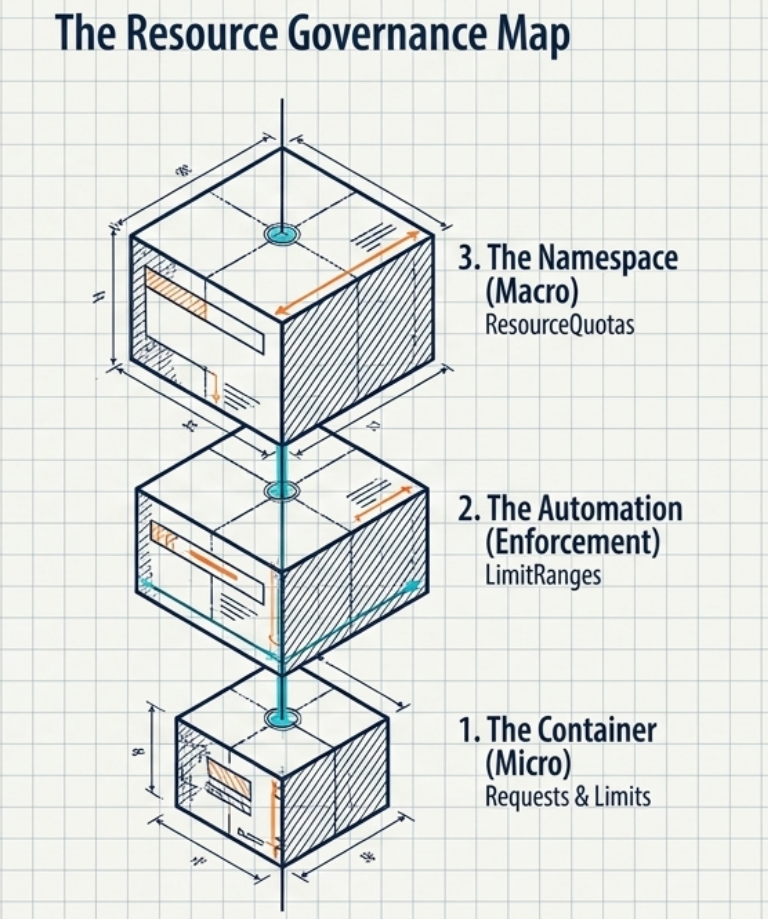
Kubernetes governs resources at three distinct levels:
- The Container (Micro): Granular
requestsandlimitsdefined directly on individual workloads. - The Automation (Enforcement):
LimitRangesthat automatically inject defaults or enforce min/max boundaries per container. - The Namespace (Macro):
ResourceQuotasthat cap the aggregate consumption of a whole team or environment.
Resource Units
Section titled “Resource Units”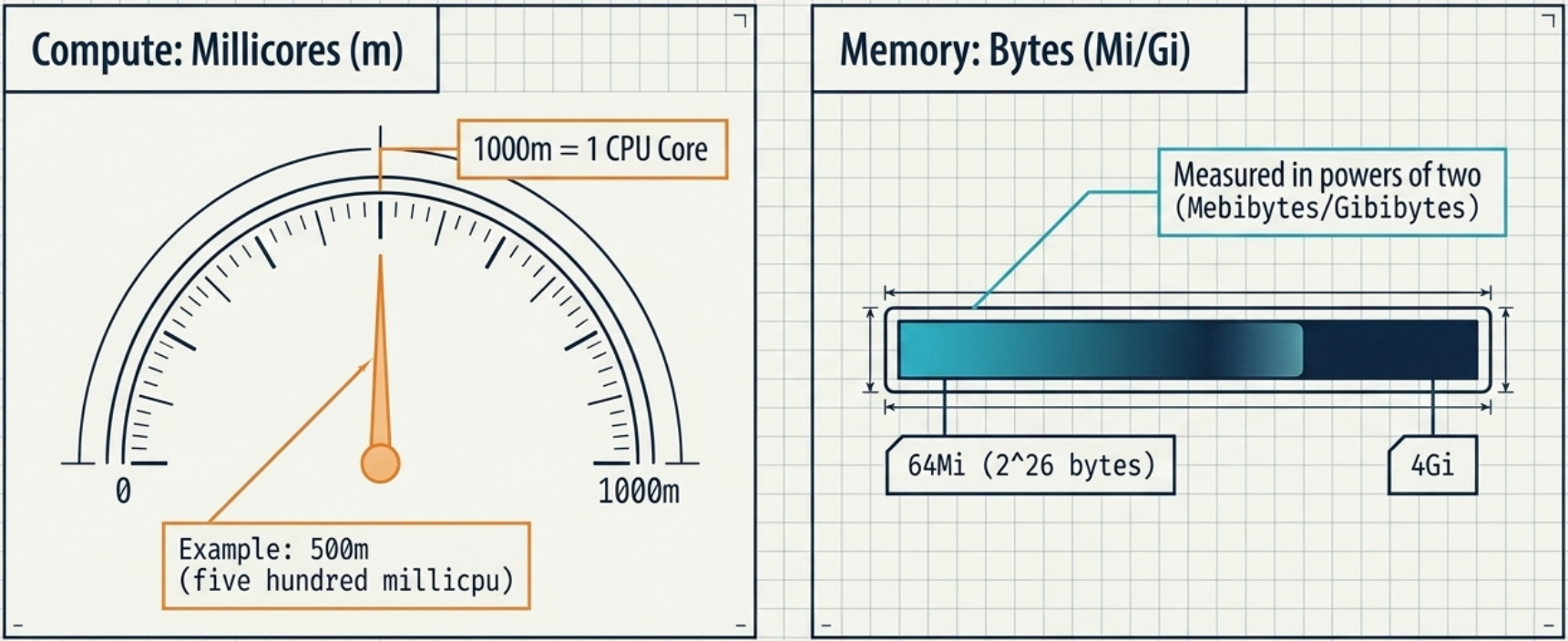
m = millicores = millicpu. 1000m is exactly one logical CPU (vCPU/hyperthread), regardless of the underlying hardware.
| Format | Meaning | Equivalent |
|---|---|---|
250m | 250 millicores | 0.25 of one CPU core |
500m | 500 millicores | 0.5 of one CPU core |
1 | 1 whole core | 1000m |
0.5 | decimal notation | 500m |
2 | 2 whole cores | 2000m |
Memory
Section titled “Memory”| Format | Full name | Bytes |
|---|---|---|
64Mi | 64 Mebibytes | 2²⁶ bytes |
256Mi | 256 Mebibytes | 268,435,456 bytes |
1Gi | 1 Gibibyte | 2³⁰ bytes |
4Gi | 4 Gibibytes | 4,294,967,296 bytes |
Other Resources
Section titled “Other Resources”| Resource type | Example spec field | Example value | Notes |
|---|---|---|---|
| Ephemeral storage | ephemeral-storage | 4Gi | Temporary on-disk space (logs, caches) |
| Huge pages | hugepages-2Mi | 60Mi | Must match page size configured on the node |
Requests
Section titled “Requests”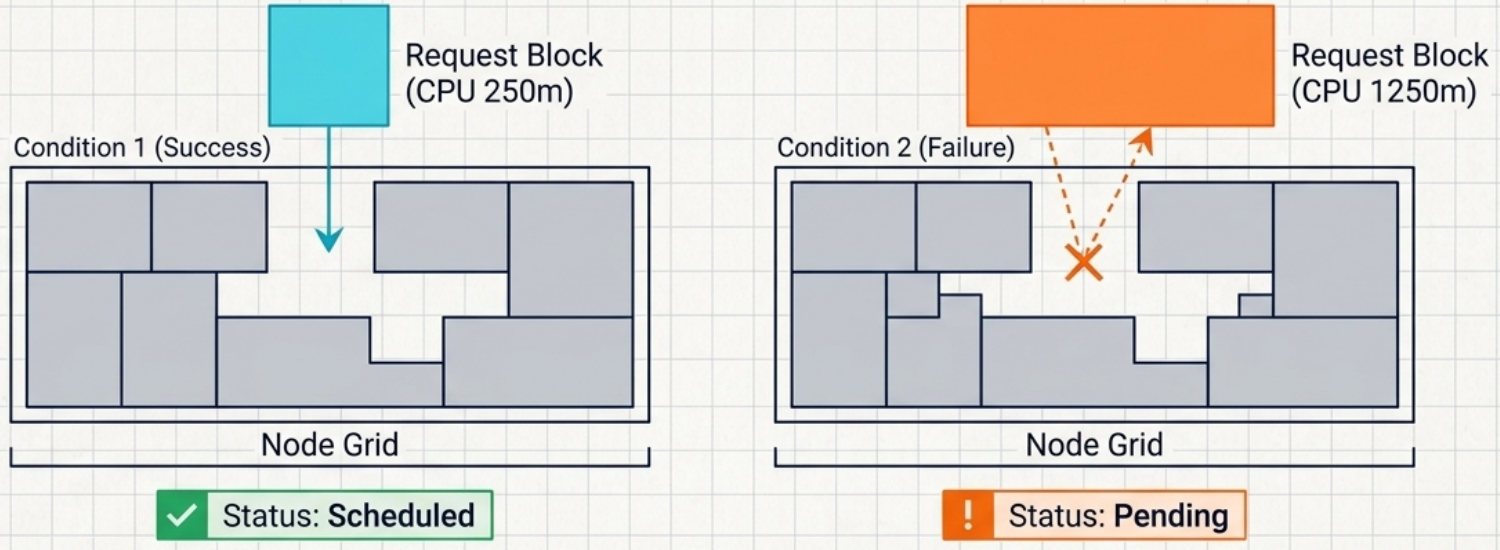
A resource request is the minimum guaranteed allocation for a container. It has two effects:
- Scheduling:
kube-scheduleronly places the pod on a node that has at least this much unallocated capacity - QoS: the
kubeletuses requests to classify pods into eviction priority tiers (see QoS section)
Scheduling Mechanism
Section titled “Scheduling Mechanism”The scheduler sums requests across all containers in a pod (including sidecars) and finds a node with sufficient remaining capacity:
Pod with:  business-app  →  256Mi + 1 CPU  sidecar       →   64Mi + 250m
Scheduler looks for a node with at least:  → 320Mi memory AND 1250m (1.25) CPU unallocated
If no node qualifies, the pod stays Pending.
spec: containers: - name: app image: my-app:1.0 resources: requests: cpu: "250m" # scheduler uses this to find a node memory: "256Mi" # scheduler uses this to find a node ephemeral-storage: "1Gi"Best Practices
Section titled “Best Practices”| Rule | Rationale |
|---|---|
| Always define CPU requests | Scheduler can’t make accurate placement decisions without them |
| Always define memory requests | Prevents pod from landing on a node that will OOMKill it immediately |
| Set memory request = memory limit | Gives the container a guaranteed, non-overcommitted allocation (also achieves Guaranteed QoS) |
Limits
Section titled “Limits”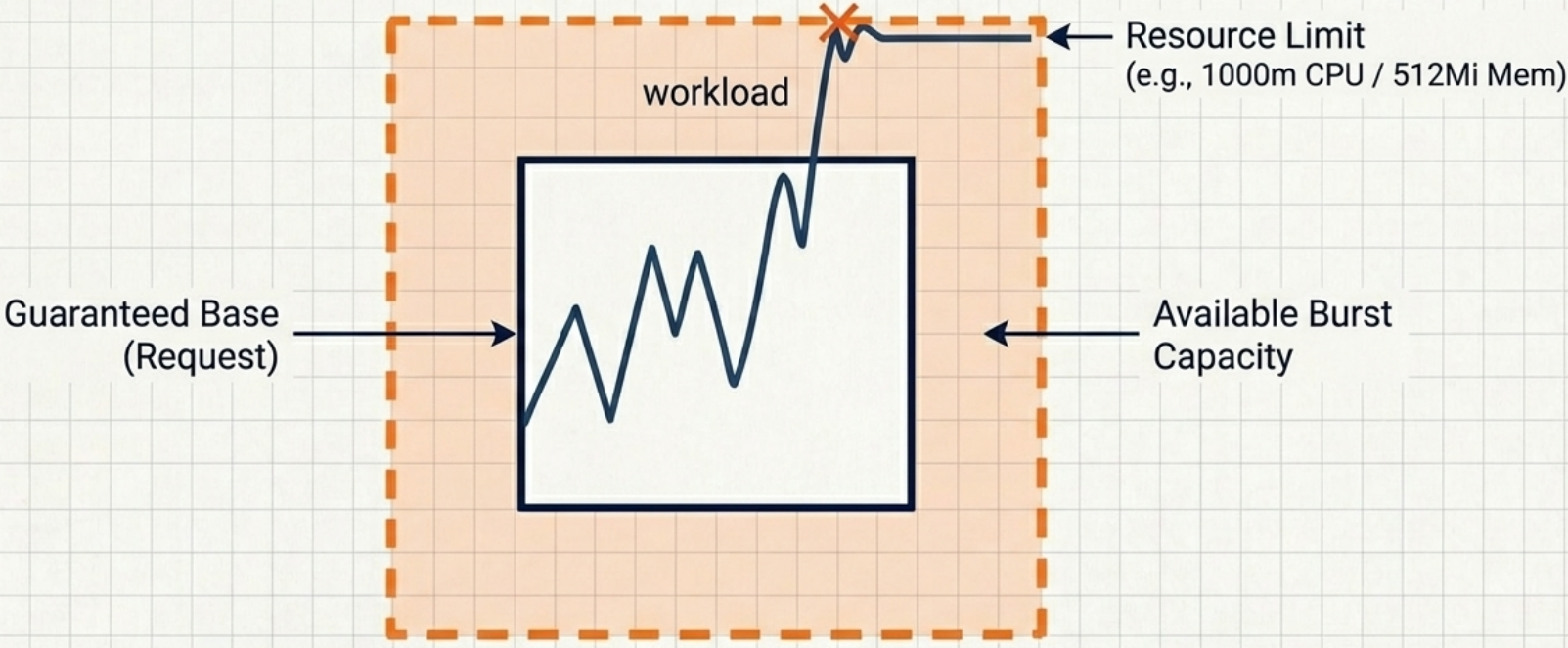
A resource limit is the maximum a container is allowed to consume at runtime. The container runtime enforces it – but enforcement differs by resource type.
Enforcement: OOMKilled vs CPU Throttle
Section titled “Enforcement: OOMKilled vs CPU Throttle”| Resource | What happens when the limit is exceeded |
|---|---|
| Memory | The Linux kernel sends SIGKILL to the container process. Pod shows OOMKilled reason. Kubelet restarts it (based on restartPolicy). |
| CPU | The Linux CFS scheduler throttles the container – it can’t use more CPU than its limit for a given scheduling period. The process is not killed, but it slows down. |
spec: containers: - name: app image: my-app:1.0 resources: requests: memory: "256Mi" cpu: "500m" limits: memory: "256Mi" # same as request → Guaranteed QoS # cpu: "1" # intentionally omitted – avoids throttlingBest Practices
Section titled “Best Practices”| Rule | Rationale |
|---|---|
| Set memory limit = memory request | Non-overcommitted memory allocation; achieves Guaranteed QoS and prevents surprise OOMKills |
| Avoid CPU limits | CPU limits throttle the container even when the node has idle capacity – degrades latency without protecting anyone |
| Exception: CPU limits in strict multi-tenant environments | Prevents a noisy neighbour from consuming all spare CPU on a shared node – benchmark before enabling |
Quality of Service (QoS) Classes
Section titled “Quality of Service (QoS) Classes”Kubernetes automatically assigns a QoS class to every pod based on its resource declarations. The class determines eviction priority when a node runs low on memory.
Classification Rules
Section titled “Classification Rules”| Class | Criteria | Eviction priority |
|---|---|---|
| Guaranteed | Every container has both requests and limits for both CPU and memory, and request == limit for each | Last to be evicted |
| Burstable | At least one container has a CPU or memory request or limit defined, but not all containers have request == limit for both CPU and memory | Middle |
| BestEffort | No container has any CPU or memory requests or limits | First to be evicted |
Practical Classifications
Section titled “Practical Classifications”# → Guaranteed: request == limit for ALL containers on BOTH CPU and memoryresources: requests: cpu: "500m" memory: "256Mi" limits: cpu: "500m" # same as request memory: "256Mi" # same as request# → Burstable: at least one container has a request or limit, but pod is not Guaranteed# (limits > requests, CPU limit omitted, or only some containers have resources set)resources: requests: cpu: "250m" memory: "128Mi" limits: memory: "256Mi" # memory limit != request; no CPU limit → not Guaranteed# → BestEffort: no CPU or memory requests or limits on any containerresources: {}# Verify a pod's assigned QoS classkubectl describe pod <name> | grep "QoS Class"# QoS Class: GuaranteedSizing: Finding the Right Numbers
Section titled “Sizing: Finding the Right Numbers”Understanding requests, limits, and QoS is only half the battle – the harder question is what values to actually set. Get them wrong in either direction and you’ll hit scheduling failures, OOMKills, or wasted cluster capacity.
Resource sizing is an approximation. Setting them too low causes scheduling failures and OOMKills; too high wastes cluster capacity.
Methods
Section titled “Methods”| Method | When to use |
|---|---|
kubectl top pods/nodes | Immediate – shows real-time actual CPU/memory consumption; first step in any sizing investigation |
| Load testing | Pre-production – exercise realistic traffic patterns and measure peak CPU/memory consumption |
| Runtime monitoring | Post-deployment – track actual vs. requested usage with Prometheus + Grafana or cloud monitoring |
| VPA | In-cluster – automatically adjusts requests and limits based on observed usage; Goldilocks runs VPA in recommendation-only mode under the hood |
| Goldilocks | Dashboard – runs VPA in recommendation mode and surfaces sizing suggestions without auto-applying them |
| KRR | CLI – analyses historical Prometheus metrics and outputs concrete recommended requests/limits |
In-Place Resizing (Kubernetes 1.27+)
Section titled “In-Place Resizing (Kubernetes 1.27+)”Before 1.27, changing a container’s resource requests/limits required deleting and rescheduling the pod. From 1.27, container resize policies allow CPU and memory to be adjusted at runtime without a restart:
spec: containers: - name: app resizePolicy: - resourceName: cpu restartPolicy: NotRequired # CPU can be resized without restart - resourceName: memory restartPolicy: RestartContainer # memory resize requires restartResourceQuota
Section titled “ResourceQuota”All the settings so far – requests, limits, QoS – operate at the container level. Kubernetes also provides two mechanisms to govern resources at the namespace level, preventing any single team or workload from monopolising shared cluster capacity. ResourceQuota is the first of these.
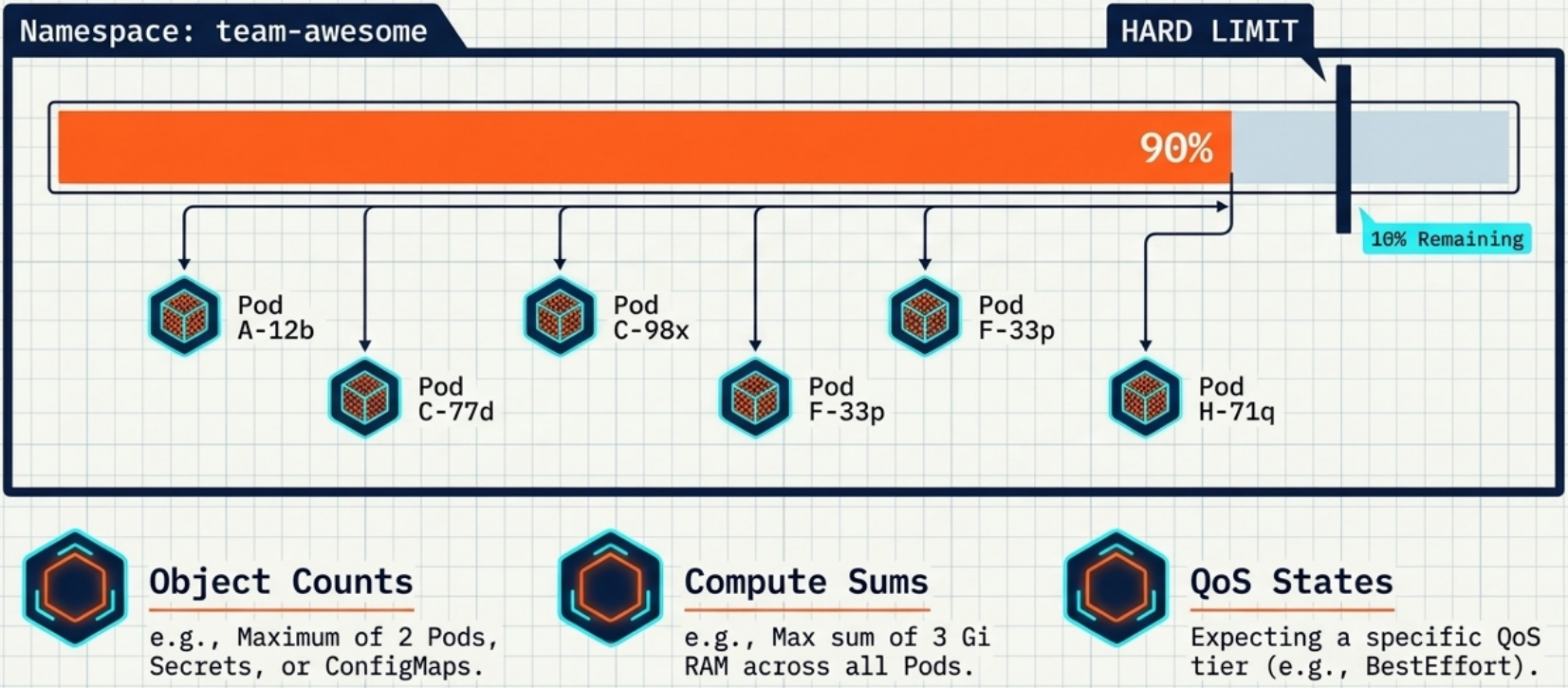
A ResourceQuota is a namespace-level cap on aggregate resource consumption. It prevents one team or workload from monopolising a shared cluster.
What You Can Limit
Section titled “What You Can Limit”| Type | Example constraint | Effect |
|---|---|---|
| Object count | pods: 2 | Maximum 2 pods in the namespace |
| Compute (requests) | requests.cpu: "1" | Sum of all pod CPU requests ≤ 1 core |
| Compute (limits) | limits.memory: 4Gi | Sum of all pod memory limits ≤ 4Gi |
| QoS class | scopes: [BestEffort] | Only BestEffort pods allowed |
apiVersion: v1kind: ResourceQuotametadata: name: backend-quota namespace: backend-teamspec: hard: pods: "2" # max 2 pods in this namespace requests.cpu: "1" # total CPU requests ≤ 1 core requests.memory: 1Gi # total memory requests ≤ 1Gi limits.cpu: "4" # total CPU limits ≤ 4 cores limits.memory: 4Gi # total memory limits ≤ 4Gi# Create namespace + apply quotakubectl create namespace backend-teamkubectl apply -f backend-quota.yaml
# Check live usage vs hard limitskubectl describe resourcequota backend-quota -n backend-team# NAME AGE REQUEST LIMIT# backend-quota 5m requests.cpu: 500m/1, ... limits.memory: 512Mi/4GiEnforcement
Section titled “Enforcement”When a ResourceQuota constrains compute resources, every pod in that namespace MUST explicitly define those resources – or the API server rejects it:
# Pod with no resources block → rejectedError from server (Forbidden): pods "nginx" is forbidden: failed quota: backend-quota: must specify limits.cpu, limits.memory, requests.cpu, requests.memory for: nginxWhen cumulative usage would exceed a hard limit → rejected:
Error from server (Forbidden): pods "nginx3" is forbidden: exceeded quota: backend-quota, requested: pods=1,requests.cpu=500m,requests.memory=512Mi, used: pods=2,requests.cpu=1,requests.memory=1Gi, limited: pods=2,requests.cpu=1,requests.memory=1GiLimitRange
Section titled “LimitRange”A LimitRange sets per-object (per-container or per-PVC) minimum, maximum, and default resource values. It complements ResourceQuota:
| ResourceQuota | LimitRange | |
|---|---|---|
| Scope | Aggregate namespace totals | Individual container / PVC |
| Purpose | Cap total cluster consumption | Enforce healthy per-object sizing |
| Effect on missing resources | Rejects the pod | Injects defaults automatically |
apiVersion: v1kind: LimitRangemetadata: name: cpu-constraints namespace: defaultspec: limits: - type: Container # applies to each container in every pod min: cpu: "100m" # container cannot request less than 100m max: cpu: "2" # container cannot limit more than 2 cores defaultRequest: cpu: "200m" # injected if container omits requests.cpu default: cpu: "200m" # injected if container omits limits.cpuDefault Injection
Section titled “Default Injection”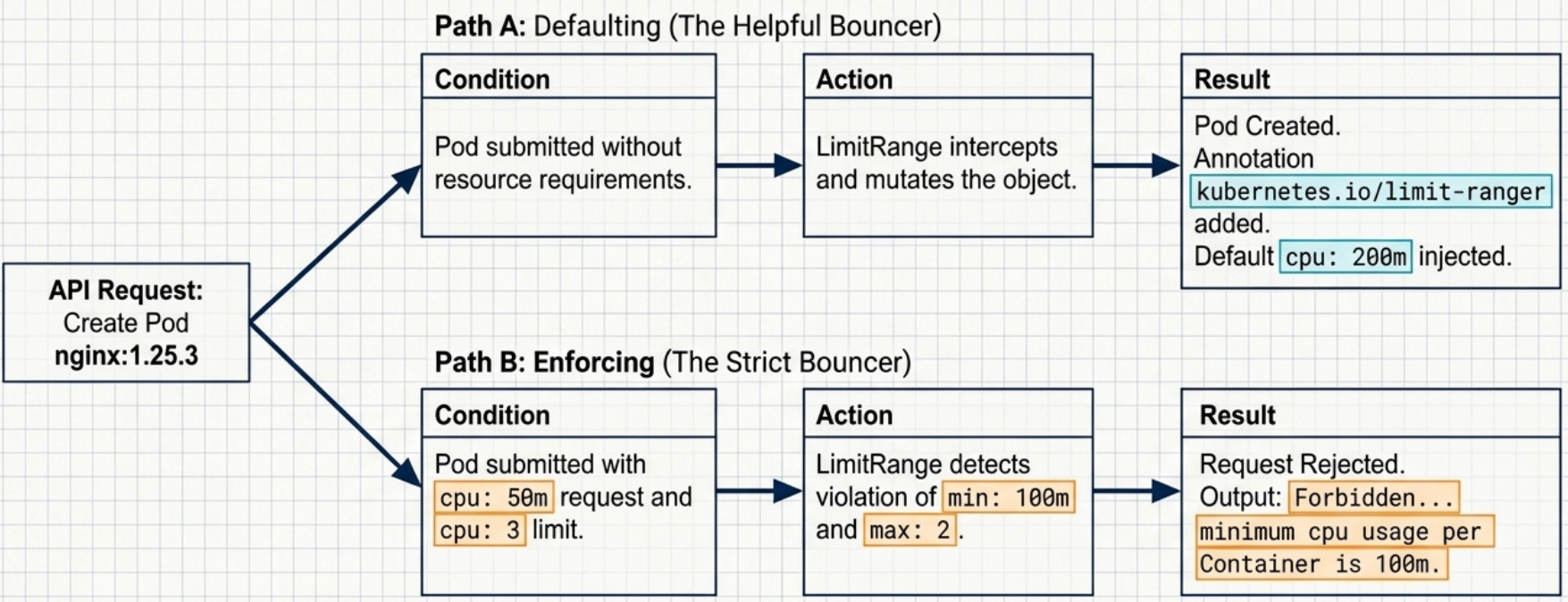
If a container defines no CPU resource at all, the LimitRange automatically injects the defaultRequest and default values. The mutation is recorded in a pod annotation:
kubectl describe pod my-pod# Annotations:# kubernetes.io/limit-ranger: LimitRanger plugin set cpu request to 200m; cpu limit to 200mValidation Enforcement
Section titled “Validation Enforcement”If a container explicitly requests less than min or limits more than max, the pod is rejected immediately:
Error from server (Forbidden): pods "nginx" is forbidden: [minimum cpu usage per Container is 100m, but request is 50m, maximum cpu usage per Container is 2, but limit is 3]Best Practices
Section titled “Best Practices”- One LimitRange per namespace – multiple LimitRanges cause non-deterministic default injection (unpredictable which one wins)
- LimitRange changes do not affect already-running pods – only new pods created after the change
Troubleshooting
Section titled “Troubleshooting”| Symptom | Likely cause | Diagnostic | Fix |
|---|---|---|---|
Pod stuck Pending | Requests exceed available node capacity | kubectl describe pod → events show PodExceedsFreeCPU or PodExceedsFreeMemory | Lower requests, add nodes, or free capacity on existing nodes |
Container keeps restarting, reason OOMKilled | Container exceeded its memory limit | kubectl describe pod → Last State: OOMKilled | Increase memory limit; check for memory leak |
| Container slow under load, no crash | CPU limit causing throttling | Check CPU throttle metric (container_cpu_cfs_throttled_seconds_total) | Remove CPU limit or raise it |
Pod creation fails with Forbidden: must specify limits.cpu | ResourceQuota active; pod has no resource declarations | kubectl describe resourcequota -n <ns> | Add resources.requests and resources.limits to the pod spec |
Pod creation fails with exceeded quota | Namespace has hit its hard cap | kubectl describe resourcequota → compare Used vs Hard | Delete unused pods, scale down deployments, or request quota increase |
Pod creation fails with minimum cpu usage per Container is Xm | LimitRange min violated | kubectl get limitranges -n <ns> then describe | Raise the container’s CPU request above the minimum |
| Unknown defaults injected into pod | LimitRange auto-mutation | kubectl describe pod → kubernetes.io/limit-ranger annotation | Inspect the LimitRange; explicitly set resources if defaults don’t suit you |