
Service Discovery Deep Dive
- Service discovery is how one microservice finds and communicates with another - by name, not by IP. Kubernetes automates the entire name-to-IP translation chain so application code only ever needs to know the target Service name.
- Division of labour: developers configure which Service names to call; Kubernetes handles ClusterIP allocation, DNS registration, EndpointSlice tracking, and kernel-level routing on every node.
- Foundation: every Service gets a stable
ClusterIPand a DNS entry. The DNS entry is what makes discovery reliable regardless of Pod churn underneath.
How Service Discovery Works
Section titled “How Service Discovery Works”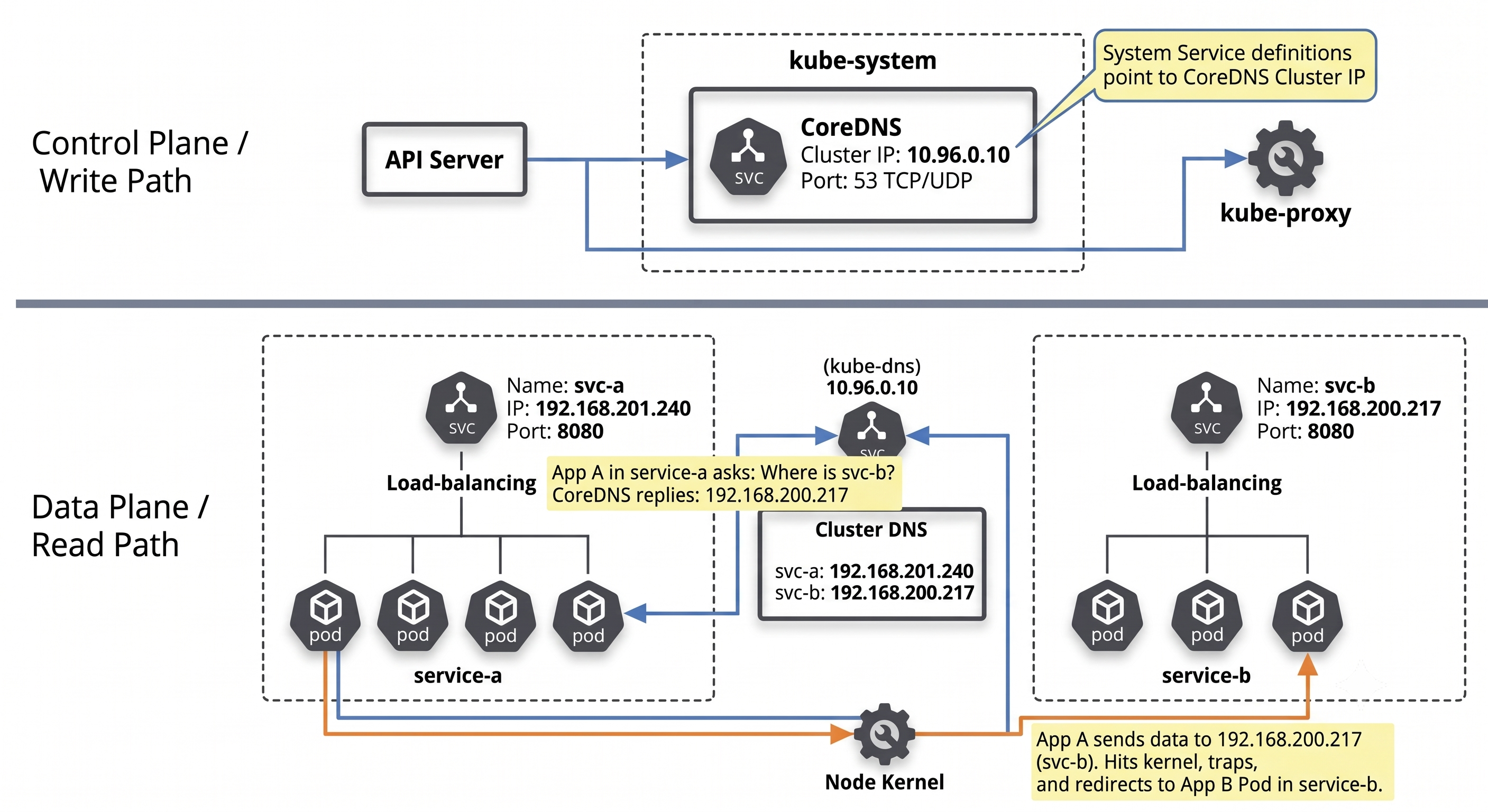
When app-a needs to talk to app-b, the flow is:
- Name configured (manual): the developer sets the target Service name (
app-b) inapp-a’s config - this is the only manual step. - DNS query (automated):
app-a’s container queries the cluster DNS forapp-b’s IP. - ClusterIP returned (automated): CoreDNS resolves the name to
app-b’s virtual ClusterIP. - Traffic sent (automated):
app-asends packets to the ClusterIP;kube-proxykernel rules intercept and forward to a healthy Pod.
The Routing Challenge: ClusterIPs are Non-Routable
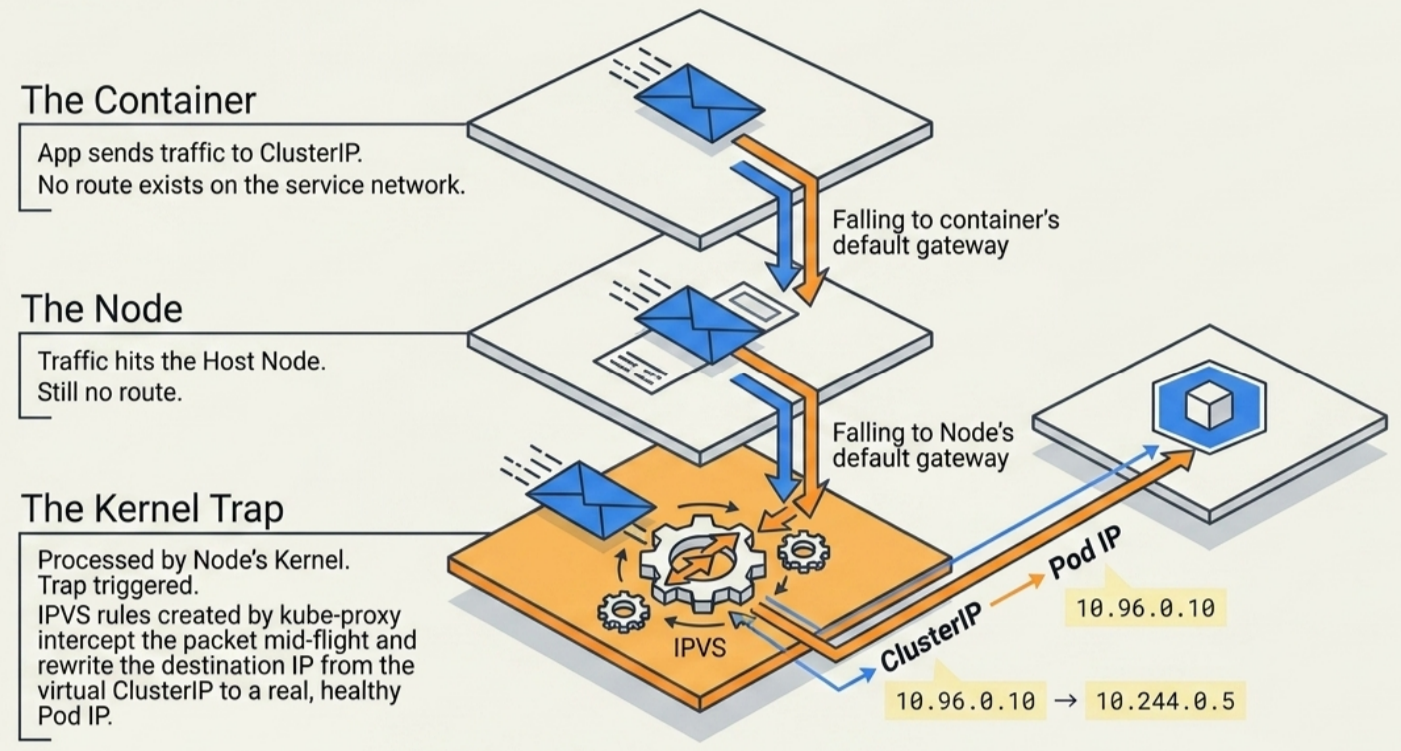
Section titled “The Routing Challenge: ClusterIPs are Non-Routable”ClusterIPs live on a virtual service network that has no routes on containers or nodes. Packets fall through to default gateways:
flowchart LR
    subgraph SourcePod["📦 SOURCE CONTAINER (Pod Netns)"]
        direction TB
        P1["1️⃣ Packet sent<br/><code>dst: ClusterIP</code>"]
        P2["2️⃣ Route lookup<br/><i>No route in netns</i>"]
        P3["3️⃣ Default gateway<br/><code>via veth interface</code>"]
        P1 --> P2 --> P3
    end

    subgraph HostNode["🖥️ HOST NODE (Kernel & kube-proxy)"]
        direction TB
        H1["4️⃣ Host interface<br/><i>Packet arrives</i>"]
        H2["5️⃣ Routing check<br/><i>Towards default gw</i>"]
        H3["6️⃣ Kernel netfilter<br/><i>Processes packet</i>"]
        H4["7️⃣ kube-proxy rules<br/><code>iptables / IPVS</code>"]
        H5["8️⃣ DNAT rewrite<br/><code>ClusterIP ➔ Pod IP</code>"]
        H1 --> H2 --> H3 --> H4 --> H5
    end

    subgraph DestPod["🎯 TARGET BACKEND POD"]
        direction TB
        D1["9️⃣ Delivered to Pod<br/><code>dst: Pod IP:targetPort</code>"]
    end

    SourcePod -->|"leaves container netns"| HostNode
    HostNode -->|"routed via CNI"| DestPod
kube-proxy watches the API server for Service and EndpointSlice changes and pre-programs these kernel rules on every node. Traffic interception is transparent to the application.
| Phase | Responsible entity | Action |
|---|---|---|
| Configure target name | Developer | Hardcode or inject Service name into app config |
| DNS request | Application container | Query nameserver from /etc/resolv.conf |
| Name resolution | CoreDNS | Resolve FQDN to ClusterIP |
| Packet interception | Node kernel + kube-proxy | Rewrite destination IP to Pod IP |
DNS Resolution and /etc/resolv.conf
Section titled “DNS Resolution and /etc/resolv.conf”On Pod creation, kubelet populates /etc/resolv.conf in every container:
search dev.svc.cluster.local svc.cluster.local cluster.localnameserver 10.96.0.10options ndots:5Directive Breakdown
Section titled “Directive Breakdown”nameserver: the ClusterIP of thekube-dnsService - all DNS queries go here.search: ordered list of suffixes appended to unqualified (short) names:<current-namespace>.svc.cluster.local- tried firstsvc.cluster.localcluster.local
options ndots:5: if a name has fewer than 5 dots, search suffixes are tried before treating it as an absolute FQDN.
Short Names vs. FQDNs
Section titled “Short Names vs. FQDNs”| Name type | Example | Scope | How it resolves |
|---|---|---|---|
| Short name | web | Same namespace only | Resolver appends <local-ns>.svc.cluster.local automatically |
| FQDN | web.prod.svc.cluster.local | Any namespace | Sent directly without search suffix appending |
Short name resolution (intra-namespace): when a Pod in dev runs curl web:8080:
- Resolver appends
dev.svc.cluster.local- queriesweb.dev.svc.cluster.local - CoreDNS returns the ClusterIP for
webindev kube-proxyrules forward traffic to a healthy Pod
Cross-namespace resolution: to reach web in prod from dev, the FQDN is required:
curl web.prod.svc.cluster.local:8080Short names always expand to the local namespace first - they cannot reach remote namespaces.
Verify resolv.conf Inside a Pod
Section titled “Verify resolv.conf Inside a Pod”kubectl exec -it <pod-name> -n <namespace> -- cat /etc/resolv.conf# Expected: search <ns>.svc.cluster.local svc.cluster.local cluster.local# nameserver 10.96.0.10# options ndots:5The ndots:5 Performance Trap
Section titled “The ndots:5 Performance Trap”The default ndots:5 causes up to 5 sequential DNS lookups for any external FQDN that has fewer than 5 dots. For example, calling api.github.com from a Pod in the default namespace triggers:
1. api.github.com.default.svc.cluster.local <- NXDOMAIN2. api.github.com.svc.cluster.local <- NXDOMAIN3. api.github.com.cluster.local <- NXDOMAIN4. api.github.com. <- RESOLVED (absolute)This adds latency on every external call and hammers CoreDNS with wasted queries. Two mitigations:
- Trailing dot trick: use
api.github.com.(note the trailing dot) in your config. The resolver treats a trailing dot as an absolute FQDN and skips search suffixes entirely. - Lower
ndotsviadnsConfig: override per-Pod in the spec (covered in Services - DNS Policy):
spec: dnsConfig: options: - name: ndots value: "2" # external FQDNs with 2+ dots resolve directlyNamespace-Scoped Discovery
Section titled “Namespace-Scoped Discovery”FQDN Structure
Section titled “FQDN Structure”Every Service gets a Fully Qualified Domain Name:
<service-name>.<namespace>.svc.cluster.localExamples:
webindefault-web.default.svc.cluster.localwebindev-web.dev.svc.cluster.localwebinprod-web.prod.svc.cluster.local
Namespace Isolation Rules
Section titled “Namespace Isolation Rules”- Service names must be unique within a namespace - one
webper namespace. - Service names can be identical across namespaces -
webindevandwebinprodare separate, independent Services. - This enables parallel environments (
dev/staging/prod) on the same cluster with identical manifests and no naming collisions.
StatefulSet Pod DNS
Section titled “StatefulSet Pod DNS”Regular Services resolve to the ClusterIP (load-balanced across all Pods). Headless Services for StatefulSets expose each Pod individually:
<pod-name>.<headless-svc-name>.<namespace>.svc.cluster.localFor a StatefulSet db backed by headless Service db-headless in namespace data:
# Individual Pod addresses - stable across restarts:db-0.db-headless.data.svc.cluster.local  # pod 0db-1.db-headless.data.svc.cluster.local  # pod 1db-2.db-headless.data.svc.cluster.local  # pod 2
# The headless service itself returns all Pod IPs as A records (no ClusterIP):nslookup db-headless.data.svc.cluster.local# returns: 10.244.1.5, 10.244.2.3, 10.244.3.7
This is how StatefulSet Pods find each other by stable identity - for clustered databases (PostgreSQL replicas, Kafka brokers, etcd peers) where a Pod must know the address of a specific peer. See DaemonSets and StatefulSets for the full StatefulSet coverage.
Practical Example: Same Name, Different Namespaces
Section titled “Practical Example: Same Name, Different Namespaces”Two deployments - web Service in dev (responds “Hello from DEV”) and web Service in prod (responds “Hello from PROD”):
# From a Pod in the dev namespace:curl web:8080# Hello from DEV  <- resolves to dev namespace via search suffix
curl web.prod.svc.cluster.local:8080# Hello from PROD <- FQDN bypasses local search, targets prod directly# Confirm the two services have different ClusterIPs:kubectl get svc web -n dev # e.g. 10.96.138.186kubectl get svc web -n prod # e.g. 10.96.147.32CoreDNS: The Service Registry
Section titled “CoreDNS: The Service Registry”Every cluster runs an internal cluster DNS (CoreDNS) as the service registry - a Kubernetes-native application built from standard API objects, all in kube-system with label k8s-app=kube-dns.
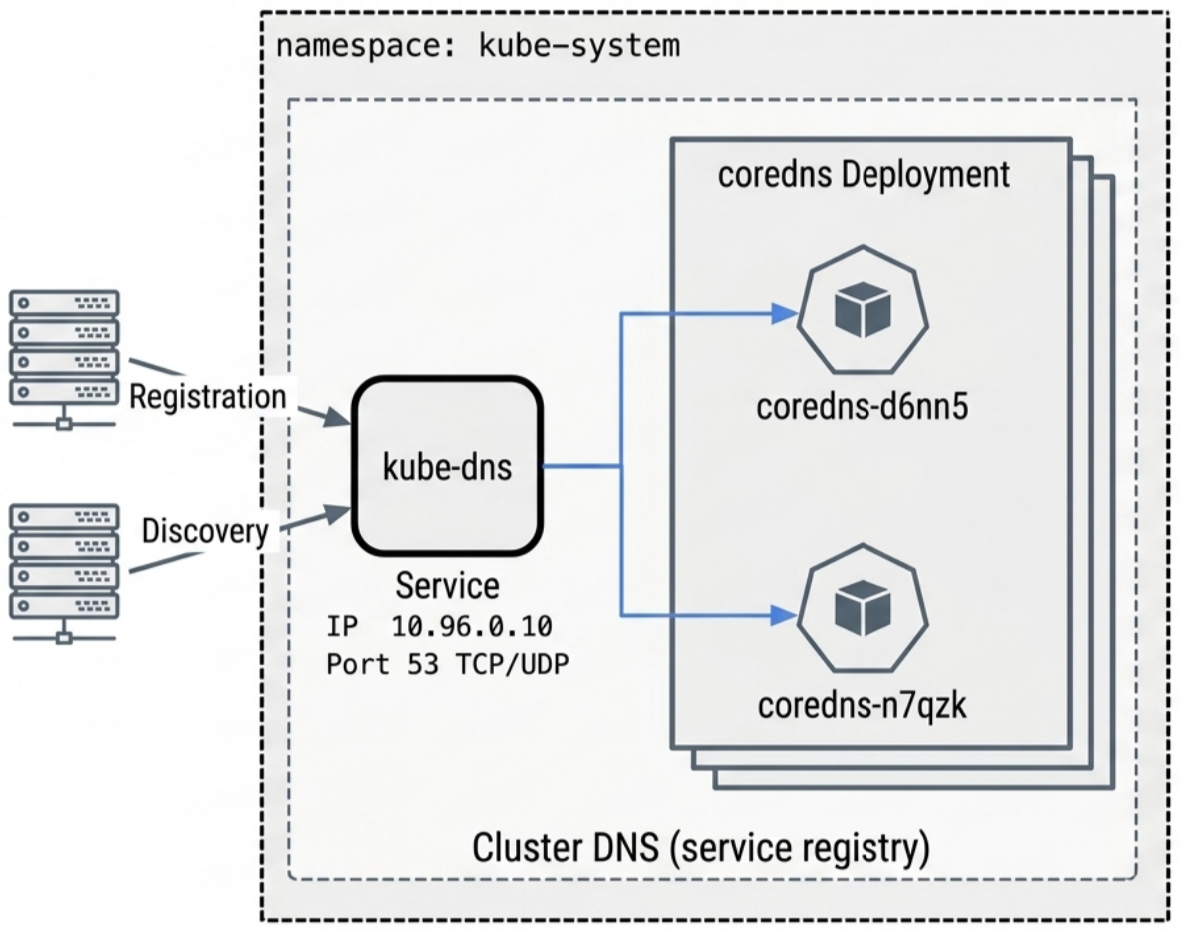
The 4 Components
Section titled “The 4 Components”| Component | Object name | Role | Key details |
|---|---|---|---|
| Deployment | coredns (or kube-dns) | Manages DNS Pod lifecycle and replicas | Typically 2+ replicas for redundancy |
| Pods | coredns-xxxxx-xxxxx | Process A/AAAA and SRV resolution queries | Image: registry.k8s.io/coredns/coredns |
| Service | kube-dns | Stable ClusterIP frontend for all DNS queries | Always named kube-dns across all clusters; ports 53/UDP, 53/TCP, 9153/TCP |
| EndpointSlice | kube-dns-xxxxx | Tracks active CoreDNS Pod IPs | Prefixed kube-dns- (e.g. kube-dns-jb72g) |
Inspection Commands
Section titled “Inspection Commands”# All 4 components share this labelkubectl get deploy,pods,svc,endpointslice -n kube-system -l k8s-app=kube-dns
# Or individually:kubectl get deploy -n kube-system -l k8s-app=kube-dnskubectl get pods -n kube-system -l k8s-app=kube-dnskubectl get svc kube-dns -n kube-systemkubectl get endpointslice -n kube-system -l k8s-app=kube-dnsCustomising CoreDNS
Section titled “Customising CoreDNS”CoreDNS is configured via a Corefile stored in the coredns ConfigMap in kube-system. You can edit it to add forwarding rules, stub zones, hosts overrides, or custom caching.
# View the current Corefilekubectl get configmap coredns -n kube-system -o yamlDefault Corefile structure:
.:53 { errors health { lameduck 5s } ready kubernetes cluster.local in-addr.arpa ip6.arpa { # handles cluster DNS pods insecure fallthrough in-addr.arpa ip6.arpa ttl 30 } prometheus :9153 # metrics endpoint forward . /etc/resolv.conf { # upstream for external names max_concurrent 1000 } cache 30 # cache TTL in seconds loop reload loadbalance}Common Customisations
Section titled “Common Customisations”Forward a specific domain to an internal resolver (split-horizon DNS for on-prem):
corp.example.com:53 { errors forward . 192.168.1.53 # on-prem DNS resolver cache 30}Add static host entries (useful for legacy services without DNS):
hosts { 10.0.1.50 legacy-db.internal fallthrough}Override external DNS (redirect a domain to a cluster Service for testing):
rewrite name api.external.com internal-api-svc.default.svc.cluster.localAfter editing, CoreDNS picks up changes automatically via the reload plugin - no restart needed. Validate with:
# Edit the ConfigMapkubectl edit configmap coredns -n kube-system
# Watch CoreDNS logs for reload confirmationkubectl logs -f <coredns-pod> -n kube-system# [INFO] plugin/reload: Running configuration SHA512 = <new-hash>Service Registration Pipeline
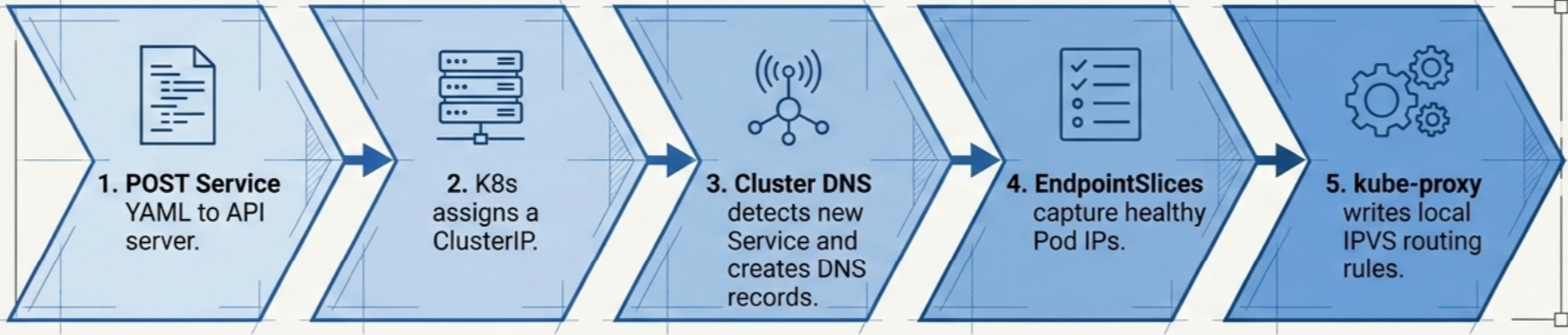
Section titled “Service Registration Pipeline”When a developer posts a Service manifest, 8 automated stages fire in sequence:
flowchart TD
    subgraph Row1["Phase 1: Registration & Storage (Control Plane)"]
        direction LR
        S1["1️⃣ POST YAML<br/><code>API server</code>"] --> S2["2️⃣ ClusterIP allocated<br/><i>Service IP range</i>"] --> S3["3️⃣ Persisted to etcd<br/><i>Cluster store</i>"] --> S4["4️⃣ CoreDNS detects<br/><i>via API watch</i>"]
    end

    subgraph Row2["Phase 2: DNS & Data Plane Sync (Worker Nodes)"]
        direction RL
        S8["8️⃣ IPVS rules live<br/><i>Kernel interception</i>"]
        S7["7️⃣ kube-proxy syncs<br/><i>Node daemon</i>"] --> S8
        S6["6️⃣ EndpointSlices created<br/><i>Controller</i>"] --> S7
        S5["5️⃣ DNS records written<br/><i>A/AAAA & SRV</i>"] --> S6
    end

    Row1 -->|"API watch events trigger sync"| Row2
- Stage 1 - POST to API server: manifest authenticated, RBAC checked, schema validated.
- Stage 2 - ClusterIP allocation: a unique virtual IP is drawn from the service network range.
- Stage 3 - Persisted to etcd: Service state and ClusterIP written to the cluster store.
- Stage 4 - CoreDNS detects: CoreDNS maintains a watch stream on the API server; new Service detected instantly.
- Stage 5 - DNS records written: CoreDNS generates A/AAAA records (name to ClusterIP) and SRV records (named ports to port numbers).
- Stage 6 - EndpointSlices created: the EndpointSlice controller matches the Service selector against healthy Pods and populates slices with Pod IPs.
- Stage 7 - kube-proxy syncs: the
kube-proxydaemon on every node pulls the new Service and EndpointSlice data. - Stage 8 - Kernel rules programmed:
kube-proxywrites IPVS/iptables rules to intercept ClusterIP traffic and load-balance it to Pod IPs.
Multi-Cluster Services (MCS API)
Section titled “Multi-Cluster Services (MCS API)”As clusters scale to fleet management, cross-cluster discovery is standardized by the Multi-Cluster Services (MCS) API. Rather than using messy API federations or bespoke syncing controllers, MCS uses ServiceExport and ServiceImport to define cross-cluster boundaries declaratively.
Core Concepts
Section titled “Core Concepts”- ClusterSet: A fleet of clusters managed together (the boundary of trust).
- ServiceExport: An opt-in resource created in the source cluster to declare a local Service should be accessible to the rest of the ClusterSet.
- ServiceImport: Created automatically in destination clusters by an MCS controller (e.g., Cilium Cluster Mesh or GKE MCS) to mirror the exported Service.
Example Workflow
Section titled “Example Workflow”# Source Cluster: Export the local 'payments' serviceapiVersion: multicluster.x-k8s.io/v1alpha1kind: ServiceExportmetadata: name: payments namespace: financeOnce exported, the service becomes globally discoverable across the ClusterSet using a specialized DNS domain:
# Destination Cluster: resolve the imported servicenslookup payments.finance.svc.clusterset.localDNS and Routing
Section titled “DNS and Routing”The <svc>.<ns>.svc.clusterset.local FQDN pattern is standard. When a Pod queries this domain, CoreDNS resolves it to a virtual IP (VIP) managed by the MCS controller, which securely tunnels the traffic (often via eBPF/WireGuard tunnels or service meshes) to the remote endpoints.
NodeLocal DNSCache
Section titled “NodeLocal DNSCache”In large clusters, every DNS query from every Pod hits the CoreDNS Pods directly, creating a bottleneck. NodeLocal DNSCache solves this by running a DNS caching agent as a DaemonSet on every node - queries are answered locally without a network hop to CoreDNS.
- How it works: a
node-local-dnsDaemonSet binds to a link-local IP (typically169.254.20.10) on each node.kubeletconfigures new Pods to use this local IP asnameserverinstead of thekube-dnsClusterIP. - Cache hits: served in microseconds from the node, no CoreDNS round-trip.
- Cache misses: the node agent forwards to CoreDNS and caches the response for subsequent queries.
- Conntrack benefit: uses TCP for upstream queries to CoreDNS, avoiding conntrack race conditions that can drop UDP DNS responses under load.
# Check if NodeLocal DNSCache is deployedkubectl get daemonset -n kube-system node-local-dns
# Verify the link-local IP is listening on a nodekubectl debug node/<node-name> -it --image=busybox -- nslookup kubernetes 169.254.20.10ExternalDNS
Section titled “ExternalDNS”ExternalDNS is a controller that watches Kubernetes Services and Ingresses and automatically creates/updates records in external DNS providers (Route53, Cloud DNS, Azure DNS, Cloudflare, etc.). It bridges the gap between in-cluster DNS and public DNS.
How It Works
Section titled “How It Works”- Annotate a Service or Ingress with the desired hostname:
apiVersion: v1kind: Servicemetadata: name: web-public annotations: external-dns.alpha.kubernetes.io/hostname: app.example.comspec: type: LoadBalancer- ExternalDNS detects the annotation, reads the Service’s external IP (assigned by the cloud load balancer), and creates an A record in your DNS provider:
app.example.com -> 203.0.113.45 # created automatically in Route53 / Cloud DNS- When the Service is deleted or the annotation removed, ExternalDNS deletes the record.
Why It Matters
Section titled “Why It Matters”- No manual DNS management - hostnames follow the lifecycle of Kubernetes objects.
- Works with Ingress - can create DNS records for every Ingress host rule automatically.
- Provider-agnostic - same annotations work across AWS, GCP, Azure, and 30+ other providers.
# Check ExternalDNS is running and watching the correct sourceskubectl get pods -n kube-system -l app.kubernetes.io/name=external-dnskubectl logs -n kube-system -l app.kubernetes.io/name=external-dns | grep "Desired change"# Desired change: CREATE app.example.com A [203.0.113.45] in zone Z1234Troubleshooting Service Discovery
Section titled “Troubleshooting Service Discovery”Step 1 - Check CoreDNS Health
Section titled “Step 1 - Check CoreDNS Health”# Deployment should show all replicas readykubectl get deploy -n kube-system -l k8s-app=kube-dns# NAME READY UP-TO-DATE AVAILABLE# coredns 2/2 2 2
# Pods should be Running with 0 restartskubectl get pods -n kube-system -l k8s-app=kube-dns
# Check logs for config errors or plugin failureskubectl logs <coredns-pod-name> -n kube-system# Healthy output:# .:53# [INFO] plugin/reload: Running configuration SHA512 = 591cf3...# CoreDNS-1.11.1 linux/arm64Step 2 - Verify kube-dns Service IP
Section titled “Step 2 - Verify kube-dns Service IP”kubectl get svc kube-dns -n kube-system# NAME TYPE CLUSTER-IP PORT(S)# kube-dns ClusterIP 10.96.0.10 53/UDP,53/TCP,9153/TCPCross-check that 10.96.0.10 matches the nameserver in a container’s /etc/resolv.conf:
kubectl exec -it <any-pod> -- cat /etc/resolv.confStep 3 - Verify EndpointSlice is Populated
Section titled “Step 3 - Verify EndpointSlice is Populated”kubectl get endpointslice -n kube-system -l k8s-app=kube-dns# NAME ADDRESSTYPE PORTS ENDPOINTS# kube-dns-jb72g IPv4 9153,53,53 10.244.1.9,10.244.1.14Empty ENDPOINTS means CoreDNS Pods are not passing readiness - check Pod status and logs.
Step 4 - Live DNS Resolution Test
Section titled “Step 4 - Live DNS Resolution Test”Launch a diagnostic Pod with DNS utilities:
kubectl run dnsutils --image=registry.k8s.io/e2e-test-images/jessie-dnsutils:1.7 -it --rmInside the Pod, query the kubernetes Service (present in every cluster):
nslookup kubernetes# Server: 10.96.0.10# Address: 10.96.0.10#53## Name: kubernetes.default.svc.cluster.local# Address: 10.96.0.1- Lines 1-2: DNS queries are reaching
kube-dnsat port 53 - CoreDNS is reachable. - Lines 3-4: name resolved to FQDN and correct ClusterIP - DNS records are intact.
Cross-verify the returned IP:
kubectl get svc kubernetes # ClusterIP should match the Address aboveRecovery: Restart CoreDNS
Section titled “Recovery: Restart CoreDNS”If nslookup: can't resolve kubernetes - delete the Pods; the Deployment recreates them:
kubectl delete pod -n kube-system -l k8s-app=kube-dns
# Wait, then verify and re-testkubectl get pods -n kube-system -l k8s-app=kube-dns
Common Failure Modes
Section titled “Common Failure Modes”| Symptom | Likely cause | Fix |
|---|---|---|
nslookup: can't resolve <name> | CoreDNS crash-looping or nameserver IP mismatch | Restart CoreDNS Pods; verify ClusterIP matches resolv.conf |
| DNS resolves but traffic fails | kube-proxy rules stale or EndpointSlice empty | Check kubectl get endpointslice; restart kube-proxy DaemonSet |
| Short name resolves wrong Service | Pod in wrong namespace | Use FQDN to explicitly target the correct namespace |
| Cross-namespace comms fail | Using short name for cross-namespace call | Replace with <svc>.<ns>.svc.cluster.local |
Cleanup
Section titled “Cleanup”# Delete the diagnostic Pod (--rm handles this if used above, otherwise:)kubectl delete pod dnsutils