
Scaling & HPA
Kubernetes provides a layered approach to scaling: you can scale manually when you know your capacity needs, or let autoscalers respond to real-time demand. The two dimensions of scaling – Pods and nodes – can be combined for fully elastic infrastructure.
Manual Scaling
Section titled “Manual Scaling”You can adjust the number of running Pods at any time using two methods. Unlike rolling updates, manual scaling is near-instantaneous.
Imperative (flag)
Section titled “Imperative (flag)”kubectl scale deployment <name> --replicas=5Declarative (preferred)
Section titled “Declarative (preferred)”Edit spec.replicas in the manifest and re-apply:
spec: replicas: 5 # updated from 3kubectl apply -f deployment.yamlThis keeps your source YAML as the single source of truth, ensuring the live cluster never drifts from your declared state.
Scaling to Zero
Section titled “Scaling to Zero”kubectl scale deployment <name> --replicas=0All Pods are terminated but the Deployment and ReplicaSet objects remain. Scale back up at any time – useful for temporarily suspending a workload without losing its configuration.
Autoscalers
Section titled “Autoscalers”For dynamic workloads, manually adjusting replicas is impractical. Kubernetes provides three autoscalers that react to real-time signals:
| Autoscaler | What it scales | Default installed | Disruption |
|---|---|---|---|
| HPA | Number of Pods | ✅ Yes | None – adds/removes Pods smoothly |
| Cluster Autoscaler (CA) | Number of nodes | ✅ Yes (cloud) | None for running Pods |
| VPA | CPU/memory per Pod | ❌ No | Disruptive – deletes and recreates Pods |
Horizontal Pod Autoscaler (HPA)
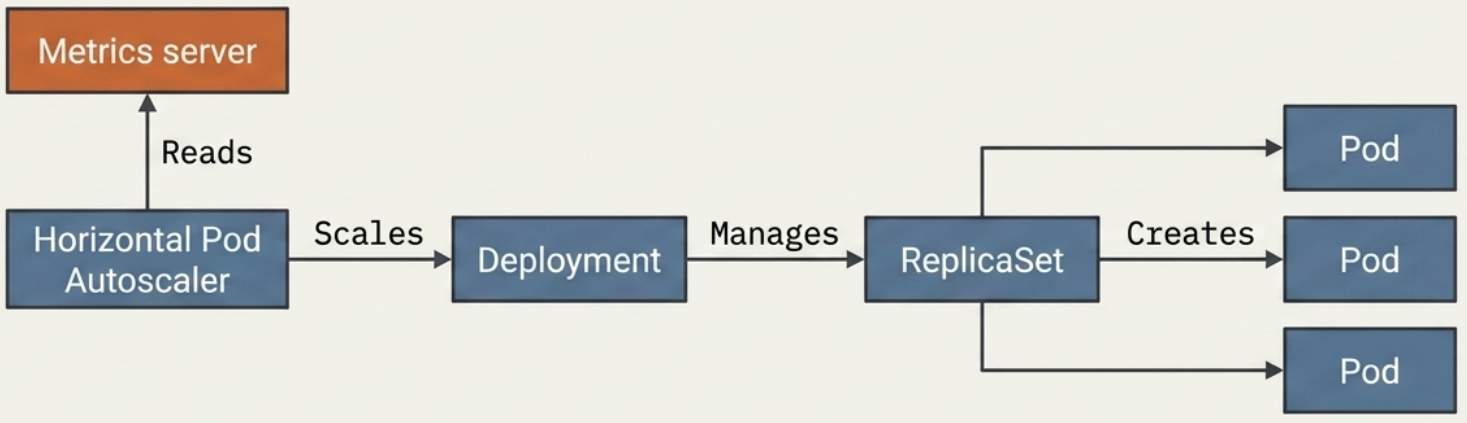
Section titled “Horizontal Pod Autoscaler (HPA)”The HPA automatically adds or removes Pods in a Deployment (or StatefulSet/ReplicaSet) based on observed metrics. It is the primary autoscaler for handling traffic fluctuations.
How it Works
Section titled “How it Works”The HPA controller polls metrics at a configurable interval and computes the target replica count:
desired replicas = ceil(current replicas × (current metric / target metric))Minimal HPA Spec
Section titled “Minimal HPA Spec”apiVersion: autoscaling/v2kind: HorizontalPodAutoscalermetadata: name: my-app-hpaspec: scaleTargetRef: apiVersion: apps/v1 kind: Deployment name: my-app minReplicas: 2 maxReplicas: 10 metrics: - type: Resource resource: name: cpu target: type: Utilization averageUtilization: 70 # scale out when average CPU > 70%kubectl apply -f hpa.yaml
# Check HPA status and current metricskubectl get hpakubectl describe hpa my-app-hpaPrerequisites
Section titled “Prerequisites”Before an HPA can function, three conditions must be met:
| Requirement | Detail |
|---|---|
| Metrics Server | Must be installed and running. Without it, the HPA cannot evaluate workload performance. Allow a few minutes after installation for metric collection to begin. |
| Resource requests defined | Containers must declare resources.requests.cpu (for CPU scaling) and/or resources.requests.memory (for memory scaling). These serve as the utilisation baseline for percentage calculations. |
| Sufficient cluster capacity | The cluster must have enough CPU and memory headroom to schedule additional Pod replicas when scaling out. |
Metric Sources
Section titled “Metric Sources”| Metric type | What it measures | Example use case |
|---|---|---|
Resource (CPU/memory) | Average utilisation across Pods | Web servers, APIs |
Pods | Custom per-pod metric | Requests per second |
Object | Metric from another K8s object | Queue depth on a Service |
External | Metric from outside the cluster | Message queue depth (SQS, Pub/Sub) |
Multi-Metric HPA
Section titled “Multi-Metric HPA”You can evaluate both CPU and memory simultaneously – the HPA scales out if either threshold is exceeded:
apiVersion: autoscaling/v2kind: HorizontalPodAutoscalermetadata: name: app-cachespec: scaleTargetRef: apiVersion: apps/v1 kind: Deployment name: app-cache minReplicas: 3 maxReplicas: 5 metrics: - type: Resource resource: name: cpu target: type: Utilization averageUtilization: 80 - type: Resource resource: name: memory target: type: AverageValue averageValue: 500MiThe target Deployment’s Pod template must define both CPU and memory requests for multi-metric evaluation:
resources: requests: cpu: 250m memory: 100Mi limits: cpu: 500m memory: 500MiImperative Shortcut
Section titled “Imperative Shortcut”# Create an HPA targeting 80% CPU, scaling between 3–5 replicaskubectl autoscale deployment <name> --cpu-percent=80 --min=3 --max=5
# Check current statekubectl get hpaMonitoring and Troubleshooting
Section titled “Monitoring and Troubleshooting”# List all HPAs and their current metric values vs. targetskubectl get hpa
# Detailed configuration, status conditions, and scaling eventskubectl describe hpa <name>Sample kubectl get hpa output:
NAME REFERENCE TARGETS MINPODS MAXPODS REPLICAS AGEapp-cache Deployment/app-cache 1994752/500Mi, 0%/80% 3 5 3 2m14sStatus conditions in kubectl describe hpa:
| Condition | What it signals |
|---|---|
AbleToScale | HPA controller is ready to execute scaling operations |
ScalingActive | HPA is successfully calculating replica counts from valid metrics |
ScalingLimited | Scaling is constrained – replicas have hit the min or max boundary |
Troubleshooting <unknown> in the TARGETS column:
| Cause | Fix |
|---|---|
Pod template missing resources.requests | Add CPU and/or memory requests to the container spec |
| Metrics Server not installed or unhealthy | Install/restart Metrics Server; allow a few minutes for metric collection |
Cluster Autoscaler (CA)
Section titled “Cluster Autoscaler (CA)”The Cluster Autoscaler operates at the infrastructure level – it adds or removes nodes rather than Pods. It works in tandem with the HPA.
Scale-Out Flow
Section titled “Scale-Out Flow”When the HPA requests more Pods than the current nodes can accommodate:
- HPA instructs the scheduler to add Pods
- Scheduler cannot place Pods – marks them as Pending
- CA detects Pending Pods and provisions a new node from the cloud provider
- Once the node joins the cluster, the scheduler assigns the Pending Pods to it
Scale-In Flow
Section titled “Scale-In Flow”When demand drops:
- HPA scales down Pods
- Nodes become underutilised
- CA safely evicts any remaining Pods from the underutilised node, rescheduling them elsewhere
- CA terminates the now-empty node
Vertical Pod Autoscaler (VPA)
Section titled “Vertical Pod Autoscaler (VPA)”The VPA adjusts the CPU and memory requests/limits on existing Pods rather than changing their count. It is less common in production for these reasons:
- Not installed by default – requires manual installation
- Disruptive – currently scales by deleting the existing Pod and replacing it with one that has updated resource settings. In-place resource updates are under active development upstream
- Conflicts with HPA – running both on CPU/memory metrics simultaneously is not recommended without careful configuration
apiVersion: autoscaling.k8s.io/v1kind: VerticalPodAutoscalermetadata: name: my-app-vpaspec: targetRef: apiVersion: apps/v1 kind: Deployment name: my-app updatePolicy: updateMode: Auto # Off | Initial | Recreate | Auto| Update mode | Behaviour |
|---|---|
Off | Recommendations only – no automatic changes |
Initial | Apply recommendations only at Pod creation |
Recreate | Evict and recreate Pods when adjustments are needed |
Auto | Currently equivalent to Recreate (in-place update is not yet stable) |
Multi-Dimensional Autoscaling
Section titled “Multi-Dimensional Autoscaling”Combining the HPA and CA gives you fully elastic infrastructure – Pods scale horizontally with demand, and nodes scale to accommodate the Pods.
Traffic spike → HPA adds Pods → Nodes fill up → CA adds nodes → Pods schedule
Traffic drops → HPA removes Pods → Nodes underutilised → CA removes nodes
This is sometimes called multi-dimensional autoscaling and is the standard pattern for production cloud-native applications.
KEDA (Advanced)
Section titled “KEDA (Advanced)”For workloads driven by external event sources (message queues, databases, HTTP request rate), the Kubernetes Event-Driven Autoscaler (KEDA) extends the HPA with custom scalers. It can scale from zero (no Pods when idle) to many, based on signals like:
- Queue depth (RabbitMQ, Kafka, SQS, Azure Service Bus)
- Cron schedule
- Prometheus query result
- HTTP request rate
KEDA is a CNCF project and a common complement to the built-in HPA in event-driven architectures. For multi-cluster scaling at enterprise scale, community projects like Karmada extend these capabilities across multiple Kubernetes clusters.